Up next in 10


Get the full source code of application here:
Show More Show Less View Video Transcript
0:00
Uh hello guys, welcome to this video. So
0:02
Uh hello guys, welcome to this video. So
0:02
Uh hello guys, welcome to this video. So in this video, I'll show you a VS code
0:04
in this video, I'll show you a VS code
0:04
in this video, I'll show you a VS code extension uh which can execute any sort
0:06
extension uh which can execute any sort
0:06
extension uh which can execute any sort of program in any language. So this is a
0:09
of program in any language. So this is a
0:09
of program in any language. So this is a very popular extension. If you just go
0:11
very popular extension. If you just go
0:11
very popular extension. If you just go to the extension tab, just type your
0:13
to the extension tab, just type your
0:13
to the extension tab, just type your coder runner. So this extension will
0:15
coder runner. So this extension will
0:15
coder runner. So this extension will come right here. It's got 36 million
0:18
come right here. It's got 36 million
0:18
come right here. It's got 36 million installs. So click the install button
0:22
installs. So click the install button
0:22
installs. So click the install button and as you can see it supports all the
0:24
and as you can see it supports all the
0:24
and as you can see it supports all the languages C, C++, Java, JavaScript, PHP,
0:28
languages C, C++, Java, JavaScript, PHP,
0:28
languages C, C++, Java, JavaScript, PHP, Python. As soon as you do this, if you
0:31
Python. As soon as you do this, if you
0:31
Python. As soon as you do this, if you have a let's suppose we have this index
0:34
have a let's suppose we have this index
0:34
have a let's suppose we have this index cpp file. So on the sidebar section you
0:38
cpp file. So on the sidebar section you
0:38
cpp file. So on the sidebar section you it will add this button here run or
0:42
it will add this button here run or
0:42
it will add this button here run or debug.
0:44
debug.
0:44
debug. It will add this option for you. So you
0:47
It will add this option for you. So you
0:47
It will add this option for you. So you can basically click this run code
0:49
can basically click this run code
0:49
can basically click this run code button. And now you will see it will run
0:51
button. And now you will see it will run
0:51
button. And now you will see it will run this C++ file here
0:54
this C++ file here
0:54
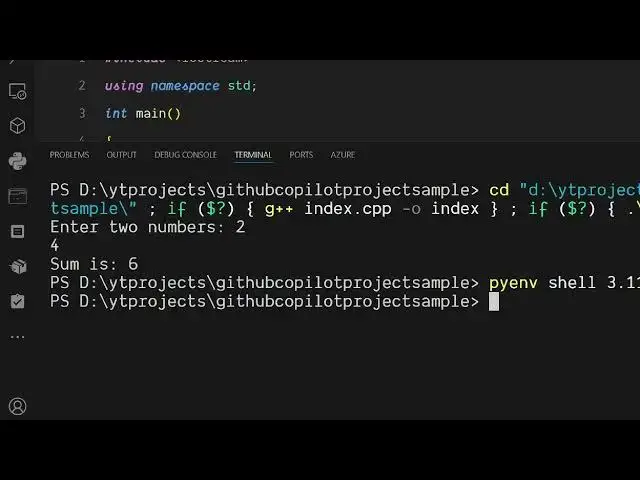
this C++ file here directly. So you can add two numbers.
0:58
directly. So you can add two numbers.
0:58
directly. So you can add two numbers. sum is six. So it also created this
1:01
sum is six. So it also created this
1:01
sum is six. So it also created this compiled this CP file to .exe and we can
1:06
compiled this CP file to .exe and we can
1:06
compiled this CP file to .exe and we can do this with anything. Let's suppose we
1:08
do this with anything. Let's suppose we
1:08
do this with anything. Let's suppose we have a Python file and simply
1:18
so we write this and again we see this
1:21
so we write this and again we see this
1:21
so we write this and again we see this option of run Python file appearing. So
1:25
option of run Python file appearing. So
1:25
option of run Python file appearing. So it adds this support for all the
1:26
it adds this support for all the
1:26
it adds this support for all the languages. So with a matter of time you
1:29
languages. So with a matter of time you
1:29
languages. So with a matter of time you can able to run programs in any
1:32
can able to run programs in any
1:32
can able to run programs in any language. It can be Python, it can even
1:36
language. It can be Python, it can even
1:36
language. It can be Python, it can even be JavaScript as well. So
1:44
again you will see this option appearing
1:46
again you will see this option appearing
1:46
again you will see this option appearing run code right here. Click this and you
1:50
run code right here. Click this and you
1:50
run code right here. Click this and you will see on the terminal itself it will
1:52
will see on the terminal itself it will
1:52
will see on the terminal itself it will run this program.
2:09
So definitely try this extension guys.
2:11
So definitely try this extension guys.
2:11
So definitely try this extension guys. It supports all the languages.
2:13
It supports all the languages.
2:13
It supports all the languages. CodeRunner it is called it's developed
2:15
CodeRunner it is called it's developed
2:15
CodeRunner it is called it's developed by this person Janha. It's got 35
2:18
by this person Janha. It's got 35
2:18
by this person Janha. It's got 35 million installs. So it supports all the
2:20
million installs. So it supports all the
2:20
million installs. So it supports all the languages all the popular languages. It
2:23
languages all the popular languages. It
2:23
languages all the popular languages. It compiles and then run the program
2:25
compiles and then run the program
2:25
compiles and then run the program directly in the terminal itself with a
2:27
directly in the terminal itself with a
2:27
directly in the terminal itself with a matter of click.
#Programming
#Development Tools
#Scripting Languages