live_tv
Livestream Starting Soon
00
Hours
:
00
Minutes
:
00
Seconds
Up next in 10

Build React.js Youtube IFrame Player API to Embed YT Videos in Video Player in Browser
Jan 9, 2025

Buy the full source code of application here:
Show More Show Less View Video Transcript
0:00
uh hello guys welcome to this video so
0:02
in this video I will look at how to
0:04
build out a YouTube video player inside
0:07
react CH you can play any YouTube video
0:10
inside your react CH application using
0:12
iframe API of Google and it does provide
0:16
you with this nice little package which
0:19
you can interact with so you can see on
0:21
your screen we are loading a YouTube
0:23
video embedding it inside your
0:25
application and we have three buttons
0:27
out there so once the player is ready
0:29
the video will display and we have these
0:32
three buttons to play the video pause
0:33
the video or stop the video if I click
0:36
the play button the video will play if I
0:39
click pause the video will
0:46
pause so we have these buttons so and
0:48
the status will also change you can
0:53
see so video is
0:58
playing so the package which is
1:00
responsible for this uh you can go to
1:03
npmjs.com
1:05
and just search for this package which
1:08
is react Das YouTube so this is actually
1:13
the
1:16
package it is officially it's a using
1:20
the YouTube iframe
1:22
API YouTube iframe player API it is
1:25
using this API to actually embed the
1:27
YouTube video uh this this is it's
1:31
almost 4,000 weekly downloads and this
1:33
is the command so just install this
1:35
module I've already installed it so I
1:37
will show you the complete example so
1:40
first of all just make a simple react
1:43
functional
1:45
component and right we will at the very
1:48
top we will require this package we'll
1:51
simply say import YouTube from the react
1:55
YouTube this is the actual
1:57
method and then we'll also be using
1:59
bootst for building the user interface
2:01
this is not
2:02
mandatory but you can install this just
2:06
to look good react bootstrap and
2:09
bootstrap so I personally use these two
2:12
libraries for building the user
2:13
interface so just install
2:16
this so we have just imported
2:19
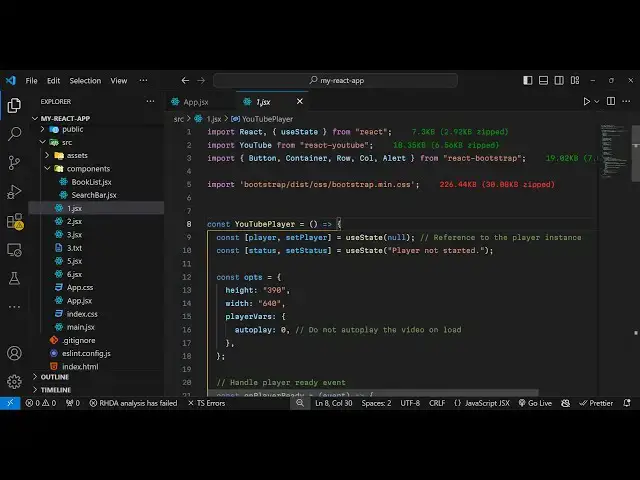
this and now for we need to declare some
2:23
State variables for the player video
2:25
player so we have player set player and
2:29
we'll be using the UST State hook
2:31
initial value will be null the second
2:33
variable will be used to
2:36
basically
2:37
just draw the
2:39
status so this U State initial value
2:43
will be player not
2:45
started here it will just be showing the
2:48
status of the video
2:50
player and after this in the jsx right
2:53
here we will now be
2:56
having we will wrap everything using the
2:59
container class
3:00
of bootstrap component I give it a class
3:04
name of margin top five inside this we
3:08
will actually have the
3:11
row and the class name justify
3:16
content
3:18
Center and here you'll be having uh a
3:21
column and give it
3:24
a access property to auto
3:30
give it a S2 property which will be
3:32
YouTube player with
3:37
react I'll will be using this component
3:40
this component actually takes uh the
3:43
video ID as an argument so you need to
3:46
go to YouTube whichever video that you
3:48
want to
3:51
load so I will load my own Channel video
3:55
so what I will do you copy the link and
3:59
then paste it and you only need the
4:01
video ID so right
4:05
here this is the video
4:08
ID once you get the video ID after this
4:11
you need to declare some options so I
4:14
can actually declare an object right
4:17
here at the very top and declare an
4:20
options and this actually contain the
4:22
height of the player let me give it 390
4:25
pixel and the width of the player let me
4:27
make it 640
4:30
you can give any width and height and
4:32
then it takes your player variables
4:35
which includes the autop playay option
4:38
if you want to play the video
4:40
automatically then you put it to zero so
4:43
it basically tells that do not autop
4:45
play the video on video load so once you
4:49
can pass these
4:52
options by passing a property the second
4:56
property it takes his
4:58
options NE can provide these options
5:01
that we have and it also takes an on
5:04
ready call back function so when the
5:06
player is ready you will execute this
5:09
call back function on player ready you
5:12
can call this anything so this is our
5:14
call back function so when the player is
5:17
ready when the YouTube video player is
5:20
automatically
5:21
loaded so inside this e parameter will
5:25
automatically be passed and here we can
5:27
set the player to e. Target and set our
5:32
St status which is player is
5:36
ready so if you refresh your browser you
5:38
will see it will look something like
5:42
this so the video will get
5:45
loaded and now to show the status we can
5:48
simply go to the jsx and
5:53
write after this we can have a
5:57
row just give it a class last name of
6:01
justify content
6:03
Center margin ofp four and inside your
6:11
column here we can put the
6:15
alert and we can actually variant will
6:19
be of
6:23
info
6:24
status so now the status will show right
6:28
here player is ready
6:30
so now we need three buttons which will
6:31
be responsible for interacting with the
6:33
video players so right after this is
6:38
ending we will have three buttons so
6:42
give it a
6:44
row and just align this in the center
6:47
position so we will simply say that
6:48
justify
7:02
so inside this you will have three
7:03
buttons first button would be for
7:05
playing the video second one would be
7:07
for
7:12
pausing and the third button would be
7:14
responsible for stopping the
7:22
video so let me give it some classes to
7:25
so this variant will be of primary a
7:28
blue color and and give bind on click so
7:32
when we click this function we'll be
7:33
executing this function play video and
7:36
same thing I will do this for rest of
7:39
the
7:56
buttons so this one will be for pausing
7:59
the video this one will be for stopping
8:02
the
8:04
video so variant let me change to
8:06
warning it will be a yellow color and
8:09
danger red color so now we have we need
8:12
to Define all these three functions
8:15
which is for playing and pausing so one
8:18
by one play
8:22
video for playing the video we actually
8:26
if the player is loaded in that case we
8:28
have a function which in this which is
8:30
play video so it will play the video and
8:32
it will change the status
8:35
to playing
8:38
video similarly we have both these two
8:41
methods for pausing and
8:43
stopping also available so I will just
8:47
write these two methods
8:50
again so we have this method pause video
8:53
and then it is stop
8:56
video so now we have these three buttons
8:58
so if I click click one by one play so
9:01
playing video hello guys if I pause the
9:05
video video is paused video stopped so
9:08
in this way you can embed any YouTube
9:10
video inside your react CH application
9:12
using this YouTube iframe player API
9:15
package and react CHS so I've shown you
9:18
a complete example all the source code
9:20
is given in the description so thank you
9:22
very much for watching this video please
9:24
hit that like button subscribe the
9:26
channel and also do check out my website
9:28
as well free mediat tools.com which
9:30
contains thousands of free tools
9:33
regarding audio video and image and I
9:36
will be seeing you in the next video
#Flash-Based Entertainment
#Multimedia Software
#Web Services
#Educational Software