Up next in 10

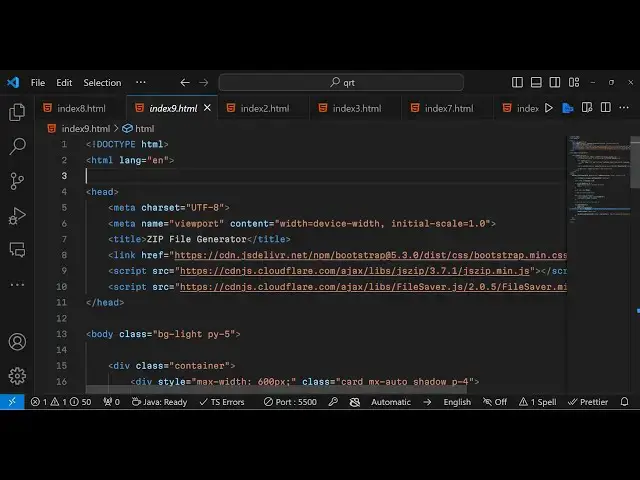
Build a Zip File Generator From Multiple Files Using JSZip & Filesaver.js Library in JavaScript
Jan 9, 2025

Get the full source code of application here:
https://gist.github.com/gauti123456/ee00b9f4947f26602d08768d4c26613b
Show More Show Less View Video Transcript
0:00
uh Hello friends welcome to this video
0:02
so in this video we will look look at
0:04
how to actually uh ZIP multiple files
0:07
into a single zip file using Adam zip
0:12
library and file saer Library as you can
0:15
see on your screen this is actually the
0:17
application zip file generator so if you
0:19
want to compress your file multiple
0:23
files into a single file you can use
0:26
this application you can choose right
0:27
here multiple files right here
0:31
and you can see I have selected five
0:33
image files and I need to compress it
0:35
into a single zip file simply I need to
0:38
click this button as I click this button
0:40
you will actually see my files have been
0:43
compressed and it has been compressed
0:45
into a single file a zip file and now I
0:48
can simply extract it to actually see
0:50
all the content so I will show you how
0:54
to do this
0:56
uh so there is this Library called as
0:59
ADM zip ADM zip is a package or a
1:05
library that allows you to compress
1:08
multiple files into a single file so
1:11
this is the module npmi you can you it's
1:16
very popular 5 million weekly downloads
1:19
are
1:20
there so we will be using it in the
1:27
browser so in JavaScript HTML and CSS
1:33
so the library you can simply type here
1:37
JS zip jszip this is actually the
1:43
library it's a JavaScript library for
1:45
creating reading and editing zip files
1:48
with a lovely and simple API so you can
1:52
install this Library by simply using the
1:54
CDN so or you can use also use it as a
1:59
nodejs model module as well so we
2:01
actually included the CDM right here all
2:04
the source code will be given in the
2:05
description of this video so let me
2:08
start building this application from
2:11
scratch
2:13
so let me delete
2:15
everything so I just included the
2:18
bootstrap CDN uh this JS zip CDN and
2:22
file saver is a library if you want to
2:25
download something as a attachment file
2:27
saer JS is a library
2:31
so it allows you to download any file in
2:34
the browser as an attachment so we are
2:36
also using this Library as well so these
2:38
three libraries we are using bootstrap
2:41
jszip and file saver so now to get
2:44
started uh we will make a simple
2:47
interface using the container class of
2:51
bootstrap and inside this you will have
2:54
card MX Auto Shadow all these
2:58
classes and we will be giving a Max
3:00
width
3:07
of giving a style here Max width of 600
3:13
pixel so inside this we will Define the
3:16
H1 tag which will simply say zip file
3:23
generator we be giving a class of text
3:26
Center to align this adding in the
3:28
center position font size will be four
3:30
font weight will be
3:32
bold margin from the bottom position
3:35
four so if you refresh your browser it
3:38
will look something like
3:41
this so after this we will allow the
3:44
user to
3:48
have to select files for that we will
3:52
have input type is equal to file we
3:55
giving an ID here to it file input and
3:58
multiple we will ATT attach it so that
4:00
the user can select multiple files you
4:02
will be giving a form control class or
4:05
bootstrap class and it should be
4:08
required so if you just refresh now uh
4:11
you will see this choose file input has
4:15
been added now after that we will have a
4:18
simple
4:22
button this will simply say generate
4:26
zip you're giving an ID here to it of
4:29
generate zip so that we can Target in
4:32
JavaScript and this is the bootstrap
4:36
class bitth 100 button button
4:42
primary margin bottom four
4:46
so there will be this full size button
4:49
added full size Blue Button this is the
4:51
interface and now we can actually write
4:54
the JavaScript
4:57
code so right here
5:00
we will also be showing a simple status
5:03
message at the bottom when the zip file
5:06
is generated so for that we will have a
5:09
paragraph We will give it an ID here to
5:11
status so we'll give it a Class A
5:14
bootstrap text
5:16
Center text success so green message
5:20
will be shown to the user when the zip
5:22
file is generated so right here we will
5:25
first of all
5:26
target using document get element by ID
5:30
we have Target the button of generate
5:32
zip we given an ID here so when we click
5:35
this button this call back function will
5:38
execute and inside this function we will
5:41
get access to all the files which are
5:44
selected by the user so we will be
5:46
storing that inside a variable which
5:48
will be file
5:51
input so document get element by ID file
5:56
input we'll get the reference to that
5:59
element element input element we have
6:00
given an ID if you see so we are simply
6:03
getting the reference and then we are
6:05
simply getting the files so we can
6:07
simply say file input. files so all the
6:11
files the user select so here you will
6:13
be simply be having the if condition
6:15
that if the
6:17
files length is equal to
6:20
zero so in that case we will simply
6:23
alert the user that please
6:27
select at least
6:30
one
6:31
five because the length is zero so we'll
6:34
simply
6:39
return so after that if the length is
6:43
not zero in that case we will initialize
6:46
the library which is
6:49
jszip so jszip can be initialized using
6:52
this
6:53
Constructor and now we need to add the
6:57
files in the
7:00
jszip so we can use a simple for Loop
7:04
const file of
7:05
files and for each file we will
7:08
basically get
7:12
the just first of all make this as a
7:15
async function because you'll be using
7:17
await keyword
7:20
so we'll using await and you will simply
7:23
say file do array buffer so you'll get
7:27
the array buffer of the file
7:31
and then we can simply say zip and it
7:33
contains a function which is file which
7:36
takes two argument first the name of the
7:38
file file. name and the second one is
7:40
the actual data of the file so file data
7:44
that's all so if you see we are using a
7:47
simple for Loop it is iterating through
7:49
all the files which are selected by the
7:51
user it is getting the file name and the
7:53
file data and we are zipping the
7:56
file compressing the file now we need to
7:58
download this file you need to
8:03
generate the zip file and save it now
8:07
for saving it we have this function
8:09
which is generate
8:13
async and right here it takes an object
8:16
which contains two properties the type
8:18
parameter which is actually a
8:24
blob and this returns a promise we can
8:26
handle this using dot then
8:32
and it actually returns a content right
8:40
here and here we can actually use the
8:44
file
8:45
saver library to save the zip file so
8:50
this actually contains a save as
8:52
function and here we'll be calling this
8:54
and passing this content and plus the
8:57
file name let me call this as result
9:01
.zip
9:02
so after that we can simply show a
9:05
message at the bottom of the screen that
9:07
your file has been generated in the
9:10
status div manipulating the text content
9:13
of it and simply saying that zip
9:17
file
9:20
generated
9:22
successfully that's all so this
9:24
completes the application very simple so
9:27
if I go to it uh select multiple
9:30
files these files can be videos images
9:34
any files click on that and you will see
9:36
zip file generated successfully and we
9:39
got our result. ZIP
9:42
file so you see basically this file you
9:47
can open with
9:49
any software that you have inside your
9:51
computer simply click extract all it
9:54
will extract the
9:56
files and it will create a folder which
9:59
is
10:00
result and it will contain all these
10:03
files that you
10:04
compressed and uh this is the benefit of
10:07
using zip files so now you can make a
10:10
simple zip file generator right in the
10:12
browser itself using this uh jszip
10:16
library jszip and so in this way so
10:20
please hit that like button subscribe
10:22
the channel as well all the source code
10:24
will be given in the description and do
10:26
check my website freem mediat tools.com
10:28
so so in this website I add daily a lot
10:32
of lot more quality
10:34
tools so do check this website also so I
10:39
will be seeing you in the next one
#Programming
#Software
#Web Services