live_tv
Livestream Starting Soon
00
Hours
:
00
Minutes
:
00
Seconds
Up next in 10

Build a Vue.js 3 PDF Viewer to Load & Embed Local PDF Files With Controls Using vue-pdf-embed in TS
Jan 13, 2025

Get the full source code of application here:
https://codingshiksha.com/vue/build-a-vue-js-pdf-viewer-to-load-embed-local-pdf-files-with-controls-using-vue-pdf-embed-in-ts/
Show More Show Less View Video Transcript
0:00
uh hello guys welcome to this video so
0:02
in this video I will show you how to
0:04
select your local PDF document the PDF
0:08
document which is present on your
0:09
computer to render it in vuejs 3
0:11
application and we using the package
0:14
called as view PDF ined in the last
0:16
tutorial I showed you how to load PDF
0:19
document from a URL but in this video I
0:21
will show you how to choose a PDF
0:23
document from your local file system so
0:26
as I choose the file uh I need to
0:28
navigate to
0:32
the PDF
0:34
document so this is actually the PDF
0:37
document I will load uh let me load this
0:40
one so as soon as I load it you will see
0:43
the PDF document the first page is
0:45
displaying so I can toggle this option
0:48
so we are on the first page and it is
0:50
displaying it I can navigate to the
0:52
second page third page and you can see
0:55
that you can successfully rendering this
0:57
PDF document and we can toggle through
1:00
to the pages here you can go to the
1:02
previous page you can go to the next
1:04
page so in this way you can render your
1:07
PDF document in vuejs 3 application
1:09
using this package so this is the local
1:12
PDF document so here you can select any
1:16
PDF file that are present inside your
1:18
computer and then you can navigate
1:20
through and read it so again for this we
1:23
are using this package view PDF inbit so
1:27
command is simple you install this if
1:30
you haven't watched my previous video I
1:32
showed you the complete tutorial on this
1:34
video on this package
1:38
so the code is given in the description
1:40
of this video so the code will be
1:42
similar but there will be a slight
1:46
difference
1:49
so I will just show you the different
1:52
part of the
1:54
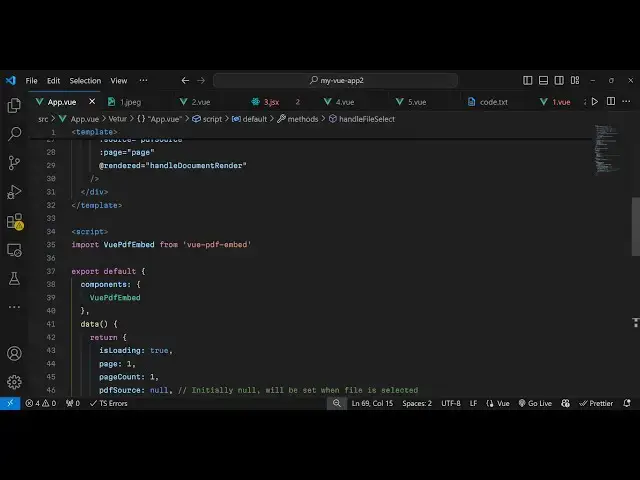
code so we import this package this will
1:57
be the same we import this in the typ
1:59
typescript then we register it by inside
2:02
component section and then we have these
2:05
variables is loading the current page
2:07
number total Pages PDF SS and show all
2:13
pages and the different part will
2:16
be instead of loading it from a URL we
2:20
will allow the user to select a PDF file
2:25
so inside this app content we will have
2:28
an input field
2:30
input type will be file and we'll only
2:33
be accepting PDF
2:35
files and we will just find an onchange
2:38
event handler so when you select the PDF
2:40
file this function will execute handle
2:42
file select so we just added this input
2:46
statement so as soon as you load that
2:48
you will see this inputs choose file
2:52
button so just inside after this now you
2:58
need to Define this function function so
3:00
we have defined this let me write this
3:03
function and explain to you what is
3:05
happening in
3:08
this so we have this function handle
3:11
file
3:12
select so when you select the PDF file
3:17
this function will
3:19
execute e parameter will automatically
3:22
get passed and then we just get access
3:25
to it e. target. files
3:28
0 here'll be Simply Be comparing that if
3:32
the file and the type of the file
3:35
is a PDF file or not if it's a PDF file
3:40
then we read the
3:42
file so for reading it we again using
3:45
the same approach file reader
3:48
API onload function when the file is
3:52
loaded we say this. PDF
3:58
Source just read read this and convert
4:00
this into base 64 code using this so we
4:04
read read as data URL so it will return
4:08
the base 64 code of this PDF document
4:11
and we store it in the PDF Source
4:14
variable and then we can directly attach
4:16
this PDF Source inside our component so
4:20
just after this input field we render
4:23
this PDF file by this custom component
4:26
view PDF
4:28
ined and this time again we get the
4:31
reference we give the reference to it
4:33
and here in the source parameter instead
4:36
of a URL this time we are passing this
4:39
PDF document which is stored inside this
4:42
variable PDF
4:44
source and the page number will be the
4:47
first page
4:48
number that's all so if you refresh now
4:51
uh if you load this PDF document and now
4:55
as soon as you select the PDF document
4:57
you will see we selected that and we are
4:59
on the first page so in this way uh you
5:03
can do
5:06
this
5:08
so this this code is given in the
5:12
description guys it's very similar to my
5:14
last video where I showed you how to
5:15
load the file from a URL but in this way
5:19
we can load this from a local file
5:20
system as well so we have all these
5:23
controls we are on the first page
5:25
navigate to the other Pages as well
5:28
previous next page
5:30
so thank you very much guys for watching
5:32
this video and please hit that like
5:34
button subscribe the channel and also
5:36
check out my website as well uh free
5:39
mediat tools.com uh which contains
5:42
thousands of tools regarding audio video
5:44
and image and I will be seeing you guys
5:47
in the next video
#Programming
#Software
#Multimedia Software