live_tv
Livestream Starting Soon
00
Hours
:
00
Minutes
:
00
Seconds
Up next in 10

Build a Vue.js 3 International Phone Number Form Input Field With Country Codes in Browser Using TS
Jan 13, 2025

Get the full source code of application here:
https://codingshiksha.com/vue/build-a-vue-js-3-international-phone-number-form-input-field-with-country-codes-in-browser-using-ts/
Show More Show Less View Video Transcript
0:00
uh hello guys welcome to this video so
0:02
in this video I will show you how to
0:04
integrate this form input field where we
0:07
want to receive phone number input
0:10
mobile number input of different
0:12
countries with a drop- down
0:14
automatically here you can select your
0:17
country wherever you
0:19
are so all these International codes
0:22
will be automatically added so you will
0:24
see for each country we have a different
0:26
country code so if you are entering a
0:29
mobile number or any sort of number this
0:31
form input field will be very much
0:33
necessary so let's suppose I live in
0:35
India so I enter my mobile number 10
0:39
digit
0:40
number so as soon as you see this plus
0:43
91 is automatically added because this
0:46
is the country code of India so that's
0:48
why this is your 10 digigit number
0:51
alongside with this country code and you
0:53
also see the flag as well which is in
0:55
India so it's a very good component
0:59
specifically for vuejs 3 which you can
1:03
select any country and then it will add
1:05
this automatically this country code for
1:07
you so if you go to npmjs.com uh just
1:10
search for this package which is called
1:12
as view telephone
1:16
input so it's specifically for V js3
1:20
applications so the command is simple
1:24
you install this I've already installed
1:26
it so it's almost got 96,000 weekly
1:29
download the prop they do offer their
1:33
official website as
1:35
well can check out International
1:37
Telephone input with
1:39
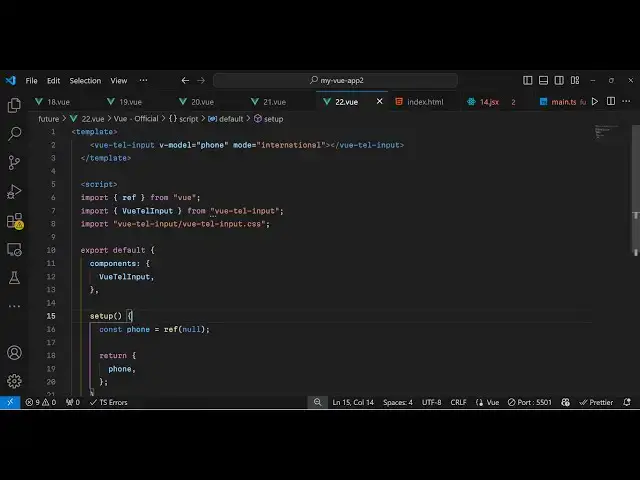
vuejs so now to get started it's very
1:43
easy first of all write your template
1:47
and then inside your typescript code I
1:50
have given all the source code in the
1:53
description
1:55
so
1:57
now we first of all the necessary
2:01
packages first of all the base package
2:03
of reference from
2:05
View and then we also need to import
2:08
this package which is view telephone
2:11
input and it will be coming from this
2:14
package view telephone input and we also
2:18
need to import it CSS file as
2:21
well which will be required for The
2:25
Styling so they do offer in their own
2:28
CSS file so you import the package then
2:31
you import their CSS file as well so
2:34
that's all now we need to
2:37
export this actual component we need to
2:39
register it we register it like this
2:42
inside your components we pass this
2:45
component name which is view telephone
2:47
input and then it also takes a
2:50
function setup function and then here we
2:54
need to define a state
2:56
variable which will be the phone number
2:59
which reference by default it has a null
3:01
value and we will simply return this
3:04
state phone number like this that
3:08
completes your typescript code we
3:09
registered this module so now we can use
3:12
this module inside our template in the
3:16
HTML
3:18
so view telephone input we simply render
3:22
this and now it takes some parameters
3:24
first of all your V model here we need
3:27
to bind this to the phone number input
3:30
and there is a mode available so if you
3:33
are receiving International numbers then
3:35
we simply say International that's
3:37
all these are the two parameters it
3:40
takes the actual phone number variable
3:42
the mode is
3:44
international so if you refresh your
3:47
application now you will see by default
3:49
it will detect my country so I'm living
3:52
in India so it detects it from the
3:55
browser location so my default browser
3:58
location is India so that's why when I
4:00
load the page it shows the Indian
4:02
Country to me so now if I write the
4:05
number automatically this plus 9 will
4:08
automatically get
4:10
added you will see that as soon as you
4:13
write it will detect this number and
4:16
then add the actual country
4:20
code you can change to any country then
4:23
it will change the actual country code
4:26
and attach
4:27
this so the flags are all also appearing
4:31
that's the Maj major part of this using
4:33
this module so thank you very much guys
4:35
for watching this video please hit that
4:38
like button subscribe the channel and do
4:40
check out my website as well uh free
4:43
mediat tools.com uh which contains
4:46
thousands of tools regarding audio video
4:48
and image and I will be seeing you guys
4:51
in the next video