Up next in 10

Build a Vue.js 3 Command Prompt Editor to Run Commands in Browser Using vue-command in TS
Jan 13, 2025

Get the full source code of application here:
https://codingshiksha.com/vue/build-a-vue-js-3-command-prompt-editor-to-run-commands-in-browser-using-vue-command-in-ts/
Show More Show Less View Video Transcript
0:00
uh hello guys welcome to this video so
0:02
if you want to make command line inside
0:05
the browser inside VJs application there
0:08
is a plug-in component available to us
0:11
where you can render this command prompt
0:13
and uh very easily so it looks like a
0:16
terminal or a command prompt and you can
0:19
execute some commands here you can
0:22
configure custom commands so as soon as
0:25
you write this you will see command not
0:28
found so you can add your own custom
0:30
command so one such command we
0:32
configured is hello world so if you just
0:34
type hello world right here it will
0:38
print
0:39
out hello world so as soon as you type
0:42
this command so in this way you can
0:44
configure custom commands inside your
0:48
terminal or command prompt editor so
0:51
there is this package which supports
0:53
this out of the box which is if you go
0:56
to npmjs.com uh just need to search for
1:03
this which is a view command so this is
1:07
actually the name of the
1:09
package so it's a terminal clone you can
1:14
actually make inside browser so the
1:17
command is simple I've already installed
1:19
it almost having 947 weekly downloads
1:24
so so now to integrate this it's very
1:27
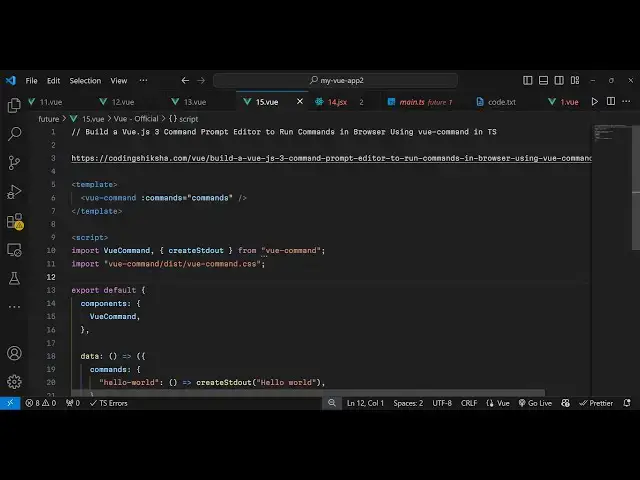
easy come to app. view file and uh
1:32
inside the script we'll write the types
1:36
script code so first of all we need to
1:39
import this package view
1:42
command and also this method create
1:47
standard output for rendering out the
1:50
result from the command and this all
1:53
will be coming from this package view
1:56
command so in this way and we also need
1:58
to import it CSS file as well which is
2:02
located in the dis directory view
2:05
command.
2:08
CSS and then we simply export
2:12
default here we provide our
2:17
components so in this way you are
2:21
integrated this
2:22
component and next we need to actually
2:26
pass some data to the vuejs
2:30
template so for
2:34
this we will Define the commands in this
2:38
terminal so you can provide your own
2:41
custom commands so one such command I
2:43
will provide is Hello World in this
2:46
way you can use this function to render
2:49
out something on the screen create
2:52
standard output so you can say hello
2:54
world this is
2:56
a simple message
3:03
so that's all in this typescript now we
3:05
come to the template where we need to
3:07
render this so we simply use this
3:10
component like this view command and it
3:13
actually takes a series of commands as
3:15
an
3:17
argument so we have configured this
3:19
commands so you simply inside double
3:23
codes you pass this variable so we have
3:26
a series of commands right here so it
3:28
can be multiple commands as well you
3:29
just just need to put a comma and then
3:31
you can even attach multiple commands so
3:34
let's suppose I copy this and add a new
3:39
command here which will
3:43
be one so as soon as I type one on the
3:46
command line this will also print out
3:48
the same message so you refresh it you
3:51
will see now if I press one you will see
3:54
it will print out this message and also
3:57
hello world
4:00
it will print out this so you can
4:03
configure a different message if I print
4:05
one so let's suppose I
4:10
say this is one you
4:15
typed so as soon as I press one you will
4:20
see so in this way guys you can build
4:23
out a command prompt or a terminal right
4:26
in the browser itself using this vuejs
4:28
component so thank you very much for
4:31
watching this video and do check out my
4:33
website as well uh free mediat tools.com
4:36
uh which contains thousands of tools
4:39
regarding audio video and image and I
4:41
will be seeing you guys in the next
4:43
video
#Computers & Electronics