Up next in 10

Build a Vue.js 3 Bootstrap Datepicker Form Input Field in Different Locales & Languages Using TS
Jan 13, 2025

Get the full source code of application here:
https://codingshiksha.com/vue/build-a-vue-js-3-bootstrap-datepicker-form-input-field-in-different-locales-languages-using-ts/
Show More Show Less View Video Transcript
0:00
uh hello guys welcome to this video so
0:02
in this video I will show you how to
0:04
integrate the bootstrap date picker
0:07
inside your UJS 3 application in
0:09
different languages as well so you will
0:11
see it's a Hindi language so you can
0:14
also depending upon your country and
0:16
native language you can integrate this
0:19
calendar or date picker in different
0:21
languages so this is your date picker
0:24
you can see you can pick any date and
0:25
then it will say selected date is this
0:28
format this this is a form input field
0:31
for picking dates that's a calendar if
0:33
you see you can adjust the year like
0:36
this then the month can pick any month
0:40
here so by default it's showing it the
0:43
month name in a language here Hindi
0:46
which is relevant in Indian country but
0:48
here in this code you can adjust the
0:51
country depending upon if you now want
0:53
to show Arabic you will say Arabic TW
0:56
letter digit code which is you will
0:59
include this file
1:00
and then instead of Hindi you will say
1:03
Arabic so now what happens if you check
1:06
so the dates months will be shown in
1:08
Arabic so by default if you don't
1:12
provide any anything this option by
1:15
default the language is English language
1:17
so if you try to refresh now the months
1:20
will be displayed in a English
1:22
language so calender this is actually
1:25
the module that I want to show you uh
1:28
which is
1:31
called as view flat picker component so
1:34
if you go to the website here npmjs.com
1:39
just search for this which is view flat
1:47
picker component so it's a specifically
1:52
for vuejs 3 the command is
1:55
simple I've already installed it it's
1:59
almost having 65,000 weekly downloads so
2:02
it's a pretty popular package so now to
2:05
integrate this I will show you step by
2:08
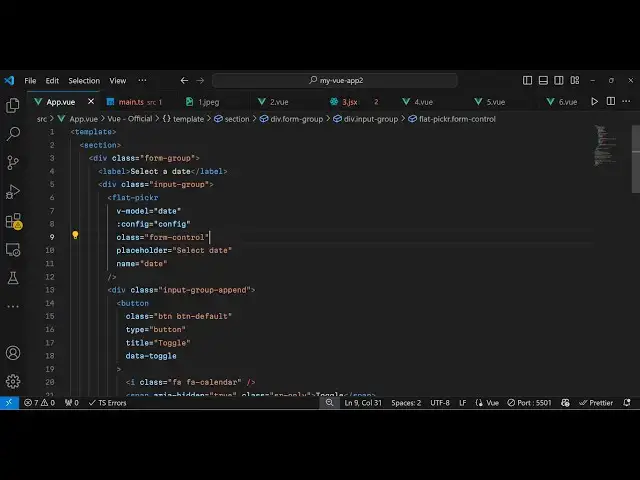
step so go to your app. view file which
2:11
is a main component file in
2:14
vuejs first of all here we need
2:18
to make a template and for this we do
2:23
need the bootstrap CDN so I will just
2:25
include it the bootstrap
2:27
CDN essentially it is using boot strap
2:30
in the
2:32
background and here we simply say
2:35
select a
2:37
date and then the user will select the
2:41
date inside this form input field so
2:45
just attaching this class which is input
2:50
group and then we embed this component
2:52
flat picker and this takes some options
2:56
but for integrating this now we just
2:59
need to write our typescript
3:02
code so first of all we will require all
3:05
the necessary packages which is
3:07
reference from
3:10
view which is a base
3:13
package and then we import the bootstrap
3:16
CDN so bootstrap dis CSS
3:20
bootstrap.css and then we import this
3:23
package which is flat picker
3:30
coming from view flat
3:32
picker component and for this we also
3:36
need to import its CSS file as
3:43
well so you can see we have imported
3:46
this module and also the CSS file as
3:48
well so after you do
3:55
this so you can check out their
3:57
documentation they have various themes
3:59
about their calendar and date picker one
4:01
such theme we will be using
4:04
is it's located inside your disc SL
4:08
themes and you'll be using this material
4:11
blue theme CSS we just need to include
4:14
this as
4:15
well so then we need to declare a date
4:19
so we will just say a date variable the
4:23
format is two year followed by the month
4:27
and then the date
4:29
day so
4:31
2022 it's a October month 28 of October
4:36
2022 this is your date that you
4:39
declared so now we need to provide this
4:42
config
4:45
object which will be your configuration
4:47
object for using this module so we'll
4:51
simply put the r property to true and
4:54
the alt format property to the format
4:58
that you want so I want this format
5:01
month j y this is the actual
5:07
format so essentially you provide the
5:09
config object right
5:11
here this is your config object
5:14
containing these four
5:17
properties so now the typescript code is
5:20
complete we come now to the template so
5:23
where we do need toplay uh display this
5:26
calendar or date picker we provide the V
5:29
model which is your essentially your
5:31
date variable and then the config object
5:37
which is located inside your config
5:39
object that we declared and you can even
5:41
give it a custom class which is a form
5:45
control you can give it a placeholder
5:48
text so I will simply say to the user
5:51
that simply select
5:54
date and also you'll be binding this
5:57
name parameter date so so if you try to
6:00
refresh your browser you will see this
6:03
input field will be added but if I click
6:06
this nothing happens now to open that
6:10
calendar or model
6:18
window so for doing
6:21
this this is your
6:23
bootstrap border section
6:30
so just after when it's
6:32
ending just paste it right here so I
6:36
have given all the source code in the
6:39
description so basically what happens
6:42
right here if you see we have binded
6:44
these buttons and this is your phont
6:48
awesome calendar icon we have the toggle
6:50
button and then we got our clear button
6:53
as
6:54
well so if you see now you will see the
6:57
calendar being opened which which
6:59
contains the months and the year name
7:01
you can select your date and then the
7:03
date is displayed right
7:04
here so all the source code I've given
7:07
in the description so in this way you
7:09
can integrate this
7:12
package and last but not least if you do
7:16
want to change the language there is
7:17
this property local here you need to
7:21
provide whatever language that you have
7:24
let's suppose Hindi then we need to
7:26
import this language so we say Hindi
7:29
coming from that that I already showed
7:31
you so thank you very much for watching
7:34
this
7:35
video so do check out my website as well
7:38
free mediat tools.com uh which contains
7:41
uh thousands of tools regarding audio
7:44
video and image and I will be seeing you
7:47
guys in the next video
#Programming
#Educational Software
#Computer Education