live_tv
Livestream Starting Soon
00
Hours
:
00
Minutes
:
00
Seconds
Up next in 10

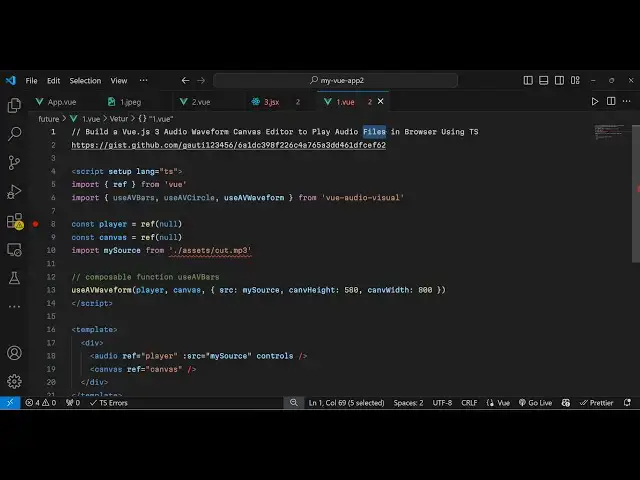
Build a Vue.js 3 Audio Waveform Canvas Editor to Play Audio Files in Browser Using TS
Jan 13, 2025

Get the full source code of application here:
https://codingshiksha.com/vue/build-a-vue-js-3-audio-waveform-canvas-editor-to-play-audio-files-in-browser-using-ts/
Show More Show Less View Video Transcript
0:00
so hello guys welcome to this video so
0:02
in this video I will show you a plugin
0:04
where you can play your audio files with
0:07
a nice little wave form it will generate
0:10
this wave
0:12
form inside the browser so when you play
0:15
the audio file you will listen you will
0:18
also
0:23
see so as soon you can see the video is
0:26
playing
0:38
so in this way we can display this
0:40
waveform as well so the package name is
0:47
uh if you just go to npmjs.com
0:53
the package name is view audio visual so
0:58
this is compatible with the latest
1:00
version as well so just search for this
1:02
package view audio visual so this is
1:06
actually the
1:07
package so you just need to install this
1:11
I've already installed it so the command
1:13
is simple you install this it's almost
1:16
having 5,000 weekly downloads
1:21
so so it offers you this audio player
1:25
and you can play the audio you also have
1:27
the download button and then it will
1:29
generate this this nice little
1:31
waveform and
1:35
uh so now to get started inside your
1:39
view app. view file so
1:43
we first of all require this package so
1:47
we will write the typescript code so I
1:49
will just mention the
1:52
language which will be typescript so
1:54
right here we first of all require the
1:57
necessary packages
2:01
and we import
2:07
this so this waveforms will be in
2:09
different shapes if you want a circular
2:12
one if you want this bar one so all
2:14
these options are available in this
2:16
package view audio visual so we import
2:19
this and then we declare some variables
2:22
which will be required so first of all
2:24
the audio
2:26
player this will be null and then canvas
2:30
which will also be null when we load the
2:33
application so now we need to import the
2:37
audio file that you want to play so it's
2:39
present in my assets
2:41
directory
2:43
so I will just import this inside assets
2:47
then audio. MP3 so we have just imported
2:50
This MP3 file so it is present in my
2:52
assets directory you will see this audio
2:55
MP3 file we are importing it using this
2:58
import statement so after this we simply
3:02
use this use AV
3:05
waveform and we actually pass the audio
3:08
player the canvas and then a third
3:12
option is the object The Source property
3:15
which is stored inside my source and
3:19
then you also need to
3:20
provide the height and the width of
3:25
the the waveform so in this I will
3:28
provide 500 and 300
3:31
respectively so in this way the source
3:35
the canvas height and the width so now
3:38
you can safely go to the template and
3:40
render out the audio player so for this
3:45
we just need to inside the audio
3:53
tag we need to pass some options here
3:56
which is the reference first of all
4:00
and then the source is equal to my
4:02
source so whichever and then you also
4:06
want the controls available in the audio
4:08
editor so we passing three options the
4:10
reference the source which audio file
4:13
you want to play plus the controls so if
4:15
you refresh now you will see this
4:20
audio and for displaying this we do need
4:24
to add some CSS as well
4:27
so I have given all the sours code in
4:30
the description so you can get all the
4:32
source code so if you just paste
4:34
it it will generate this nice little
4:37
waveform if you see side by side so you
4:39
can while listening the audio you can
4:43
see this waveform as well
4:47
so so this is actually the plugin here
4:50
which will generate this nice little
4:52
waveform visual editor for VJs 3
4:56
applications so thank you very much for
4:58
watching this video and do check out my
5:01
website as well free mediat tools.com
5:03
which contains thousands of tools
5:06
regarding audio video and image and I
5:09
will be seeing you guys in the next
5:11
video
#Music & Audio
#Online Media
#Software