Up next in 10

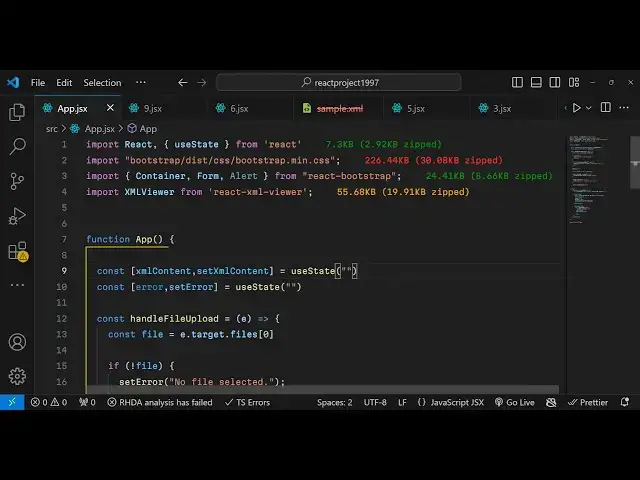
Build a React.js XML Viewer & Editor to Render XML Using react-xml-viewer Library in Browser
Jan 9, 2025

Get the full source code of application here:
https://gist.github.com/gauti123456/dcbf72baeb88e3a4bd7be8fc42f1a777
Show More Show Less View Video Transcript
0:00
uh Hello friends welcome to this video
0:02
so in this video we'll talk about
0:03
another reacts Library this time it is
0:06
used to display XML files so XML viewer
0:10
and editor and if you want to display
0:12
XML files inside react CH this will be a
0:15
perfect library for you so we have this
0:18
choose file button so here the user will
0:21
select their XML file and as soon as you
0:24
select the XML file you will see it will
0:27
show the actual content of the XML file
0:30
with syntax highlighting and you can
0:32
clearly see the data right here and if
0:34
this is a perfect small little library
0:38
and if you want to if you're working
0:40
with XML files if you want to read and
0:42
display XML files in browser using react
0:44
chase this Library will be a perfect one
0:47
let me show you the name of the library
0:51
and if you go to npmjs.com and just
0:55
search for this package react XML Das
1:00
viewer this is actually the name of the
1:02
package the very first package which
1:04
comes right here this is the
1:07
one so it has got almost 23,000 weekly
1:11
downloads so I will show you very simple
1:15
example on how to using this this is a
1:17
command you need to install
1:19
this so I've already installed this so
1:22
just type npmi react XML viewer and also
1:27
we are using bootstrap as well so so
1:30
these three packages you need to
1:32
install bootstrap and react bootstrap we
1:35
using this also I already installed all
1:38
three packages I will start the
1:40
development
1:42
server and I will start from
1:45
scratch so just make a simple app level
1:48
component functional
1:50
component and for this we need to
1:54
import the bootstrap I will just include
1:57
that bootstrap is not necessary for for
2:00
this tutorial so I got just for staring
2:03
purposes so you imported these three
2:05
container form alert from react bootst
2:08
and also included the CSS file and now
2:11
for this application we need to
2:13
basically declare two State variables
2:15
first to keep track of which XML file
2:18
the user has selected so for that we
2:22
have this XML content variable and for
2:25
this we using the UST State hook which
2:28
will be imported then initial value will
2:30
be nothing and the second variable will
2:32
be for keep track of the any error which
2:36
happens again the initial value of this
2:39
will be nothing and now in the jsx we
2:42
will actually be using a simple
2:46
container we will wrap everything using
2:49
the container class of
2:51
bootstrap and we will just be giving a
2:55
class inside this we will have a simple
2:58
heading
3:02
in the center position and we will
3:04
simply say uh react XML
3:12
viewer and then we'll have a simple form
3:15
uh using this form
3:20
group inside this we will have the form
3:23
label you simply say that
3:28
upload and X XML
3:33
file so then we have a
3:38
simple input field where we accept the
3:42
user input so type is equal to five and
3:45
you'll only be accepting XML
3:49
files and basically attach a onchange
3:52
event handler so when you
3:55
actually upload a XML file this function
3:58
will get executed so we just need to
4:00
Define this
4:02
function handle
4:05
file e parameter will automatically be
4:08
passed this event
4:10
parameter
4:12
so in inside this function we will
4:15
basically get access to the file the
4:17
user select by using e. target. files
4:21
and then we will have two conditions
4:23
just to check if the file is
4:25
uploaded so if the file is not uploaded
4:28
we will set these error messages is no
4:30
file selected and please upload a valid
4:32
XML file so if the file is not an XML
4:35
file in either of these cases we will
4:37
not execute the code so if the file is
4:41
correct then it will set the error to
4:43
nothing and then we read the XML
4:47
whatever file submit by first of all the
4:49
file reader API which is built in in
4:52
every browser you'll use this and it
4:56
actually contains a function you'll read
4:58
this file
5:02
as read as text and then we have this
5:06
method it's a very basic method in order
5:08
to read a file we have this onload
5:12
function so then we'll simply set the
5:15
XML content to be the actual event.
5:18
Target
5:20
dot result and then if any sort of error
5:24
take place this error call back will
5:26
happen on error so you set the error
5:28
error reading the file so that's all
5:31
that we need to do and now to display
5:33
that XML file just after the form group
5:37
we will display the XML file using that
5:39
function using the
5:41
module so we simply say if the XML
5:44
content is available then in that case
5:49
display we'll display it in this div
5:51
we'll give it a class name of bootstrap
5:54
the margin top four some spacing from
5:57
the top and you have the H5 t T XML
6:01
content and then we will display the XML
6:04
viewer which will be coming from react
6:07
XML viewer so you'll see that this is
6:10
actual
6:11
package and this Al only takes a simple
6:14
attribute which is the actual XML that
6:16
you want to display and it is available
6:19
inside the XML content variable that's
6:22
all so if you just refresh your
6:25
application just go to the Local Host
6:30
and it's a very basic module and just
6:32
select and it will display it the XML
6:37
you can
6:38
see but the module works really well and
6:43
if you are working with XML files it's a
6:45
great module to display your XML files
6:48
in browser using react so thank you very
6:51
much for watching this video and to
6:53
please hit that like button subscribe to
6:56
channel and do check out my website as
6:58
well free mediat tools.com which
7:00
contains thousands of free tools
7:02
regarding audio video and Mage and I
7:04
will be seeing you next video
#Software
#Other
#Other