Up next in 10

Build a React.js Word & Text Annotation Highlighter Component Using react-highlight-words in TS
Jan 13, 2025

Buy the full source code of application here:
Show More Show Less View Video Transcript
0:00
uh hello guys welcome to this video so
0:02
in this video I will show you a plugin
0:04
in react CHS if you want to highlight a
0:07
series of words in a large amount of
0:09
text if you want to annotate or
0:11
highlight so in this way you can do it
0:15
you can see in this we are highlighting
0:16
these words multiple words so the is
0:19
appearing multiple times so we are
0:21
highlighting with this yellow color
0:23
adding a background so that it becomes
0:26
easy for the reader to understand which
0:28
words you want to highlight so in react
0:31
chair there is a plugin out there if you
0:33
go to npmjs.com just search for this
0:36
plugin which is react highlight words so
0:40
this is essentially this plugin that we
0:43
are
0:44
using and uh it's annotate plug-in for
0:48
text the command is simple I've already
0:50
installed it and it's a very popular
0:53
plugin 4 465,000 weekly
0:57
downloads so they do offer a demo as
1:00
well so on their official
1:04
website so now I will show you the
1:08
simple example of it so just make a
1:10
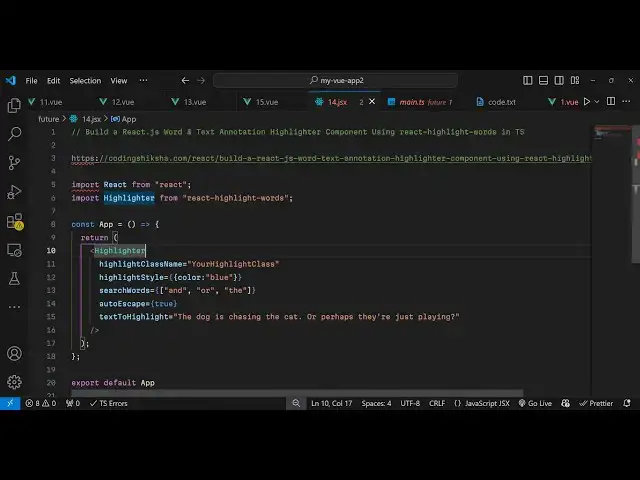
simple functional component and now we
1:13
need to import this package so we write
1:15
this import statement so we simply say
1:19
import highlighter and it will be coming
1:22
from this package which is react
1:24
highlight words so it's almost 19
1:27
kilobytes so now we need to inside your
1:30
GSX we now need to import this package
1:35
highlighter and uh it takes some options
1:38
so the first option it takes is the
1:41
highlighting class name so if you want
1:45
to
1:46
modify the highlighting features using
1:49
custom CSS you can use this class it can
1:52
be your custom class name the second
1:54
option is take is the highlighting style
1:56
so here you can give it a style here so
2:00
I want the highlighting to be in blue
2:02
color so I will say color would be blue
2:05
and which words you want to highlight so
2:07
in this way you can add a array of words
2:11
so I want to highlight and
2:14
word
2:18
and the team
2:21
word so you also have autoescape you can
2:25
it's a Boolean parameter you need to
2:27
true and last but not least which text
2:31
you want to
2:32
highlight so I
2:48
say so this is your text if you try to
2:52
refresh
2:55
here you will now
2:58
see at and the words that we mentioned
3:01
are
3:03
highlighted the text color is blue but
3:06
the background remains in yellow so you
3:09
can change the color of the text let's
3:11
suppose I want the highlighting to be
3:13
done in green color so the text color
3:16
will change to green color if you now
3:19
see the text color has changed to Green
3:22
so if you now want to
3:26
modify background as well so you can
3:29
mention a different color black so now
3:33
if you see the highlighting change to
3:34
black color the text color is green so
3:38
in this way you can modify add your
3:41
custom styling annotate styles to a
3:44
bunch of text in react CH so this is the
3:47
simple plugin you can use it so thank
3:50
you very much for watching this video
3:51
and do check out my website as well uh
3:54
free mediat tools.com uh which contains
3:57
thousands of tools regarding audio video
4:00
and image and I will be seeing you guys
4:02
in the next video
#Software
#Other
#Other