Up next in 10

Build a React.js Video Player to Play Local MP4 Video Files Using video-react in JSX
Jan 9, 2025

Buy the full source code of application here:
Show More Show Less View Video Transcript
0:00
uh hello guys welcome to this video so
0:02
in this video I will show you a react
0:05
CHS package which allows you to render
0:07
your videos in a nice little video
0:09
player and which has all the controls
0:11
out there let me show you we have a
0:13
choose file button and here you can
0:16
select your actual video file all the
0:18
extensions are
0:19
supported MKV MP4 AI so I selected this
0:24
video file you'll see it will actually
0:26
show this thumbnail as well we have this
0:28
play button and as you click the play
0:30
button the video will start playing let
0:32
me turn on the volume so click the play
0:35
hello guys welcome to this video so in
0:37
this video you can see this nice little
0:39
video player and you can navigate to any
0:41
section in the video
0:42
resolution and in this way the video
0:45
will play and we have all these controls
0:47
you can have full screen as well and you
0:50
can adjust now to actually show volum
0:53
here we have this play button pause
0:55
button we have the button to adjust the
0:58
volume as well you can adjust the volume
1:00
some options by using the
1:02
slider and then we also have the button
1:05
to actually change the speed of the
1:07
audio so you also have these buttons
1:10
here 1X 5x so this control is also there
1:14
so if you change it to Let's suppose if
1:16
I change the speed so now the speed of
1:19
the
1:22
video and we can even Slow Down the
1:24
video as well so we have all these
1:27
controls so the actual name of the
1:29
package is is video react and if you
1:32
specifically it's made for reactj
1:34
applications and if you go to npmjs.com
1:37
and just search for this package video
1:40
react this is the package I'm talking
1:43
about and you just need to install it by
1:46
executing this command I've already
1:47
installed it so it has got almost 70,000
1:51
weekly downloads so I will show you a
1:54
very basic example so just make a simple
1:56
functional
1:57
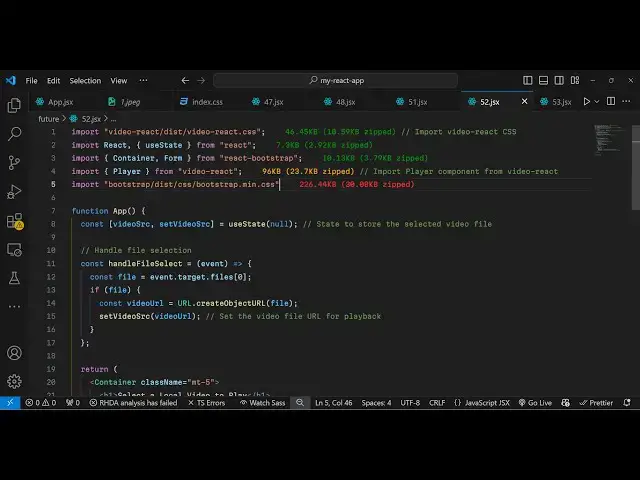
component and now we just need to import
2:01
this package so we simply say import and
2:04
then we simply import this
2:07
package and it contains these methods
2:10
which is the control
2:13
bar and then it contains also
2:16
playback menu button as well and thirdly
2:19
the actual player so these three things
2:21
if you see this control bar playback
2:23
menu button and player all these things
2:26
are importing from this package video
2:28
react it's almost 96 kiloby of package
2:32
and for building this interface we are
2:35
using uh bootstrap so we will be
2:37
importing the CSS file of
2:40
this like
2:42
this and also we are using react
2:44
bootstrap which is specifically used for
2:48
designing your application using
2:50
bootstrap so there is a package here
2:53
react bootstrap so we imported all these
2:56
packages at the top now we come to the
2:59
Js
3:00
six so wherever you need
3:03
to so we wrap everything inside this
3:06
container component we simply say
3:09
here container and we just give it a
3:12
bootstrap class of uh margin top five
3:17
and inside this we will have an H1
3:18
heading and it will simply say that
3:20
select a local video to play and then we
3:25
will have a simple form here a bootstrap
3:28
form and and inside this we will have a
3:31
label here and we'll simply say to the
3:33
user that please select a video file and
3:38
after this we will have a simple input
3:40
field a control input field and this
3:43
will be of
3:44
type
3:46
file and where we only allow the user to
3:49
Simply only select video file so we'll
3:52
only say accept video
3:54
files and we'll bind this onchange event
3:57
handler so whenever you change
4:00
the file here this function will execute
4:04
handle file select so now I just need to
4:06
Define this function right here so
4:09
handle file
4:11
select so right here e parameter will
4:14
automatically get passed and now we just
4:17
need to read the actual file which is
4:19
selected by the user so we can easily do
4:21
this using e. target. files. Z so it
4:24
will get the reference of this selected
4:26
file so after we get this actual file we
4:29
need to read read the file and for
4:31
reading the file we will use this
4:33
function which is url. create object URL
4:38
which is a JavaScript function for
4:40
reading the file and once you read the
4:43
file you'll set this so for this we do
4:46
need to declare a state variable inside
4:48
react CH just a single variable so here
4:51
we'll be storing the actual video after
4:56
we read the video so we'll use the UST
4:58
State hook in initial value will be null
5:01
so you'll use this function of hook so
5:04
once you read the file video file you
5:07
use this function set video source to
5:10
store the bytes after reading the video
5:14
file so once you do this now it becomes
5:18
easy to show the video in the video
5:20
player so just after the form here
5:22
you'll be having this condition that if
5:24
the video source is available then in
5:27
that case we need to show the video in a
5:29
video player
5:30
so we import
5:32
this actual player component and it
5:34
actually takes some options first is the
5:37
plays in line so this will actually show
5:40
all the controls of the video player and
5:43
then if you want to show a thumbnail to
5:45
the video that you are playing let me
5:48
import image file uh which is stored
5:51
inside my assets folder and the name of
5:55
the file is 1. jpg so if you just check
5:58
we have a source folder inside this we
6:01
have the assets folder so we have this
6:03
1. jpg image so this image I'm loading
6:06
right here just importing
6:09
it so now this player takes an option
6:12
poster we can directly attach this image
6:14
and the third parameter is the actual
6:16
image file that you want to Sorry video
6:19
file that you want to load so then
6:21
inside the source parameter you can
6:22
simply attach the video source so now if
6:26
you refresh your application you will
6:28
see you will CH have this choose file
6:30
button so once you select your video
6:32
file let me select any video file this
6:37
one so now you will not see the video
6:40
player playing let me see
6:44
what what kind of error is
6:55
there I think I made some kind of typo
6:58
mistake right here
7:04
and I think we do need to also show the
7:06
control bar as well right
7:08
here and for showing the
7:12
buttons we have this playback menu
7:15
button which is used for specifically
7:17
showing the buttons to increase or
7:19
decrease the speed of the video so here
7:21
you will mention the an array here so
7:24
these are the different speeds at which
7:26
you allow the user to play the video so
7:29
so again if I refresh now and try to
7:33
select a
7:46
file so I think there is some kind of
7:48
typo mistake let me paste this code
7:51
right here once again I have given all
7:54
the source code in the description so
7:56
don't need to worry about it you can get
7:57
all the source code so you will now see
8:00
the video is now showing up and if I
8:02
select
8:04
it you will now see this thumbnail
8:06
appearing this is a custom image that I
8:08
configured then we have this play button
8:11
if I H welcome to this the video is
8:13
playing so you can navigate to any
8:15
section in the video using this nice
8:17
little video player and we have all
8:19
these controls appearing if you see you
8:22
can even adjust the speed of the video
8:24
as well using this nice little widget
8:27
appearing so this is actually the
8:29
package package specifically designed
8:31
for react sh if you want to play any
8:33
sort of video inside your application
8:35
you can use this package video react so
8:38
thank you very much for watching this
8:40
video and do check out my website as
8:42
well uh freem mediat tools.com uh which
8:45
contains thousands of tools regarding
8:48
audio video and image and I will be
8:50
seeing you in the next video
#Flash-Based Entertainment
#Online Video
#Multimedia Software