live_tv
Livestream Starting Soon
00
Hours
:
00
Minutes
:
00
Seconds
Up next in 10

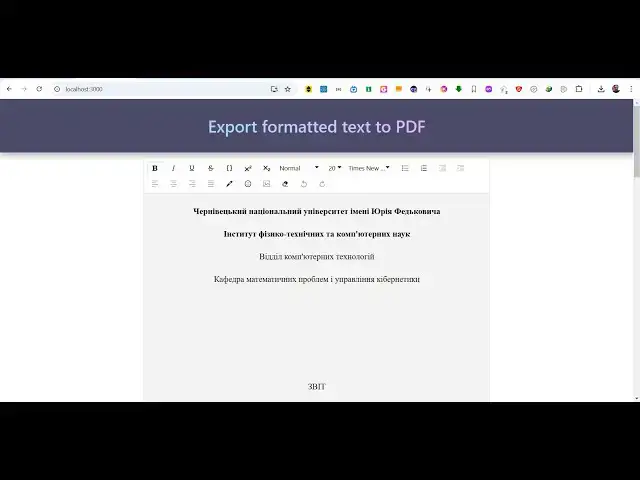
Build a React.js Ultimate PDF Editor Using Draft.js WYSIWYG Controls With Live Preview in Browser
Jan 26, 2025

Buy the full source code of application here:
https://procodestore.com/index.php/product/build-a-react-js-ultimate-pdf-editor-using-draft-js-wysiwyg-controls-with-live-preview-in-browser/
Hi Join the official discord server to resolve doubts here:
https://discord.gg/cRnjhk6nzW
Visit my Online Free Media Tool Website
https://freemediatools.com/
Buy Premium Scripts and Apps Here:
https://procodestore.com/
Show More Show Less View Video Transcript
0:00
uh Hello friends welcome to this video
0:02
so in this video I will show you a react
0:05
ultimate PDF editor with live preview
0:08
using the viic Rich Text Editor we are
0:10
using the open source draft chair liary
0:13
so we have all these rich controls out
0:15
there we have the text area where you
0:17
will write your PDF document and you
0:19
will see the live preview in the bottom
0:20
section of the screen and let's suppose
0:23
if I write anything right here
0:30
so you can just see as I'm writing right
0:33
here you are seeing the live preview and
0:37
if you want to basically select any text
0:40
change to
0:41
bold italic we also have the underlined
0:46
as well and you can change this to H1
0:49
heading as
0:52
well and then we
0:56
have we have all these controls we can
0:58
change to H1 H2 h three and we have also
1:01
have the phone size you can change the
1:04
size of the text like this and you have
1:08
the font picker as well you can select
1:10
any font from
1:11
this and you also need the support here
1:15
of you can put Emojis using the Emoji
1:17
picker as well you can select any emoji
1:20
and also we can select local images as
1:23
well so if you have a image that you
1:24
want to embed you can even control their
1:27
Dimensions as well you can provide the
1:29
width and height as
1:32
well can drag and drop your image so the
1:36
image will be also be added so as after
1:39
you make the changes there is a button
1:41
as well download as PDF so as soon as
1:44
you click the button the PDF file will
1:45
be exported and you can just see the PDF
1:48
file has been exported so it's a nice
1:51
little PDF editor with the viig Rich
1:53
Text Editor and all these controls out
1:56
there and we can even change the color
1:58
of the text as well so if you want to
2:00
change this color to any other color you
2:02
can change this using this Color Picker
2:04
you can
2:07
highlight so we have the highlighting
2:09
feature as well so you can add a
2:12
background color so you can change the
2:15
text color just select the text and then
2:18
using this Color Picker you can change
2:20
their background colors so again if you
2:23
make the change you will see all these
2:24
changes will be exported and the nice
2:27
thing about this application is that it
2:28
runs in the browser
2:30
and it's having react chairs so you can
2:32
see the package.json file we are using
2:35
these dependencies which is the draft
2:37
Chas which is an open source visic
2:39
editor and we exporting the whatever
2:43
text that you write to PDF you're using
2:45
HTML to draft chairs and we using the
2:48
latest version of react chairs so it
2:50
works with all the versions but if you
2:52
are using the latest version which is
2:54
react 18 so all the source code uh you
2:58
can directly purchase the full source
3:01
code the link is given in the
3:02
description so it runs in the browser
3:04
and as soon as you uh purchase the
3:07
project you just need to go to the
3:09
directory and just first of all execute
3:13
this command which is npmi so this will
3:15
install all the dependencies which are
3:17
listed inside the package for Json file
3:19
so all these dependencies will be
3:21
installed and it will create this node
3:23
uncore modules folder and after that you
3:26
can just if you want to start this
3:29
project you can simply say npm Run start
3:32
so this will start your application at
3:34
the local development server at Local
3:36
Host 3000 so your application will start
3:39
right here and now you will be able
3:43
to so the application will start
3:48
here so it will just take 5 to 10
3:51
seconds and after that your application
3:53
will start on Local Host 3000
4:00
and if you want to build the
4:02
application you can execute the build
4:04
command which is npm run build so all
4:07
these commands are listed right here
4:09
this will start your application this
4:11
will build your application into a
4:14
minified version so that you can
4:16
directly deploy your application so it
4:19
start the development server so you will
4:21
see the application will start and you
4:24
will be able to write whatever thing
4:26
that you are writing here with which
4:29
text are
4:30
so you can edit your PDF file here all
4:33
these rich controls will be
4:38
available like this so here you can
4:41
design any PDF
4:43
document with this nice little visic
4:46
Rich Text Editor which supports adding
4:48
text images you can even add image from
4:51
a URL so let's suppose you can go to
4:55
unsplash if you have a website that
4:58
supports can directly copy the link
5:02
address copy image address and directly
5:05
paste it here and what it this will do
5:08
it will fetch that this image and
5:11
directly embed
5:12
this and you can just choose the
5:15
alignment if you want to align this in
5:17
the right position or left position or
5:20
Center you can directly do it and if I
5:24
do it you will see the image will
5:26
display in the PDF document the output
5:28
PDF document so this is a really nice
5:31
ultimate PDF editor uh in jsx and react
5:34
CH you will see all these rich controls
5:37
out there if you want a bulleted
5:41
points and if you want a number you will
5:47
see so all these you can highlight
5:52
text as
5:54
well you can change the background color
5:57
can annotate the text you will see see
5:59
the Color Picker is
6:01
there so in the source directory we have
6:04
series of components out there so after
6:06
you purchase it you will see all these
6:08
premade components are there this is a
6:11
button so the application is divided
6:13
into split components so it is very easy
6:16
to you if you want to understand the
6:18
code how the Cod code is written for
6:20
this application so it's nicely splitted
6:23
across multiple components so you can
6:26
see that each area has a specific
6:29
component ENT attached to it so you can
6:31
directly see how the code is
6:36
splitted
6:38
so the link is given guys you can
6:41
directly go to my website Pro code store
6:43
and directly purchase that full project
6:46
it directly runs in the browser this is
6:48
a PDF
6:49
editor and thank you very much guys for
6:52
watching this video and please hit that
6:54
like button subscribe the channel as
6:56
well and also check out my website as
6:58
well free media tools.com uh which
7:01
contains uh thousands of tools regarding
7:03
audio video and image and I will be
7:06
seeing you guys in the next video
#Programming
#Open Source