Up next in 10

Build a React.js Text to Speech Recognition in Different Voices & Languages Using react-speech-kit
Jan 9, 2025

Get the full source code of application here:
https://gist.github.com/gauti123456/6b5379ed73f4f3603ee1adeaac5e0a67
Show More Show Less View Video Transcript
0:00
uh hello guys welcome to this video so
0:02
in this video we will look at how to
0:05
develop the speech to text or text to
0:09
speech both kinds of application in a
0:11
single app in react Chas so we have a
0:14
specific library for react Chas which is
0:16
react speech kit so on your screen you
0:19
can see the demo right here uh we have a
0:21
text area where we allow the user to
0:24
input any text that they want to convert
0:26
to voice so we have different voices
0:29
different Lang languages of different
0:30
countries different accents you can see
0:33
UK accent us accent Indian accent
0:36
Spanish Netherlands Portuguese Chinese
0:39
Japanese so all these things voices is
0:42
available in the select list so it is
0:45
all coming using the Google API voices
0:50
API and now if you write any
0:53
text so let's
0:56
suppose I write some text right here
1:04
so we have written this Sy uh sentence
1:07
and now if I want to speak this
1:09
information I can basically select any
1:13
accent let me select this Google UK
1:16
English male voice click this button
1:19
speak my name is goutam sha and I am a
1:22
coder and blogger from India India so
1:25
you can see the accent the words have
1:28
been spoken and let me select this
1:30
accent Google
1:33
Dutch my is sh and I am a and from
1:39
indiaia you can see the vast difference
1:42
in the accent in different languages
1:45
this was Dutch this was English now let
1:47
me put the Google
1:50
Hindi my name is goam Sharma and I am a
1:53
and blogger from
1:55
India so we have different voices in
1:58
both male and female in different
2:01
languages
2:03
so my name
2:09
is so same goes with the speech to text
2:13
as well basically when we click the
2:16
start listening button the microphone
2:18
access will be granted and whatever
2:20
speaking it is being captured in the
2:22
text area you can see that so whenever
2:25
you want to stop you can click the stop
2:27
button that's all so you can copy all
2:30
the text that you spoken so these two
2:33
application I will show you uh as I
2:35
already told you this is actually the
2:37
module react speech kit if you go to
2:40
npmjs.com and just search for this
2:44
module react speech
2:47
kit so this is actually your module uh
2:50
almost
2:51
2,35
2:53
downloads so just install this I've
2:56
already installed it so what I will do I
2:58
will make a simp simple functional
3:01
component and right at the top we will
3:04
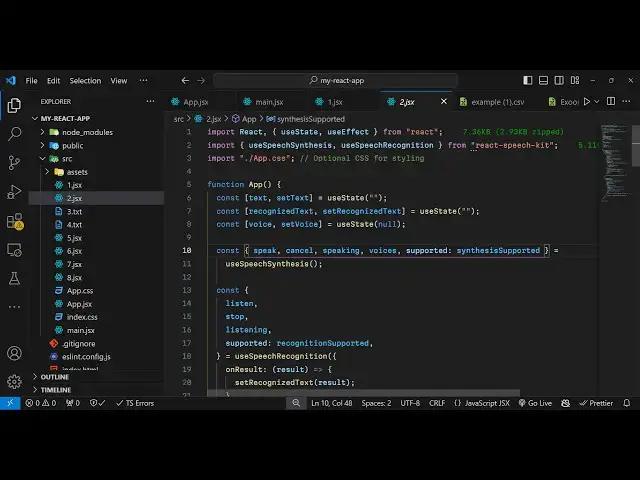
import the module which using the import
3:06
statement so we have these two hooks use
3:09
speech synthesis and the second one will
3:13
be hug speech recognition so we have
3:17
these two hooks imported from this
3:19
package react speech
3:22
kit and after this we need to declare
3:24
some State variables so we need to have
3:27
keep track of what text
3:30
is written by the user so we have this
3:32
variable for it using the UST State
3:35
hook then we will have our
3:39
recognize
3:41
text so whatever you are speaking
3:44
through your
3:45
microphone we need to keep track of that
3:47
also we have this variable for
3:50
that then we need
3:52
to have the variable for holding
3:55
different voices which will be coming in
3:57
the select field so initial value will
4:01
be again
4:04
null so we have these three variables we
4:07
have declared it now we need to
4:09
initialize
4:11
our different
4:15
methods of this Library so we can import
4:20
them one by one so it is all coming
4:24
using this you speech synthesis and
4:28
using this Library we have various
4:31
methods first is a speak and then we
4:34
have
4:36
cancel and speaking voices and supported
4:42
is of the type
4:44
synthesis support it so we have all
4:47
these methods pre-made available in this
4:50
Library so one by one we will use
4:53
it and
4:55
similarly we will have for
5:00
speech to text we import
5:04
this we have these methods listen stop
5:09
listening and again supported of the
5:12
type
5:15
recognition support
5:18
it and this actually takes an object and
5:22
in this object we have these call back
5:24
functions on result this call back
5:28
function will be executed whenever you
5:30
are done speaking through your
5:31
microphone so all the data will be
5:34
deciding in this
5:35
variable so we can
5:39
simply console log it just to
5:44
see and on
5:46
end so when you basically stop your
5:49
microphone then this also will execute
5:52
call back can say speech
5:58
recognition stop
6:00
so basically the order of the function
6:02
this will execute first when you click
6:04
the stop button and then on result will
6:06
execute holding all your data whatever
6:09
that you spoken so this is the thing and
6:12
uh now we will initialize the different
6:17
voices which will be coming in the
6:19
select field using the use effect hook
6:22
which executes whenever you load your
6:25
application so this will be ex dependent
6:28
upon the voices very aable so we have
6:31
declared this variable if you
6:35
see so just make it
6:40
voices okay sorry I think this variable
6:44
is different this voices is coming using
6:48
this built-in method so we are using
6:49
this method right here in the use effect
6:52
hook so we will have this if condition
6:54
at if voices.
6:57
length is greater than zero in that case
7:00
so you need to set the
7:02
voice the first voice in
7:05
the this
7:07
array we using this hook function set
7:10
voice and we are embedding
7:13
that now we need to construct the user
7:16
interface in the jsx so we will have
7:19
this H1 heading which will react speech
7:24
kit demo
7:30
so inside this we will have text to
7:34
speech and we will embed this variable
7:37
which is
7:38
synthesis supported and basically here
7:41
we will check that if the speech to text
7:45
is supported in text to speech is
7:47
supported in your browser or
7:49
not if it it is supported in that case
7:52
you will render this in interface but if
7:55
it's not
7:56
supported then we'll simply write
8:00
text to
8:04
speech not supported so right here we
8:07
will have this interface you will have a
8:10
simple
8:18
label so this label will simply say that
8:21
enter the
8:25
text and then we'll be writing the text
8:27
in this text area so
8:34
we will have the text area uh binded
8:38
this onchange event handler so whenever
8:40
you write something in this set text
8:42
Will execute e. target.
8:46
value and then we will for the voices we
8:48
will be having a simple select
8:54
list so V actual value will be equal to
9:01
voice like this and it also be giving an
9:04
onchange event handler to
9:09
it so set voice and you'll simply Loop
9:13
through voices.
9:24
find so e. target. values so in this way
9:31
we are binded onchange event handler so
9:33
when you select any voice from the
9:35
select picker you will be binding it and
9:39
inside this select list we will Loop
9:42
through all the voices
9:44
so using this map
9:56
operator so you'll be creating an option
9:58
right here option
10:01
tag and we'll be having this key here
10:05
and the actual value which will be the
10:07
voice
10:09
name and inside this you will say the
10:12
name of the voice depend also showing
10:15
the
10:18
information the
10:20
language so if you refresh now go to the
10:23
page you will see all your voices will
10:25
be there in the select list we have the
10:28
text area as well
10:30
and now we just need a simple
10:33
button after this
10:37
select so you'll simply
10:41
say conditionally render the button text
10:44
so if if the user is speaking in that
10:47
case you will change it to
10:50
speaking and if they are not speaking in
10:52
that case we will say speak
11:00
so basically bind an onclick listener to
11:02
this button so when we click this button
11:04
we'll be executing this function handle
11:07
speak so this button will be
11:10
disabled if the
11:14
property of speaking this Boolean
11:17
parameter if it's true then this button
11:19
will be disabled if you refresh we do
11:22
need to Define this function handle
11:24
speak
11:37
you'll see this button is not disabled
11:39
because we have this property to false
11:43
so now we just need to Define this
11:46
function handle speak so if the text is
11:48
available like this we then we can need
11:50
to invoke the speak function that we
11:54
have so it will speak these words here
11:57
we need to provide the text and the
11:59
actual
12:00
voice that's all so if you now test it
12:04
out if you write something right
12:11
here select your
12:15
voice hello
12:18
am you can see the text to speech is
12:23
working now I will come to the speech to
12:26
text same right here after
12:31
we just come out of this D we will have
12:34
another d section where now this time we
12:37
will have speech to
12:41
text again you'll be here checking this
12:44
recognition supported so if it's not
12:46
supported in that case we can say
13:03
so we will just have this section so I
13:06
will just paste it
13:27
out so all the source code will be given
13:29
in the description so right here we have
13:32
the second section speech to text here
13:34
again we are comparing recognition
13:35
supported or not if the recognition is
13:37
supported then we have this label we
13:40
have again this text area we are binding
13:43
this recogniz text so whatever that you
13:45
speak and right here whenever you click
13:48
the button we are executing this listen
13:51
function that is part of this library
13:54
and we passing this interim results to
13:57
true and when you click the stop button
14:00
then we simply
14:02
click execute the stop
14:06
function and you can see when we click
14:09
the stop button we are executing the
14:11
stop
14:12
function so if
14:15
you execute now click start listening so
14:18
whatever that you speak right here it is
14:20
being captured in the text
14:27
area so you can see that now we can
14:31
speak whatever through microphone and it
14:34
has been
14:38
capturing so this is actually the
14:41
application guys we
14:43
built text to speech and speech to text
14:46
in different languages and voices using
14:48
this react speech kit Library so thank
14:50
you very much for watching this video
14:52
and do check out my website as well free
14:54
mediat tools.com which contains
14:56
thousands of free tools regarding audio
14:59
and with video and I will be seeing you
15:01
in the next video