Up next in 10

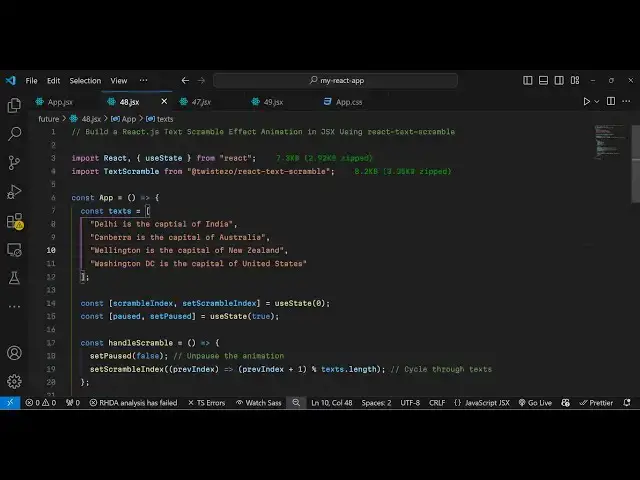
Build a React.js Text Scramble Effect Animation in JSX Using react-text-scramble Library in Browser
Jan 9, 2025

Buy the full source code of application here:
Show More Show Less View Video Transcript
0:01
uh hello guys welcome to this video so
0:03
in this video I will show you how to
0:05
scramble text inside react CH so there
0:08
is a package which does this nice little
0:10
scrambling animation of text so we have
0:14
the text and it is doing this nice
0:16
little scrambling animation that you can
0:18
see you can control everything right
0:21
here the scrambling speed of the
0:24
text the pause time taken so it's a nice
0:28
thing uh you can develop this kind kind
0:30
of effect text scrambling effect inside
0:34
react CH so there is a specific package
0:37
which allows you to do this if you go to
0:40
npmjs.com and just search
0:43
for text react text Scrambler uh just
0:48
search this uh so this is actually the
0:56
package the command is this command me
1:00
just show
1:07
you so you just need to install this by
1:09
executing this command I already
1:11
installed this
1:18
package so this is actually the command
1:21
you can pause the video and just copy
1:24
and execute this so it's almost 298 so
1:28
it's a fairly new package so now to get
1:31
started you just need to make a simple
1:33
functional component and after that you
1:35
need to require this package by using
1:37
the import
1:40
statement so like this so it will be
1:43
coming from this package and it is
1:45
almost 9 kiloby in size so after this
1:49
you need to declare a variable where you
1:51
will be holding all the
1:53
text so you can have this array here and
1:56
uh you can
2:00
have as many sentences that you want to
2:02
use it so I have these four sentences
2:05
right here which I will use for the text
2:07
scrambling animation so after defining
2:10
this in the state variable we also need
2:13
two more variables so one variable will
2:16
be for scrambling the actual text so we
2:20
need the index set scramble index and we
2:23
will be using the UST State hook and
2:26
initial value will be zero and then for
2:29
pausing the animation we will also be
2:31
having this variable as well the initial
2:34
value will be true it's a Boolean
2:37
parameter so we have these two State
2:39
variables and now wherever you need to
2:42
embed this scrambling animation you come
2:44
to the
2:45
jsx so inside the div I will give align
2:50
everything in the center position so I
2:52
will give these styles to it simple
2:56
CSS and after this we will embed this
2:59
text text Scrambler
3:01
component and it actually take these
3:11
options text scramble and it actually
3:15
take the actual text as an argument so
3:18
here you will provide your
3:22
array say the scramble index you will
3:27
provide this the second option it takes
3:29
is the
3:31
pause so it will be dependent upon it's
3:34
a Boolean parameter and then you can
3:36
even control the letter speed of the
3:38
animation can provide integer value and
3:41
then there is a next letter speed here
3:43
also you can provide animation time
3:46
pause time you can even provide it I
3:49
will provide 1,000 millisecond and you
3:51
can give it a class name as
3:53
well which is scramble text so you need
3:58
to name like this only because it's a
4:00
scramble text animation class we are
4:02
attaching it that's all that we need to
4:05
do and after this we will have a simple
4:08
button so when I click the button the
4:11
animation will happen so I will simply
4:13
bind an onclick listener to this so I
4:16
will just execute this custom function
4:18
handle scramble so when I hit this
4:20
button I need to Define this function so
4:23
I will just style this button by giving
4:26
a style
4:27
attribute and the label of the button
4:30
will Al scramble text so when the user
4:33
clicks this button I need to just Define
4:36
this function handle scramble so I just
4:38
need to go upwards and just Define this
4:40
function which is handle
4:42
scramble and inside this function we
4:45
just need to scramble the text first of
4:49
all we need to change the Boolean
4:50
parameter from True to false and then we
4:54
need to scramble the text so set
4:56
scramble
4:57
index whatever is your previous
5:02
index we will increment
5:05
this + one and then we will
5:10
percentage use this operator to the text
5:14
number of text which are there text.
5:17
length so it will create this nice
5:19
little random scrambling effect so if
5:22
you refresh your browser and come to
5:24
your application and there is this
5:26
button appearing right here and if I
5:27
click the button you will see the
5:29
scrambling effect will start the text
5:32
Will scramble randomly and you will get
5:35
this nice little effect so all these
5:38
parameters you can control it with this
5:40
nice little react package so you can
5:44
install it and directly use it inside
5:46
your application if you do want to
5:48
create text scrambling effect so it's a
5:51
nice little package so thank you very
5:53
much for watching this video and do
5:55
check out my website as well free mediat
5:57
tools.com uh which contains
6:01
thousands of tools regarding audio video
6:03
and image and I will be seeing you guys
6:05
in the next video
#Programming
#Computer Education