live_tv
Livestream Starting Soon
00
Hours
:
00
Minutes
:
00
Seconds
Up next in 10

Build a React.js Tabler Library to Show SVG Vector Icons Using tabler-icons-react in JSX
Jan 9, 2025

Buy the full source code of application here:
Show More Show Less View Video Transcript
0:00
uh hello guys welcome to this video so
0:02
in this video I will show you yet
0:03
another react CH icons package or libr
0:08
so it's specifically svg's icon scalable
0:10
vector graphics so these icons look good
0:13
you will see it actually have icons for
0:15
all those functionalities settings Bell
0:18
search icon home icon and you can
0:21
customize the color and look and feel of
0:23
these icons as well so the package name
0:26
is tabular so if you just go to to
0:30
npmjs.com just search for this
0:34
package t a b l
0:38
r and if you just this is actually the
0:42
name of the
0:45
package Tabler icons react I've already
0:49
installed it so it's almost having
0:51
13,000 weekly downloads so I will show
0:54
you step by step example how to get
0:56
started so just make a simple functional
0:58
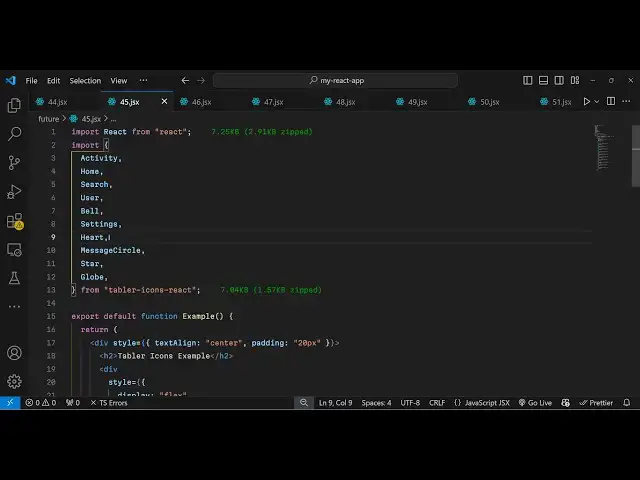
component and and we just need to import
1:02
this package using the import
1:05
statement and this is Tabler iccons
1:09
react and from this let's suppose if you
1:12
want to show the activity
1:15
icon home icon search icon so you can
1:18
import these icons like this it's very
1:21
minimalistic 2 kiloby size very
1:24
lightweight
1:26
size so if you want to now show the icon
1:29
it's very simple you
1:31
provide let me align everything in the
1:33
center position so text align Center
1:36
just give it a padding of 20
1:40
pixel so we'll have this H2 heading
1:43
Tabler icons
1:48
example so inside this I will just make
1:52
it everything in the center position so
1:54
justify send
1:57
content and I will have a gap of 20
2:01
pixel Flex WRA
2:05
to so inside this now we will embed the
2:11
icons so we activity
2:14
icon here we can pass two options first
2:17
is the size of the icon I will put
2:19
48 and then you can even customize the
2:22
color as well so you will provide the
2:24
your color so you can provide
2:26
hexadecimal Valu so if you refresh now
2:29
you will see this red activity icon
2:32
appearing and then you can add the
2:34
simple paragraph that telling about this
2:36
icon
2:38
so this is your activity icon same let's
2:41
suppose if you want to now embed the
2:44
home icon again you provide the same
2:47
size and color
3:00
so if you refresh now you will see this
3:01
blue
3:03
icon this is your home icon and in the
3:06
similar way we have more icons available
3:09
so you can check out their documentation
3:11
and search for your favorite icon and
3:14
then you can use it inside your
3:28
application so the uh configuration is
3:31
quite simple you install the package
3:33
then you require whichever icon that you
3:36
want and then directly use it by
3:38
providing these two parameters size and
3:40
actually the color so in this way you
3:43
can show more icons which is your user
3:46
icon your notification Bell icon as well
3:49
so
4:03
so just make sure that you
4:05
import the icons so vs code will
4:10
automatically import it for you so if
4:13
you just do it just make sure that you
4:15
import all the
4:17
icons it will be coming from this
4:19
package so you will now
4:21
see so the nice thing is that you it's
4:24
all SVG icons so scalable vector
4:28
graphics so all these icons are SVG so
4:31
if you go to their documentation it's
4:33
700 opensource MIT license icons it's
4:37
completely free to use so you no
4:40
copyright issue will come to inside your
4:43
website you can see almost 700 icons are
4:46
there so you can just search for your
4:48
favorite
4:49
icon and search for their name so this
4:52
is their official website Tabler
4:55
icons and you can install this for react
4:59
very simply
5:00
by clicking this button so you can read
5:02
more about it inside the GitHub repo as
5:04
well
5:05
so it's svgs
5:09
icons you can see it is mentioned on the
5:13
website that it's SVG so it's SVG icons
5:16
and uh it's completely open source so
5:21
this was a tutorial guys on how to use
5:24
these icons inside your application
5:26
thank you very much for watching this
5:27
video and do check out my website as
5:30
well uh free mediat tools.com which
5:33
contains thousands of tools regarding
5:35
audio video and image and I will be
5:38
seeing you guys in the next video