live_tv
Livestream Starting Soon
00
Hours
:
00
Minutes
:
00
Seconds
Up next in 10

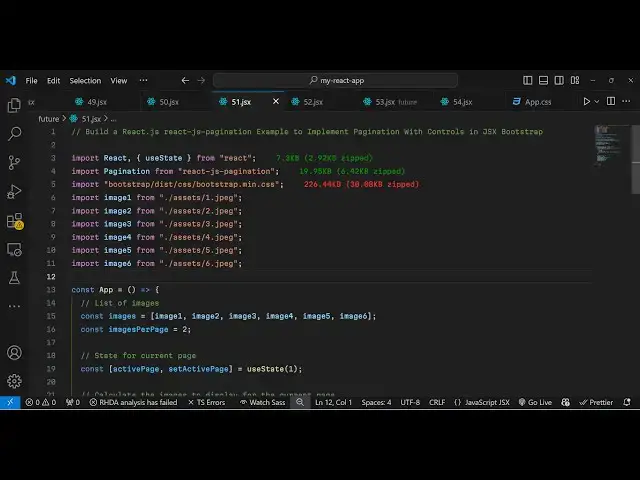
Build a React.js react-js-pagination Example to Implement Pagination With Controls in JSX Bootstrap
Jan 9, 2025

Get the full source code of application here:
https://gist.github.com/gauti123456/4c4e846e519f4e73382bfab9e4f85b2f
Show More Show Less View Video Transcript
0:00
uh hello guys welcome to this video so
0:03
in this video I will show you a react
0:05
pagination
0:07
component so we have a six images I'm
0:11
displaying and I'm displaying two images
0:13
per page so when you uh load your
0:16
application we are on the first page and
0:19
we are showing the first two images if
0:21
you see and if I navigate to the second
0:24
page we have all these pagination
0:26
controls I will see the next two images
0:28
appearing if I to the third page you
0:30
will see the next third images will last
0:33
two images will appear we also have the
0:36
next and the previous buttons as well in
0:37
the pag Nation so it is also using
0:40
bootstrap in the background so the
0:43
package name is react CHS pag Nation so
0:46
if you go to npmjs.com and just search
0:48
for this package react CHS pagination
0:53
this is the name of the package that we
0:56
are using so it's a very simple react CH
0:59
module the command is very simple you
1:01
just need to execute this command and
1:04
it's almost got 20,000 weekly downloads
1:07
so apart from that we also need to
1:10
install
1:12
bootstrap which is we using it in the
1:16
background to build out the user
1:19
interface so you also need to install
1:23
bootstrap so after that guys we will
1:27
start building this application so now
1:30
just make a simple functional component
1:32
and then we will import this pagination
1:35
component by using the import statement
1:37
and it contains this method
1:40
pagination which will be coming from
1:45
react JS pagination so it's almost 20
1:49
kilobytes of size so we are having
1:52
importing this pagination component from
1:54
this package and also we need to import
1:57
the CSS file of bootstrap that we
2:00
installed it so we are simply importing
2:02
the CDN of bootstrap CSS file so after
2:06
this guys we also need to embed six
2:08
images that we are using it is present
2:10
in my assets directory which is in my
2:12
source directory so one by one I will
2:15
import all these six jpg images using
2:18
the import statement so I will just copy
2:21
paste these six import lines so we are
2:24
importing all these six images image 1
2:27
image 2 image 3 image 4 image 5 and
2:29
image
2:30
six
2:31
so after that we will import some State
2:35
variables in our functional
2:37
component I will create an images array
2:40
where I will store all these
2:44
images like this we'll create an
2:48
array so after this we will create a
2:51
variable how many images you want to in
2:54
per page you will say two and then I
2:56
also need to declare a variable for
2:59
keeping track of the active page in the
3:01
pag Nation set active page this will be
3:05
one so initial value will be using the
3:07
US state hook so whenever you load your
3:10
application you will be on the first
3:12
page of the page Nation apart from that
3:15
we will also need to calculate the page
3:18
number for the first last and the
3:20
current page so we are using this
3:23
formula here we are multiplying image
3:25
per page by active page and then for
3:27
calculating the last page we are
3:30
minusing the this is actually the
3:32
formula and then the to get the current
3:35
images we are slicing the array and we
3:37
are using this two values which is the
3:40
index of first image and the index of
3:42
last
3:44
image so after you do this after you
3:47
calculate all these three variables now
3:50
wherever you need to embed this
3:51
pagination we come to the
3:55
jsx we just give some base CSS styles to
3:59
the
4:02
parent div we give image pagination
4:05
example and after this we will have
4:07
another div tag so here you'll be
4:11
making just we are writing this custom
4:14
CSS so just make it in the center of the
4:17
screen so the pagination will do in the
4:19
center of the screen so we will Loop
4:22
through which we calculated this current
4:25
images we'll map each image like this in
4:29
image
4:32
index so we'll be using the image tag
4:35
and we'll just attach the key parameter
4:38
which will be index The Source will be
4:41
image and I will just give it a style
4:44
parameter a width of 200 pixel and a
4:49
height of
4:52
150
4:55
pixel and I will also give it a border
4:57
radius of
5:03
of around 8 pixel so this is just a we
5:06
are simply looping through the this
5:08
array that we calculated using the map
5:11
operator for each image we are
5:12
displaying it in the image tag and just
5:15
after this we will embed our pagination
5:18
component so we simply import the
5:21
pagination component and it actually
5:23
take some parameters first of all the
5:25
active page so you need to provide the
5:28
active page
5:30
secondly it takes the items per items
5:33
count per page so how many images you
5:37
want to display so this is we are
5:38
displaying two two images so this is
5:42
located in the in this variable items
5:44
per
5:47
page I think I have declared this
5:49
variable which is images per page so I
5:53
will use this variable images per
5:55
page and then total item count so to
5:59
total items you will say images. length
6:03
you'll calculate the total images which
6:06
is six and then it also takes some
6:09
parameters for page range
6:14
display so I will say
6:17
five and also you can bind and on change
6:20
so whenever user clicks the next button
6:23
or clicks any page or navigate to any
6:27
page so we will bind this hand page
6:30
change function so what does function do
6:33
so whenever page is changed in the
6:35
pagination this function will handle
6:37
this change and you will get the page
6:40
number as pass as an argument and
6:43
depending upon which page number is
6:45
selected we will simply set the active
6:47
page to that we use the hook function
6:51
and set this to page
6:53
number that's all that we need to do
6:56
apart from that we can even apply some
6:58
customs CSS classes as well item class
7:02
you can give it a page item and Link
7:06
class you can give it page link that's
7:10
all that we need to do guys uh if you
7:12
refresh your application you will see
7:13
this nice little
7:17
pagination I think I made some kind of
7:20
mistake the pagination controls are not
7:23
total item count is marked as required
7:26
in pagination two but its value is total
7:30
item count total items
7:34
count sorry I misspelled the length here
7:38
that was a problem and now you will see
7:41
the pages will display three pages which
7:44
is correct because we are displaying six
7:48
images so 6 divided by 2 is comes out to
7:52
be three so on each page we are
7:54
displaying two images so in this way
7:57
guys you can do this pagination very
7:58
easily we are showing all these controls
8:01
so you can have your own data and let's
8:05
suppose I want to display three images
8:07
per page so now it will only contain two
8:10
images two pages so on a single page we
8:13
are displaying three images so this is
8:15
the first page and if I navigate to the
8:17
second page the next three images will
8:19
display so this is the pagination guys
8:22
you can do it using this package very
8:25
simply thank you very much for watching
8:27
this video and do check out my website
8:29
as well freem mediat tools.com uh which
8:33
contains thousands of tools regarding
8:35
audio video and image and I will be
8:38
seeing you guys in the next video
#Programming