Up next in 10

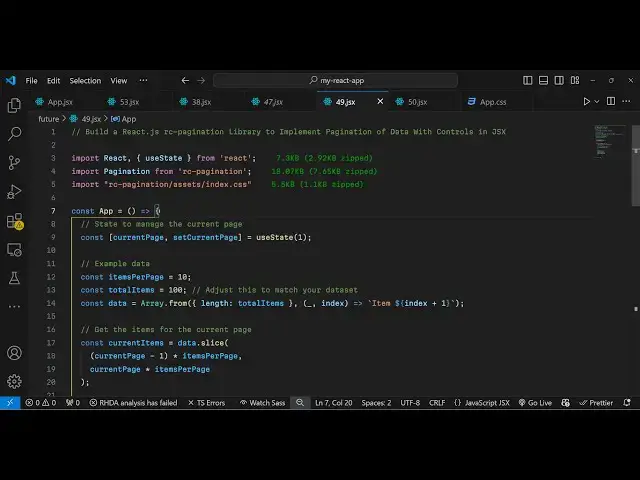
Build a React.js rc-pagination Library to Implement Pagination of Data With Controls in JSX
Jan 9, 2025

Get the full source code of application here:
https://gist.github.com/gauti123456/afa292ca539125cb6e6b3b4859acb652
Show More Show Less View Video Transcript
0:00
uh hello guys welcome to this video so
0:03
in this video I will show you yet
0:04
another react CH pag Nation Library so
0:07
this package is called as rc. pagination
0:10
and we are have a very simple example
0:13
where we are looping through an array of
0:15
items and we are displaying 10 items per
0:18
page and we are on the first page of the
0:20
pagination so we have all these
0:22
pagination controls available at the
0:24
bottom side and if I navigate to the
0:26
second page you will see the next 10
0:27
items in the pag Nation say goes with
0:30
the third page you will see so you can
0:33
paginate any sort of data it can include
0:36
images text with this library and we see
0:39
there all these controls if you want to
0:40
navigate to the previous page or next
0:42
page or you can individually click the
0:44
page number and it will navigate so this
0:48
is a very simple package so if you want
0:51
to search for this so just go to
0:53
npmjs.com and just search for this
0:55
module which is
0:58
rc. pagination
1:00
so just search like this and the very
1:02
first component which comes this is
1:04
actually the package and the command is
1:08
very simple you just need to install it
1:10
by executing this command I've already
1:11
installed it and it's almost got 8
1:14
33,000 weekly downloads it's a very
1:17
popular pagination module so it has got
1:21
a nice little documentation you can read
1:23
more about it so I will just give you a
1:26
very simple example so just make a
1:29
simple functional component and then we
1:31
need to
1:32
import this module by using the import
1:35
statement and the pagination module will
1:39
be coming from this RC pagination and
1:41
it's almost 19 kilobytes and in this way
1:44
you can import your
1:46
pagination and also we need to import
1:48
the CSS file for this which is located
1:51
in the assets directory index. CSS just
1:56
a 5.5 kilobyte CSS file of this module
2:01
for The Styling and now we come to the
2:04
actual app for this I will just declare
2:07
one state variable for keeping track of
2:09
the current page of the pagination so
2:13
initial value here will be one we'll be
2:16
using the UST State
2:18
hook so when when the user loads the
2:21
application they will be on the first
2:24
page so apart from that we need to
2:27
declare some more variables for the pag
2:29
naations such as how many items that you
2:31
want to display I will say 10 per page
2:35
and total items will be
2:37
100 and then we need to Simply generate
2:41
a very simple 100 items by this function
2:44
array from and here we'll specify the
2:47
length to be the total
2:50
items for this example you can even take
2:53
your own
2:55
data such as images coming from database
2:58
or Json API I'm just for the simple
3:00
example I'm just generating this data by
3:03
using this built-in function of
3:05
JavaScript so it will generate 100 items
3:08
and store it in this array of data so
3:11
now we have this data that we need to
3:13
pag inate so now we come to the GSX
3:16
wherever you need to embed the
3:18
pagination component and I just give it
3:20
a padding of 20 pixel and after this we
3:24
will have an heading here which will say
3:26
pagination example
3:29
with RC
3:31
pagination and then we Loop
3:34
through the array of items in the UL tag
3:37
we say current
3:42
items so I think we have declared this
3:45
variable I haven't declared this so
3:48
after generating this data we just need
3:50
to create a current items variable and
3:53
we'll be using the slice method of
3:55
JavaScript a built-in method and based
3:58
upon the current page p number we will
4:01
calculate the number of items so on per
4:04
page we will be displaying 10 items so
4:06
this is actually the simple formula for
4:09
calculating the number of items which
4:11
will be there on the current
4:14
page so that's all that we need to do
4:17
and after that we need to Loop through
4:19
these current items by using the map
4:23
function so map and for each
4:26
item we can simply Loop through like
4:29
this
4:30
we will use the Alli list item tag and
4:33
we will provide a key parameter here
4:35
which will be
4:36
index and here will
4:39
be just displaying the actual
4:42
items so just after this UL tag we just
4:46
need to display the pagination component
4:48
so we just write pagination and it
4:50
actually takes some parameters first is
4:52
the current
4:56
page the second one is the total number
4:59
of items that you need to display so it
5:01
will located in this variable total
5:03
items the page size is how many items
5:06
you want to display so we also have this
5:09
variable and lastly we'll be binding and
5:12
onchange so whenever user selects any
5:15
particular page that they want to
5:16
navigate to the paging Nation this call
5:18
back function will execute so we just
5:21
need to Define this function so whenever
5:23
the page
5:24
changes the page number will be
5:27
passed and in in this function we just
5:29
need to set the current page so we use
5:32
the hook function Set current page and
5:35
pass the actual page
5:38
number so this completes the application
5:40
and if you go to the browser and refresh
5:44
you will see 10 items will be displayed
5:46
and we will be on the first page of the
5:51
pag so you can see so 10 pages are
5:54
generated each page containing 10 items
5:57
and if you want to change it let's
5:59
suppose you want want to display 20
6:02
items per page so now the pages
6:05
will you can also see each page now
6:08
contain 20 items and the total pages is
6:11
now five because 100 items are there so
6:14
100 divided by 20 is five so in this way
6:18
guys you can
6:19
configure in react ches how to paginate
6:23
data with this package RC pagination the
6:26
configuration process is really simple
6:29
you all the source code I will give in
6:30
the description of this video so you can
6:33
use this package to paginate any sort of
6:35
data in react CH so thank you very much
6:38
for watching this video and do check out
6:41
my website as well free mediat tools.com
6:44
uh which contains thousands of tools
6:47
regarding audio video and
6:50
image and I will be seeing you guys in
6:52
the next video