live_tv
Livestream Starting Soon
00
Hours
:
00
Minutes
:
00
Seconds
Up next in 10

Build a React.js Project to Show Loading Progressbar and Spinners Using react-spinners Library in JS
Jan 9, 2025

Buy the full source code of application here:
Show More Show Less View Video Transcript
0:00
uh hello guys welcome to this video so
0:02
in this video I will show you a package
0:05
for showing loaders or Spinners inside
0:08
your react CHS application so the actual
0:11
package name is react Spinners so if you
0:15
just go to npmjs.com and just search for
0:18
this
0:19
package react Das Spinners so it's
0:24
specifically built for react chairs
0:27
package so if you want to show some kind
0:29
of cing or progress for Spinners you can
0:33
use this package uh the command is
0:35
really simple you execute this command
0:37
I've already installed it almost 410,000
0:41
weekly downloads it's a popular package
0:44
and it does offers a demo as well you
0:47
can see all these bars supported so it's
0:50
a simple bar here we also have this one
0:55
as well bouncing loading bar circular if
0:58
you want to show
1:00
like this we have the Clipper as well if
1:04
you want to show a clock in the progress
1:06
bar you can even show this as well
1:08
animation dotted progress bar as well
1:11
fading one then we have the grid
1:13
structure we have the hash one as well
1:16
this is a moon one Pac-Man you can see
1:20
all sort of shapes all sort of things
1:22
you can show inside your progress part
1:24
of spinners this is your
1:27
pulse you can see this is the ring one
1:30
this is the rise rotation one this is a
1:34
scale one this is a skew one this is a
1:37
square so all sort of shapes are
1:39
supported guys now to get started I will
1:42
show you a very simple example
1:44
explaining you the settings of this
1:46
plugin so first of all just make sure
1:48
that you install this and then just make
1:51
a simple functional component and the
1:53
very first thing you need to do you need
1:55
to import the package and we'll be
1:57
importing the package uh
2:01
clipboard clip
2:03
loader and it will be coming from this
2:06
react
2:08
Spinners and it basically contains this
2:10
clip loader so you can see we have
2:14
imported a simple loader or progress bar
2:17
spinner from this react Spinners and/
2:20
clip loader almost 3.94 kiloby size it's
2:24
very minimalistic and now to include
2:26
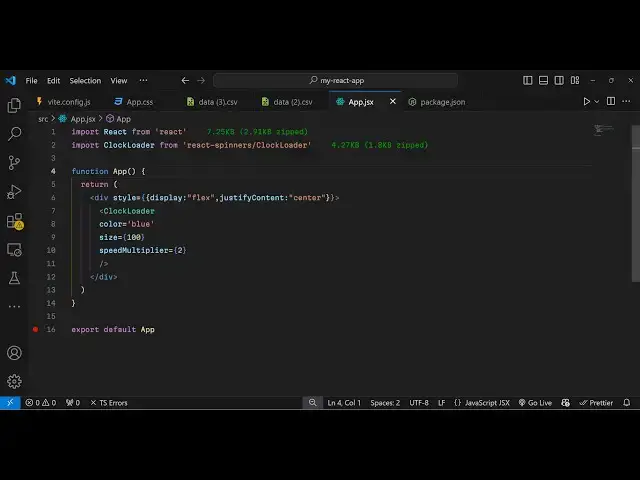
this we simply type the component which
2:29
is
2:30
lip loader and it actually takes some
2:33
options but if you don't pass any
2:36
options just refresh your application
2:38
now let me go to Local
2:42
Host whatever is my port number which is
2:44
Local Host
2:46
5173 so it will simply look like this
2:50
you will see
2:51
that let me align this in the center
2:54
position let me give it a style here of
2:56
display to flex
3:02
and justify content to
3:06
Center so it alls you Center so if you
3:09
want to change the color you can
3:11
actually provide a property here
3:13
property to this and we can change the
3:16
color to Red so now this color will be
3:18
changed and you can even change the size
3:22
as well if you want the larger size
3:23
let's suppose 100 I can make it larger
3:27
if you now see the progress part has
3:29
become larg
3:30
so you can manipulate all these options
3:34
and also in the same way we also have
3:37
the clock loader so if you want to show
3:40
the clock
3:41
loader there is this package clock
3:45
loader it will be coming from the same
3:47
package react Spinners this time this
3:49
will be clock loader so now what happens
3:52
if you see you will see this
3:56
clock so in this way
4:00
so in the similar way if you check the
4:02
documentation you can specifically
4:04
select any of the
4:07
loaders that you want to select all
4:10
these loaders are available to you so
4:12
whatever loader that you want to show
4:14
progress bar spinner you can simply show
4:18
it the example is given if you
4:21
see these are all the properties you can
4:23
control the size of the loader the color
4:25
of the
4:26
loader and this is the loading is a
4:28
Boolean parameter whether you want to
4:30
show the loader or not you can even
4:32
control that as well there is a loading
4:35
property available it's a Boolean
4:37
property default value is true so that
4:40
the spinner is showing but if you want
4:42
to hide this you can pass it false so
4:45
now this progress bar will be hidden it
4:48
will not be
4:49
shown and you can even provide a margin
4:52
as
4:53
well and if you want to increase the
4:56
animation let's suppose you want to
4:59
change the animation speed so let's
5:03
suppose by default the animation speed
5:06
is like this if you want to change this
5:09
animation speed you can manipulate this
5:11
parameter which is speed multiplier and
5:14
suppose I change to four so now the
5:17
animation will happen a lot quicker so
5:20
it totally depends upon you how you want
5:22
to if you want to double the Speed
5:25
Triple the speed so the animation will
5:27
be happening very
5:31
in a quick way so you can change to any
5:34
color you can see blue color it has
5:36
changed to it's a nice little package
5:38
and it's a very popular one as well
5:40
specifically for react CHS so all these
5:42
shapes are supported you can check out
5:45
this install it and use it inside your
5:47
reacts application so thank you very
5:50
much guys for watching this video and do
5:52
check out my website as well free mediat
5:55
tools.com uh which contains thousands of
5:58
tools regarding audio video and image
6:01
and I will be seeing you in the next
6:03
video
#Software
#Multimedia Software