Up next in 10

Build a React.js Project to Show English Virtual Typing Keyboard Using react-simple-keyboard in JSX
Jan 9, 2025

Get the full source code of application here:
https://gist.github.com/gauti123456/ba0d97a7cbd789589b3d32ab533200fc
Show More Show Less View Video Transcript
0:00
uh hello guys welcome to this video so
0:02
in this video I will show you how to
0:04
show this virtual English keyboard
0:07
inside your react CH application so for
0:10
some for some reason if you want to
0:12
display this English keyboard to let
0:14
users type virtually inside the browser
0:18
using this nice little keyboard you can
0:20
directly attach this there is a package
0:23
right here which supports can see you
0:25
can take user input using this nice
0:27
little virtual keyboard
0:30
so it's specifically built for react CH
0:32
application this key package which is
0:34
react simple keyboard so if you go to
0:37
npmjs.com uh just search for this
0:40
package react simple
0:43
keyboard and uh this is actually the
0:45
package I've already installed it so
0:48
this is the command and it's almost
0:51
having 22,000 weekly downloads so they
0:54
do offer a free demo as well you can
0:57
check out the demo
1:00
various themes are supported which is
1:02
Dark theme so you can see now it
1:03
virtually looks like a keyboard black
1:06
keyboard and uh it's available for all
1:10
the major Frameworks which is angular
1:12
react View and it in different languages
1:15
as well so you can see this is the
1:16
conard
1:18
keyboard so it supports multiple
1:21
languages of different countries
1:24
different religions this is a French
1:26
keyboard so International languages are
1:29
also support
1:30
it so Georgian keyboard you will see
1:33
that
1:34
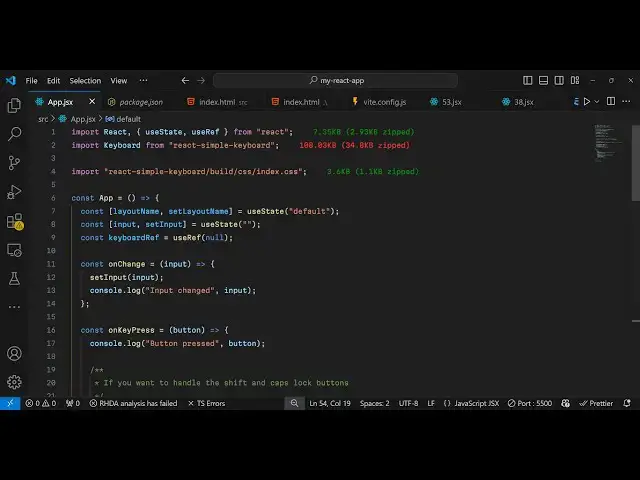
so uh now to Simply get started uh
1:38
inside your react CH app just create a
1:41
simple functional component and uh right
1:45
here we need to import this package
1:48
first of all so import
1:53
keyboard and it will be coming from
1:55
react simple keyboard
2:00
and then we also need to import it CSS
2:03
file as well so react simple
2:06
keyboard SL
2:09
build SL CSS SL index.css so this is
2:15
actually the CSS file of this package
2:18
now we just need to declare some
2:20
parameters state level variables which
2:22
is the layout
2:25
name and this will be use the default
2:28
layout
2:31
and then you can even
2:33
put a variable for taking the input
2:36
initial value will be use the UST State
2:41
hook and be attaching this keyboard
2:50
ref now to embed this keyboard it's very
2:53
simple we come to the jsx part right
2:55
here and uh we just take this input
3:00
field right here we attach the value
3:03
here so whatever the user will type on
3:06
the
3:07
keyboard This will be reflected right
3:14
here bind and on change as well
3:26
so so now to Define this keyboard we use
3:30
this
3:32
keyboard component it takes an options
3:35
right here first of all the keyboard
3:38
ref and this will be an object right
3:49
here keyboard ref. current is equal to R
3:55
and then the layout name uh it takes
4:01
it is located in this
4:04
variable we'll also bind a non
4:08
change and on key press so when you
4:12
press a keyboard key and this we will
4:16
Define all these call back functions
4:19
so on change input so whenever someone
4:23
write something key you will set this
4:28
input and
4:31
and on key
4:34
press if you press any key on the
4:37
keyboard This call back function will
4:39
execute and whichever button is pressed
4:42
we
4:44
will if handle shift is pressed so
4:50
simply if the shift button is pressed
4:53
and we will simply prevent it from
4:56
pressing I think that's all and then
4:59
lastly on
5:02
change set this input that's s so this
5:07
is a complete example I have given the
5:09
link in the description of this video of
5:11
this full source
5:13
code if you go to the browser you will
5:18
see this keyboard will show and whatever
5:20
that you
5:24
type so if you click the shift keyboard
5:27
it will change to capital letters and
5:29
and then toggle this you can also take
5:33
num numeric input put take any key on
5:37
the keyboard
5:39
and so this is actually a handy
5:41
component for react chairs for taking
5:43
user input from the keyboard itself so
5:46
thank you very much for watching this
5:48
video and do check out my website as
5:50
well free mediat tools.com uh which
5:54
contains thousands of tools regarding
5:56
audio video and image and I will be
5:58
seeing you guys in the next video
#Programming
#Computer Education