Up next in 10

Build a React.js Project to Create Animated Responsive Hamburger Menu Buttons For Website in JSX
Jan 9, 2025

Buy the full source code of application here:
Show More Show Less View Video Transcript
0:00
uh hello guys welcome to this video so
0:02
in this video I will show you if you
0:04
want to make a simple hamburger menu
0:07
inside react cheers very simply you can
0:11
essentially use a package which is
0:13
available something like this if you
0:15
click this hamburger icon that is
0:17
appearing right here it's valid for more
0:20
both mobile and desktop devices so if
0:23
the user click this hamburger icon you
0:25
will see this nice little menu appearing
0:27
and it is true for mobile devices as
0:30
well so let's suppose I make this
0:32
website as responsive I view it on
0:35
mobile device it will look something
0:37
like this so in a very easy way you can
0:39
configure a simple hamburger menu for
0:42
your react CHS application so there is a
0:45
package that you want to use here
0:47
hamburger react so if you just go to
0:50
npmjs.com
0:52
essentially in this video I will show
0:54
you two packages which is used for this
0:56
first first is this package which is
0:59
hambur
1:01
react essentially this is actually the
1:03
first package which is very much used in
1:06
this and it actually contains these nice
1:09
little icons animating I icons almost
1:12
called 23,000 weekly downloads and they
1:15
do offer a website as well where you can
1:17
check out the documentation so now to
1:20
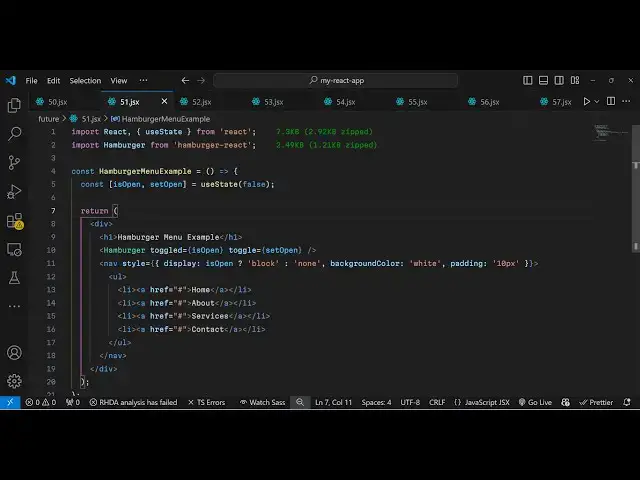
get started for this we first of all
1:23
create the functional component and then
1:25
we import this module hamburger which is
1:29
coming coming from this package
1:31
hamburger react it is almost 3 kiloby of
1:34
size and right here just create a simple
1:37
variable which will be tracking if the
1:41
user has opened the menu or not then
1:44
you'll be using this US state hook
1:45
initial value will be false so now in
1:48
the jsx wherever you want to configure
1:51
this so you will have your content of
1:54
the website let's suppose I have this
1:57
heading and just
2:00
you can make a separate component where
2:02
you will have your com menu so right I'm
2:06
just writing this
2:08
hamburger and whereever you want to show
2:11
this icon hamburger icon you will it
2:14
takes two options which is
2:16
toggled and it actually is a Boolean
2:19
parameter either true or false so here
2:22
we attaching this value is open value so
2:25
initial value is false so it will not be
2:28
shown
2:30
and then toggle so if you want to toggle
2:33
this we will create this function set
2:35
open and whenever you click it it will
2:38
now become true so now for the menu we
2:42
will have a simple menu and this style I
2:46
will just give it a simple style
2:48
property display I will change to is
2:51
open conditionally it is dependent upon
2:54
this value if it is true then I will
2:56
show it if it is false then I will hide
2:59
it
3:01
and then for the background color we
3:03
configure white color for it and padding
3:06
I will give 10 pixel and then inside
3:10
this navigation we have unordered list
3:13
and for the list items menus we create
3:17
the
3:17
[Music]
3:19
simple first we have the homepage about
3:22
page Services contact so we have four
3:24
items in the menu so you can configure
3:27
your own menu something like this
3:31
so that's all that we need to do for
3:33
this configuring it so if you try to
3:35
open it inside your application so it
3:37
looks something like this initially the
3:39
menu will not be visible once the user
3:42
clicks this hamburger icon now the menu
3:45
is visible so you see all these four
3:47
menu options that you configured and you
3:49
also see this cross icon as well so once
3:51
the user clicks the cross icon it again
3:54
Fades away so nice little animations s
3:57
also you see if I click the hammer
3:59
Burger icon nice little animation also
4:02
take place so this is true for mobile
4:05
devices as well it is completely
4:07
responsive if you see you can even now
4:11
toggle this so the second package I
4:14
wanted to show you guys it is little bit
4:17
Advanced the package name is
4:20
uh let me just show you which is react
4:24
hamburger draw this is actually the
4:26
second package it is slightly Advanced
4:29
package
4:30
let me show you the
4:32
demo so essentially it also does the
4:35
same thing you will see this hamburger
4:37
icon appearing the same look and feel
4:40
but if you click now you will see this
4:42
nice little navigation drawer appearing
4:45
right here so it has its own background
4:47
color it is slightly Advanced from the
4:49
previous package the both the animations
4:52
take place in both the packages but now
4:55
this one looks slight better as compared
4:57
to the last package so now now if you
5:00
want to install this package uh just go
5:02
to
5:03
npmjs and just search for this react
5:07
navigation
5:10
drawer so this is actually the
5:21
package sorry not react navigation it is
5:25
called as react hamburger draw react
5:29
hamburger
5:30
draw this is essentially this package
5:33
name and simple light fate specifically
5:37
designed for react CH applications just
5:40
install this package I've already
5:42
installed it's having 11,000 weekly
5:44
downloads so now to configure this again
5:47
it's very easy process we first of all
5:50
make a simple functional component and
5:53
we just require the
5:55
package by using the import statement
6:03
hamburger
6:05
drawer and it will be coming from react
6:08
hamburger draw and it's almost 21
6:11
kilobytes of package so now wherever you
6:14
want to show
6:15
this we will have an header
6:19
tag and we will import embed this
6:22
hamburger
6:23
drawer and inside this we will have an
6:26
unordered list
6:31
something like
6:36
this so we can have as many menu items
6:39
as you
6:46
want essentially we put the hamburger
6:49
draw importing it and inside this we
6:52
Define our own menu
6:55
it so if you refresh now the
6:57
configuration is quite easy you will see
6:59
the this hamburger menu appearing and
7:02
now you'll see this menu items it is
7:04
true for mobile devices as well it will
7:07
look something like this in the mobile
7:09
so when the user clicks it you will see
7:11
this nice little menu so this is the way
7:14
by which you can
7:17
uh use this to design hamburger icons
7:20
and react I've shown you both the
7:22
packages you can use any of them so
7:24
thank you very much for watching this
7:25
video and please hit that like button
7:28
subscribe the channel as well and go to
7:30
my website free mediat tools.com uh
7:33
which contains thousands of tools
7:35
regarding audio video and image and I
7:37
will be seeing you in the next video
#Programming
#Web Design & Development
#Computer Education