Up next in 10

Build a React.js Photo Collage or Gallery Carousel Using react-photo-collage Library in JSX
Jan 9, 2025

Buy the full source code of application here:
Show More Show Less View Video Transcript
0:00
uh Hello friends welcome to this video
0:02
so in this video I will show you how to
0:04
create a collage or Gallery like
0:07
structure inside react chairs so if you
0:09
have a series of images that you want to
0:11
show to the user you can use this
0:13
package react
0:15
photoage and you will see the images
0:17
will appear like this structure Carousel
0:19
or Gallery like structure you can
0:22
basically convert your images into a
0:24
collage mini collage and you can
0:26
organize your images in this manner with
0:29
nice little trans ition and animation so
0:31
all these controls will be present and
0:33
also at the bottom side you will see how
0:36
many images are present you will see the
0:39
number number as well you can even view
0:41
the images in full screen mode as well
0:43
you will see that so in this way this is
0:46
a nice little Library which we can use
0:49
it inside of a react CH
0:52
application
0:54
so we can basically show the images in a
0:57
nice little manner so the pack package
1:00
name is react photo colage this is
1:02
actually the package I've already
1:04
installed it this is actually the
1:06
command which is needed and it is almost
1:08
having 356 weekly downloads so now to
1:12
get started we just need to make a
1:15
simple functional
1:16
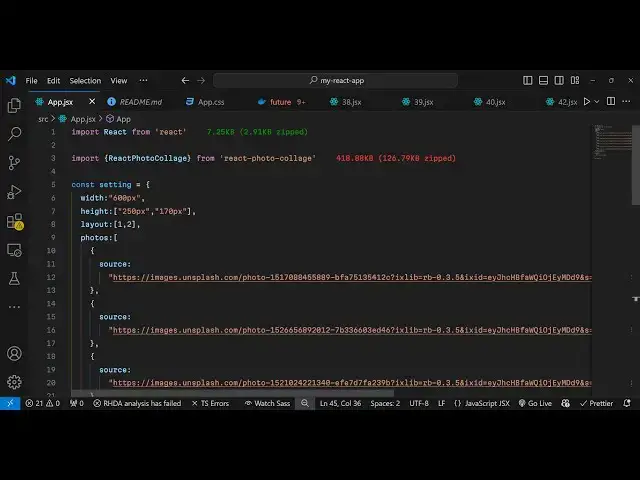
component and first of all we need to
1:19
import this package so inside this
1:21
package we have the method which is
1:26
react
1:28
photo collage this is actually the
1:31
method or component which is present in
1:33
this and this will be coming from
1:36
react photo
1:39
collage this is actually the component
1:41
here and we are importing it react photo
1:45
collage and then we just need to make a
1:47
simple object right here uh which here
1:51
we need to specify the properties of
1:54
this scar so here you can specify the
1:56
width of each image so I'm just putting
1:58
600 pixels
2:00
you can change it accordingly then we
2:02
can even provide height as well so 250
2:06
pixel and 170
2:09
pixel and then we can even provide the
2:12
layout structure so which layout
2:14
structure that you want so 1
2:16
by2 and here the fourth argument is the
2:20
photographs so which photographs you
2:22
will be displaying right here so we will
2:25
be displaying the unsplash photographs
2:28
it will be coming from from a URL so
2:31
you'll have this array of objects and
2:34
each object will have this Source
2:37
parameter and here we are providing the
2:39
full URL of this image which will be
2:41
coming from unsplash API and we are
2:45
basically putting it you can use any
2:47
image URL of your choice from internet
2:51
and then it actually takes one other
2:53
object which is if you want to
2:56
show the page numbering of photographs
3:00
how many photographs remaining you can
3:02
even toggle this option which is show
3:04
number of remaining
3:06
photos and you can put this to
3:12
true so this is actually the option
3:15
right here
3:17
and after you do this
3:21
uh you can simply embed this component
3:25
so right in the
3:27
jsx we can simply say react photo
3:31
collage and we can even pass the
3:33
settings that we configured which is
3:36
this one like this so This is actually
3:39
the component and where we are passing
3:40
the settings that we configured so if
3:43
you try to refresh your component you
3:45
will see the images will display in a
3:48
colar like structure and individually
3:50
the user can click on individual image
3:52
and they can actually view the image in
3:54
a nice little gallery or Carousel like
3:57
structure and with nice little animation
3:59
transition effects you can even view the
4:01
image in full screen mode so this is a
4:04
nice little package guys which is react
4:06
photo collage we can actually make a
4:08
nice little collat structure with custom
4:11
layouts and nice little animation so
4:14
thank you very much for watching this
4:16
video and do check out my website as
4:19
well free mediat tools.com which
4:22
contains thousands of tools regarding
4:24
audio video and image and I will be
4:26
seeing you in the next video