Up next in 10

Build a React.js Paginated Table to Fetch Data From JSONPlaceholder API Using react-paginate in JSX
Jan 9, 2025

Get the full source code of application here:
https://gist.github.com/gauti123456/c3f2ca47f43d1cac749bef848a9cdbd2
Show More Show Less View Video Transcript
0:00
uh hello guys welcome to this video so
0:03
in this video I will show you how to
0:05
paginate the data inside react CHS using
0:08
a package called as react paginate so
0:11
this package essentially renders out the
0:13
pagination buttons so I will just fetch
0:16
the data from a rest API uh such as Json
0:19
placeholder and you can see I'm fetching
0:21
these data and displaying it in the
0:23
tabular structure and we are splitting
0:26
the data into multiple pages and I'm
0:29
showing these paging Nations if you see
0:31
these controls so this is actually the
0:33
first page and it is having the first 10
0:36
post which is coming from the API and if
0:38
you want to see the next set of posts
0:41
you need to go navigate to the second
0:42
page in the paging Nation so if I move
0:44
to the second page you will see the next
0:47
10 post appearing and in the similar way
0:49
you can go to the third
0:51
page so we have all these controls if
0:54
you see the next page previous page in
0:56
the pag Nation so we can click the next
0:59
page previous page or we can go to a
1:01
specific page as well so I will do that
1:04
this front end pagination specifically
1:06
in react CH using this plugin and so
1:10
first of all just install this plugin
1:12
npmi react Paget I've already installed
1:15
it so it is you can see it's having
1:18
442,000 weekly downloads so it's a very
1:22
popular plug-in so after you install it
1:26
I will just show you a very basic
1:28
example so just make a simple functional
1:31
component and after this we just need to
1:34
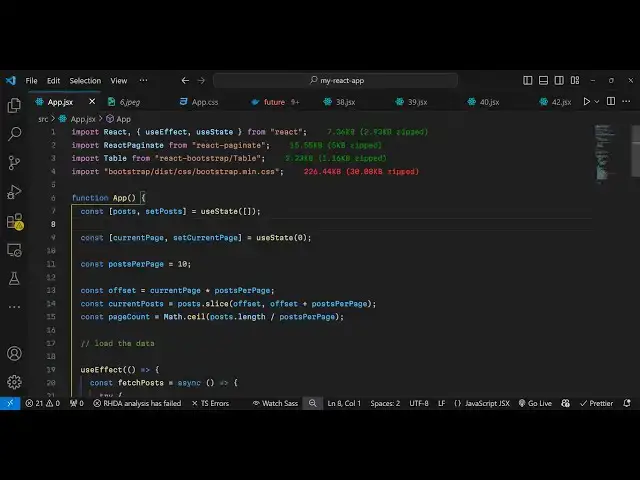
include this so now to include this
1:37
plug-in we will simply use the import
1:39
statement and we will simply write
1:42
import react paginate this is the actual
1:45
name of the component and it is coming
1:48
from react paginate apart from that we
1:51
also need uh bootstrap for styling
1:55
purpose so we are simply using the table
1:58
component from react
2:03
bootstrap and it having this component
2:07
table so react bootstrap is nothing but
2:10
uh specifically bootstrap Library if you
2:13
want to use bootstrap inside your react
2:15
CH application so I'm just using it and
2:18
also we do need to import the CSS file
2:20
as well so bootstrap dis CSS bootstrap
2:25
do main.
2:28
CSS so essentially what you need to do
2:31
uh just go to your command prompt and
2:33
just install these three packages
2:35
bootstrap react bootstrap
2:38
and thirdly this P Paget plugin so this
2:42
is actually the command that you need to
2:43
execute to install these three plugins
2:46
bootstrap react bootstrap and react
2:48
pagate so once you install this you can
2:50
start your
2:53
application so now I will make some
2:56
variables here for the applications so
3:00
first variable will be the post here
3:03
here we'll be fetching the post in this
3:05
variable we'll be using the UST State
3:07
hook of react CH initial value will be
3:09
empty
3:11
array and then we'll be having the page
3:14
number current page number so this is
3:17
required to keep track of which current
3:20
page is there in the pag Nation so
3:23
initial value will be zero so in the
3:25
paginations so the first page and
3:28
thirdly here we need to conf figured how
3:30
many posts you want to display per page
3:32
so I will be displaying 10 post which
3:34
will be coming from Json placeholder so
3:37
these three variables we have declared
3:39
and now we need to load the data when we
3:43
load the page for this we will be using
3:45
the use effect hook inside react chairs
3:48
so whenever your application renders for
3:50
the very first time inside use effect
3:53
will execute and now we'll be fetching
3:55
the data from the Json placeholder API
3:58
so right here you will make a simple get
4:01
call to the API so this will be a async
4:05
function and what this function will do
4:08
inside the TR catch block we will fetch
4:11
the
4:12
data so if any sort of error take place
4:15
we can console log the error and right
4:17
here we will simply make a fetch call so
4:22
here we need to mention the address here
4:25
of the API so Json
4:27
placeholder do type your code
4:32
dopost so this is actually the address
4:34
of the API so when you make a get
4:36
request to this API uh Json uh response
4:40
will be returned to you and now we just
4:42
need to convert this data
4:46
coming we need to convert this response
4:49
to Json first of all by using the Json
4:51
function so it will convert the response
4:54
to Json and lastly we need to set the
4:58
post coming like this using the hook
5:01
function which we have defined early on
5:03
so inside this we are using this to set
5:08
the
5:09
state and now we'll be calling this
5:12
function because we haven't called this
5:14
function so right after this right here
5:18
we'll be calling this function fetch
5:20
post and also square brackets just put
5:23
so no dependencies are there so now if
5:26
you execute your react CH application
5:28
just go to the port number Local Host
5:32
5173 so if you inspect element you can
5:35
check the console you will actually
5:40
see so if I console lock the data just
5:43
to check if the if it is working or not
5:46
so if I console loog the
5:48
data so you will see uh a set of data
5:52
will be returned to us so 100 object
5:55
array of object each object is
5:57
containing these properties which is
5:59
body I ID title user ID so I will now
6:02
display this data in a tabular structure
6:05
so that we can do the
6:08
pagination so now to display this we
6:10
will come to the jsx
6:12
part and I will simply give some
6:15
bootstrap classes to it container margin
6:18
top
6:20
five and inside this will have an H H2
6:23
heading which will say the post table
6:28
and I will just give it some bootstrap
6:31
class
6:34
here and then we'll be having the table
6:36
component to render out this information
6:42
so so that it's a bootstrap table
6:46
component so I will make this com table
6:49
as
6:49
striped
6:51
bordered and hover so these three
6:55
classes we will directly attach to it so
6:59
inside this we need to Loop through the
7:01
data so inside this table head we will
7:04
have three
7:07
columns so the First Column will be for
7:12
ID you can take any set of data that you
7:15
want to paginate I'm just taking a very
7:17
simple example fetching the data from
7:19
the API and then paginating it so now in
7:22
the table body just Open Table body
7:25
right here
7:29
and here you need to Loop through all
7:31
your data so data is contained inside
7:34
this variable which is uh current
7:38
post so I think the variable name here
7:41
is post so I will just make sure I use
7:43
the same variable post and I will just m
7:46
map through it so there is a map
7:48
function so we are mapping through each
7:51
post and in this way we can display it
7:54
in the table Road structure
8:00
so we can give it an key parameter to
8:02
this and inside this table data tag
8:04
we'll display the properties which is ID
8:07
title and body so if you refresh now you
8:09
will see 100 post will be displayed when
8:12
you refresh the page but our task is to
8:16
split this data into multiple pages so
8:19
that all the data is not
8:22
shown as the page references we need to
8:24
split this data into multiple pages so
8:27
that's the process of paging so we need
8:30
to show only 10 post per page so for
8:33
showing this pagination we have actually
8:36
after this table we will have the
8:39
buttons for the pagination so we have
8:42
the react paginate component and here we
8:44
need to pass some properties to this
8:46
component so it takes the previous label
8:50
it's a option it takes which is the text
8:55
you can give to the previous button so I
8:57
will just give previous
9:00
similarly we have the next label which
9:02
is the text for the next
9:07
page so break
9:09
label so this is actually whatever text
9:12
that you want to give in
9:15
between dot dot dot I will give and then
9:19
this is page count so this is very
9:21
important how many pages you want to
9:23
display so
9:25
this depends upon the page count
9:28
variable so we have defined this
9:29
variable if you
9:33
see uh I think we haven't defined it so
9:35
we do need to Define this now so this is
9:38
the pagination logic so now this is
9:42
actually we will simply put a variable
9:45
here offset this depends upon the
9:47
current
9:49
page uh multiplied by post per page so
9:53
current page is essentially zero here
9:56
and it will be divided by sorry
9:58
multiplied by 10 so the it it's a simple
10:02
mathematical formula for generating the
10:05
pagination pages and secondly we need to
10:08
get the current
10:10
post for the paginations so here we'll
10:13
be slicing the
10:15
post by the offset value and then you'll
10:19
be adding the offset per post per page
10:24
all the source code will be given in the
10:25
description this is little bit of maths
10:28
that I'm doing right here then we'll be
10:31
using the built-in math function
10:35
to actually divide the PO post length so
10:39
how many post are there divided by the
10:42
post per page so this will give you the
10:45
total number of pages of the pagination
10:47
so let's suppose you have 100 post and
10:50
you want to display 10 post per page so
10:53
for that uh 100 divided by 10 comes out
10:57
to be 10 so 10 pages will be generated
11:00
so in this way so now current post we
11:05
just need to instead of post we will use
11:08
current
11:12
post so now the if you refresh
11:19
now it is saying that offset is not
11:22
defined I think I
11:25
misspelled so this needs to be offset
11:29
so now if you refresh only 10 post will
11:32
be displayed if you see the rest of the
11:35
post is not displayed on a single page
11:37
we are doing the pagination so on the
11:39
single page we are only seeing the 10
11:41
post and then we are seeing these 10
11:44
pages this is the first page second page
11:48
these are clickable if you see so once I
11:51
click these Pages uh first of all I need
11:53
to style these Pages because it is not
11:55
looking great so for styling these Pages
11:58
first of all
12:02
all uh we also need to give a onclick
12:05
listener to this as well so after page
12:08
count we will actually give when we
12:11
click on any individual page so we just
12:15
need to bind a function which on page
12:20
click so when
12:22
you on page change this function will
12:26
execute whenever your page changes so I
12:29
will just find this this handle page
12:31
click function
12:33
so so when your page
12:39
changes in pagination this function will
12:42
execute so handle page
12:47
change so inside this what we need to do
12:50
we need to set whatever is your current
12:53
page set the current page equal to the
12:57
selected so here the user will select
13:01
the page that they want to select and
13:03
we'll be setting the current page to
13:05
that that's all that we need to do and
13:07
if you refresh now and now if you select
13:10
any individual page in this pagination
13:12
if I want to go to the eth page so now
13:14
you will see that eighth page data will
13:17
be loaded from 70 to 80 so the
13:21
pagination now it's perfectly working
13:23
now we just need to align these page
13:27
numbers in a word horizontal Manner and
13:30
also style it and for this you can pass
13:33
all these options
13:36
uh one by one I will do this so it
13:40
supports many options for customization
13:42
for styling purpose react paging it if
13:45
you see so it basically take all these
13:48
classes page class name page link so all
13:52
these are default options you can
13:55
customize everything change the color of
13:57
it as well so by default it will look
14:00
something like this it will appear in
14:02
blue color you can obviously change the
14:05
colors as well depends upon you but uh
14:08
the default Behavior will look something
14:10
like this this is actually your previous
14:12
page which is disabled by default and
14:15
this is your next page in the pagination
14:17
you can certainly go to a specific page
14:20
as well and the data will also change so
14:23
in this way you can Implement very
14:25
simple frontend pagination inside react
14:28
chairs you can go to any page and uh the
14:33
process is very simple this is actually
14:35
the library which is react paginate
14:39
alongside with bootstrap we are loading
14:41
Dynamic data and doing frontend
14:44
pagination so we haven't used any back
14:46
end it's all react chairs in the front
14:49
end and we have used this
14:52
package all the source code will be
14:54
given in the descriptions so thank you
14:57
very much for watching this video
14:59
and do check out my website as well free
15:02
mediat tools.com uh which contains
15:05
thousands of tools regarding audio video
15:08
and image and I will be seeing you in
15:10
the next video
#Software
#Education