live_tv
Livestream Starting Soon
00
Hours
:
00
Minutes
:
00
Seconds
Up next in 10

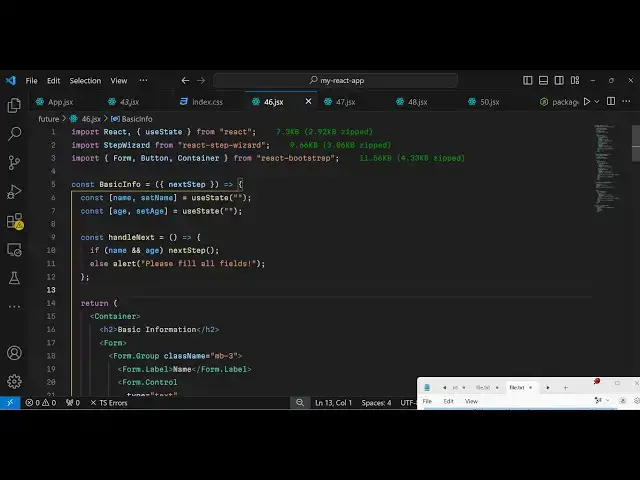
Build a React.js Multi Step Registration Form with Validation in Bootstrap Using react-step-wizard
Jan 9, 2025

Get the full source code of application here:
https://gist.github.com/gauti123456/f10ba17916fbae4c0821a05368014415
Show More Show Less View Video Transcript
0:00
uh hello guys welcome to this video so
0:02
in this video I will show you how to
0:05
create a
0:07
multi-step form example inside react
0:10
chair so if you want to create a
0:12
multi-step visard kind of a form where
0:16
it involves multiple steps the user
0:19
comes to your website you want to
0:21
register on your website so some forms
0:23
you have seen it contains multiple steps
0:26
so you can see on your screen we have a
0:28
simple example registration form in the
0:31
first screen we ask the user to submit
0:33
the name and their age and then in the
0:37
next step we have the next button right
0:39
here and when they click the next button
0:41
they will see the next set of options
0:43
that they want to submit which is the
0:45
email and the phone number so you can
0:47
see this slight little animation which
0:50
happens if you click the next button so
0:51
you go to the next step you submit your
0:54
email address and then you submit your
0:56
phone number your mobile number
1:03
and then you again click on the next
1:05
button and then you go to the next set
1:08
of options that you want to submit so
1:10
again a set of Animation take place and
1:13
then you click the Finish button to
1:15
submit the
1:16
form so in this way I will show you how
1:19
to create these multi-step visit kind of
1:22
forms inside react CH so there is a
1:25
specific package with the help of which
1:27
you can create these awesome looking
1:28
multistep form kind of
1:31
applications uh inside reactjs so if you
1:35
go to npmjs.com there is a specific
1:38
package which is available so just
1:40
search for this package which is react
1:42
step
1:45
visit this is actually the name of this
1:54
package
1:56
so it's almost got 24,000 weekly
2:00
downloads and this is actually the
2:02
command I've already installed it so I
2:04
will just show you a very basic example
2:07
apart from that for the user interface
2:09
for Designing this form we are using
2:12
bootstrap as well so if you want to use
2:15
bootstrap inside your react CH
2:17
application you can use this module
2:20
which is react
2:21
bootstrap so also install this as
2:25
well and also the base bootstrap package
2:28
as well so we we just need these three
2:31
packages for this application so install
2:34
all these three app packages I've
2:35
already installed it so I will just show
2:37
you a very basic example so first of all
2:41
we will import all the packages which we
2:43
need we need the actual package
2:46
of to create multi-step forms so for
2:49
this I will just require this package by
2:52
using the import statement import step
2:56
visit which will be coming from this
2:58
package apart from that we also need to
3:01
import the bootstrap component which is
3:04
the form component button and container
3:08
and all this will be coming from react
3:10
bootstrap and also we need to import the
3:13
CSS file of bootstrap as
3:18
well the main. CSS file that's all that
3:21
we need to do for the
3:23
packages now we will design a simple
3:27
form and this form will be containing
3:29
three parts so the first part will
3:32
handle the name and the age we go to the
3:35
next step so I will actually
3:41
have so right inside this
3:46
form I will just call this the base form
3:49
and inside this I will have three
3:51
components in the jsx so I will wrap
3:55
everything using the container class of
3:57
bootstrap
4:00
so inside this I will just give it a
4:02
bootstrap class of margin top four and
4:06
inside this you will have an H1 heading
4:09
which will simply say
4:12
registration form and I will just align
4:14
this heading in the center position so
4:17
text Center margin bottom four so now
4:22
after this we will actually use this
4:24
component which is Step visit and this
4:27
component
4:31
we need to wrap everything inside this
4:34
this is coming from this package if you
4:35
see if you want to create multiple step
4:39
kind of forms so we have this opening
4:41
tag and the closing tag so here you will
4:43
Define all your components so I will
4:46
just create a basic info component and
4:48
then I will create a contact info
4:50
component and then I will create the
4:53
terms and condition component so these
4:56
three components I will Design the user
4:59
will come to this one then this one then
5:01
this one so this is the way by which you
5:05
can design this multi-step form so now
5:07
we need to design these three
5:10
components so one by one I will Design
5:12
this so the first component is for
5:16
collecting the basic information from
5:18
the user so basic
5:23
info so here we also have this variable
5:26
automatically passed to this component
5:29
Next Step
5:30
this is automatically
5:33
there using this
5:37
package so this this variable is coming
5:40
from this
5:41
package so next
5:45
step so here you you will declare your
5:48
component and then we have the next
5:50
component which is for contact
5:55
info so the same Next Step variable will
5:58
also be present for for this
6:01
also and lastly we have the variable
6:08
for this one which is terms and
6:11
conditions
6:19
so so now we have defined all these
6:21
three components if you just refresh
6:23
your
6:26
browser you will not see anything you
6:29
will just see your heading so now we
6:31
just need to design simply the
6:35
forms so just for the basic info we will
6:38
have uh uh simple State variables for
6:42
collecting information which is the name
6:44
and the age we'll use the uate
6:47
hook same for the age as
6:53
well and then here we'll be Simply Be
6:56
designing a simple form
7:00
again we'll be wrapping so I will just
7:04
copy paste the HTML this video is not
7:07
about bootstrap
7:12
so I will just paste it just to save
7:15
some time
7:17
uh we simply using bootstrap in this
7:20
tutorial this is not mandatory that you
7:21
must use bootstrap you can use any UI
7:24
framework of your choice so we have the
7:26
simple form right here where we allow
7:28
the user to enter the name and the age
7:30
and then we have this next button to
7:33
next to go to the next step and then if
7:36
you see now you will see this form
7:38
appearing
7:41
uh it is telling you must Define these
7:45
functions if you see you have binded
7:47
this on click function so when you click
7:49
the next button we are executing this
7:51
function so we do need to Define this
7:53
function
7:54
so handle next so if the user clicks the
7:58
next button we need to go to the next
8:01
page so next step sorry uh name and age
8:04
if defined we go to the next step we
8:06
call this function if you see we are
8:09
calling this function if it is not
8:12
entered by the user if either of these
8:14
fields are not entered we show the alert
8:16
to the user that please fill out all the
8:22
fields so now if you see you will see
8:25
this uh registration form name and age
8:28
where you need to enter it
8:31
please all the please fill all the
8:33
fields if you not fill
8:36
it and if you click next you will see
8:38
this slight little transition which
8:40
happens animation and now we need to go
8:43
to the next component and here we need
8:45
to now Define this same thing same
8:48
registration
8:50
form so now this contact info we'll also
8:53
have the previous step variable as well
8:57
because this is a second component so
9:00
the user can go to the previous step as
9:02
well so these two variables will be
9:04
there previous and
9:06
next and in this step we will be
9:08
collecting the email and the phone
9:10
number from the user so we'll be
9:11
declaring these two
9:13
variables and again we'll be showing a
9:16
simple bootstrap form right inside this
9:18
so I will just copy paste
9:22
it so in this way you can design these
9:25
multistep forms which contain multiple
9:28
components and here also I Define
9:31
this when the user clicks the next
9:34
button what happens so we go to the next
9:37
step so once again we call
9:40
this if email is phone number is entered
9:44
by the user then go to the next step by
9:47
invoking this
9:49
function and else alert the user that
9:53
please fill all the
9:57
fields and also if you also see the
10:00
previous back button as well so if you
10:02
click the back button we are invoking
10:04
this previous step function which we are
10:07
receiving right here you will see so now
10:10
if you see your application it now
10:12
contains two forms splitted across
10:15
multiple steps so first of all you ask
10:17
the name and the age you click the next
10:19
button you go to the next step slide
10:22
transition happens and we now need to
10:25
enter the email address and the phone
10:28
number
10:30
and again we have now the back button as
10:32
well you can go to the previous step as
10:35
well the data will be
10:36
retained the data will not go away you
10:40
will still see your data previous fill
10:42
out data in the previous step and again
10:43
you click the next button go to the next
10:48
page so in this way you can have
10:52
multiple
10:54
components so again this will now be
10:57
simply a finish page
11:01
where we are going to the next page
11:05
so so this will contain the Finish page
11:08
so when you click the Finish button here
11:11
we are
11:15
simply go to the step so this variable
11:19
will be there go to
11:20
step so essentially it's a last last
11:23
component in the form
11:25
so we will go to the first step so we
11:29
can directly pass a number right here so
11:32
it will go to the first step once again
11:35
so when you click the Finish button so
11:37
in this
11:38
way again if you want to go to previous
11:41
we are binding this previous step Button
11:43
as well so now if you click the Finish
11:45
button you will
11:49
see so if you just enter out the
11:53
details click the next
11:57
button click on finish
12:02
so you need to toggle this option please
12:05
agree and now registration is completed
12:08
so in this
12:10
way you can have multi-step
12:14
forms using this module in react CHS you
12:17
can directly make it with any UI
12:20
framework bootstrap semantic UI any UI
12:24
framework you you can use so I've shown
12:27
you this complete example all the s code
12:29
will be given in the description of this
12:31
video so thank you very much for
12:33
watching this video and do check out my
12:36
website as well free mediat tools.com
12:38
which
12:40
contains thousands of tools regarding
12:42
audio video and
12:44
image and I will be seeing you in the
12:46
next video
#Programming
#Software
#Education