Up next in 10

Build a React.js Mouse Particle Animation Effect Using react-mouse-particles Library in Browser
Jan 9, 2025

Buy the full source code of application here:
Show More Show Less View Video Transcript
0:00
uh hello guys welcome to this video so
0:02
in this video I will show you a package
0:04
inside react Chase where you can add
0:07
this particle effect Mouse particle
0:10
effect inside react CH this is actually
0:13
the package react Mouse particles it's a
0:16
fairly new package and what this does is
0:19
actually inside your website it add this
0:22
nice little animation effect to your
0:24
mouse so whenever you are navigating
0:26
inside the website you will see this
0:28
nice little effect happen happening so
0:30
wherever you move your mouse you will
0:32
see this effect so if you want this
0:35
effect to be happening inside your mouse
0:37
you can re uh use this package
0:39
specifically built for the reactj
0:42
application so you can just see so you
0:44
can just customize the look and feel uh
0:48
you can change the color as well let's
0:50
suppose I change to blue color and
0:54
refresh so now it changes to blue colors
0:57
so I will show you
1:00
the example here how to use this so
1:03
after installing it we will just make a
1:06
simple functional component and the very
1:10
first thing we need to do we need to
1:11
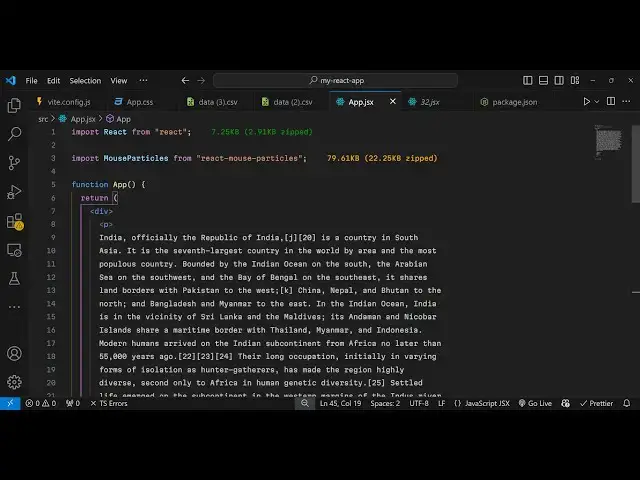
install this package using the import
1:15
statement so just go to the top
1:28
and so we just need to import this so
1:30
you'll say import Mouse
1:35
particles and it will be coming from
1:37
this package which is react Mouse
1:40
particles it's just 79 kilobyte size you
1:44
can just see right here and now you can
1:47
add some text so you just need to add
1:50
all the things that you want to add so I
1:54
will just have a simple paragraph I will
1:56
just paste it from Wikipedia so that I
2:00
have enough space to show
2:10
you so I will just paste it so this is
2:14
now the paragraph and
2:17
uh now to embed this uh it's very easy
2:23
now we can wrap everything inside this
2:26
paragraph
2:36
and then we can have this mouse
2:39
particles and here it takes some options
2:42
if you don't pass any options uh you
2:45
will see the default Behavior something
2:48
like this so here you can pass a
2:51
parameter which is the level of
2:54
intensity that you want to see in the
2:55
animation so it's a integer value it
2:59
takes let me provide six right here so
3:02
now you can see the animation will
3:04
increase and now if you also want the
3:08
number of
3:09
particles you can even control it by
3:12
this parameter num so I am just
3:15
providing 20 here so now the animation
3:18
will have more particles if you see 20
3:21
particles which is appearing one other
3:23
parameter is G
3:25
parameter if I just do this you will see
3:28
now it is having having this effect
3:32
happening and lastly we can control the
3:35
color so we can change the color to red
3:38
color so now if you see you just need to
3:41
refresh
3:45
it so now it will look something like
3:48
this you can use any color of your
3:50
choice so these four parameters are
3:53
supported you can play with these
3:55
options to actually look and customize
3:57
the feel of the mouse so if if you need
4:00
this effect you can use this package
4:03
very simple package it takes these four
4:06
parameters
4:08
leveled you can customize the color as
4:10
well number of particles that needs to
4:12
be there in the animation the level of
4:15
the intensity so all these four
4:17
parameters you can control it and then
4:19
you can customize the mouse behavior so
4:23
specifically built for react chairs so
4:26
thank you very much for watching this
4:28
video and do check out my website as
4:31
well uh free mediat tools.com uh which
4:35
contains thousands of tools regarding
4:37
audio video and MH and I will be seeing
4:40
you in the next video
#Online Media
#Other