Up next in 10



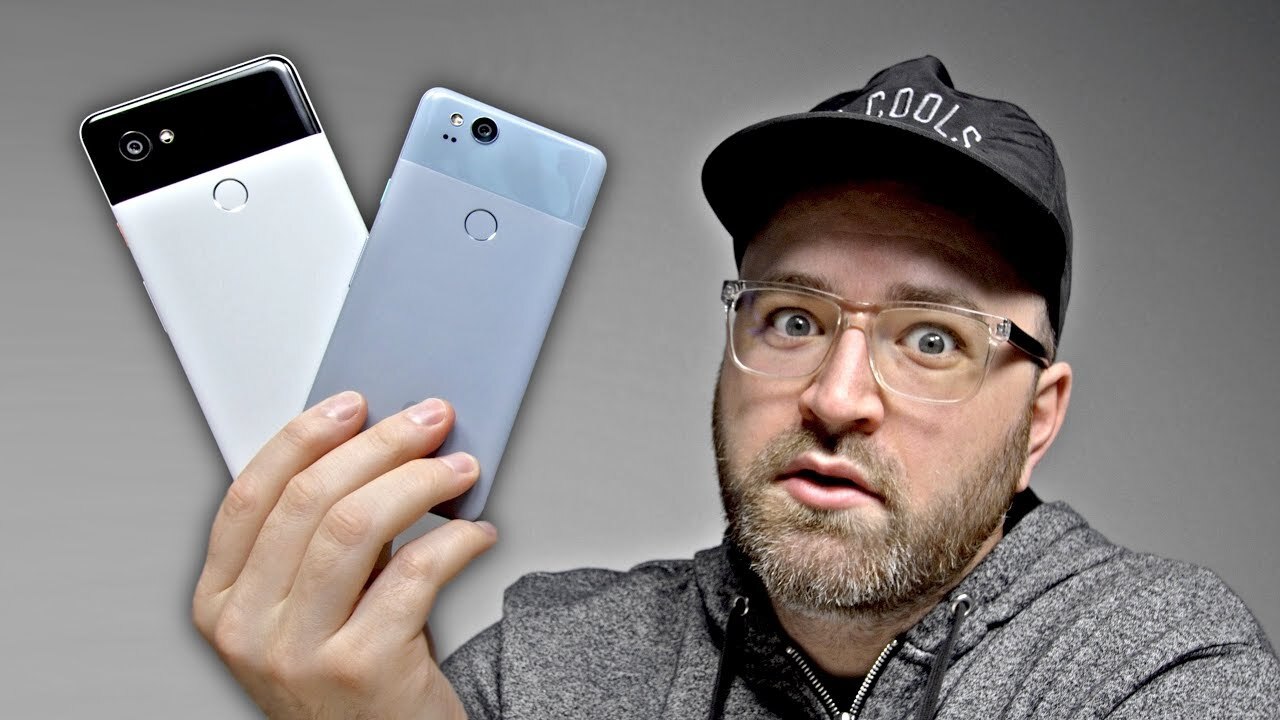
Google Pixel 2 XL and Google Pixel 2 are here in various colors. This video features the Pixel 2 in blue and white and the Pixel 2 XL in black and black / white. This video is a Pixel 2 and Pixel 2 XL hands-on video including my initial impressions. This is not a Pixel 2 review. I will have a Pixel 2 and Pixel 2 XL unboxing and review coming shortly.
Subscribe for my upcoming Google Pixel 2 and Google Pixel 2 XL review video coming shortly.
FOLLOW ME IN THESE PLACES FOR UPDATES
Twitter - http://twitter.com/unboxtherapy
Facebook - http://facebook.com/lewis.hilsenteger
Instagram - http://instagram.com/unboxtherapy
Google Plus - http://bit.ly/1auEeak
Show More Show Less View Video Transcript
0:00
It's a big day. It's a big day
0:02
What you guys have to know about me at this point is that I've been a fan of this lineup of devices since the very first one
0:09
I've said it many times here on the channel. We're talking about the Pixel, more importantly the Pixel 2
0:14
With this early look, I've got a bunch of them in front of me. In fact, I've got all but one
0:19
The Pixel 2 over here and the Pixel 2 XL. On the far left, slightly blue
0:24
Probably my favorite color of the bunch, although the panda setup over here with the black and white
0:29
not bad either. Now the regular Pixel on the left here, a familiar setup. If you've
0:34
used the previous version of Pixel, this is going to be super comfy for you when
0:38
you pick that up. On the XL, things change up just a little bit. The display
0:41
what you'll notice here, it kind of curves around a little bit. Now one thing
0:45
that's different about both these devices compared to other flagships is these forward-facing speakers, which are an immediate standout for me because I'm
0:53
always asking for it. With this rush for devices to become bezel-less, speakers
0:58
kind of take a hit they got to find another place to go with the stereo set
1:02
up look at this I'm sitting here like this we now have the search bar down at the bottom of the screen as opposed to
1:07
the top so the smaller of the two the standard pixels got a 1080p display and
1:11
then stepping up to the excel you have a 1440p display they're both OLED tech
1:16
there's really no excuse now to not have an OLED display there's a new feature
1:21
now we now have the squeeze functionality so I can just grab onto
1:25
this here and launch assistant listening to me already. No Bixby! No Bixby on here! I just squeezed this and it launched. I'm squeezing the
1:34
frame of the device and it's launching Assistant. We got the fancy wallpaper with the waves coming
1:40
in beautifully. And if you look very closely you can see Jack vacationing right over here
1:45
There he is with his towel sunscreen this orange button Look at this A little flare Now something they did is they put the colorful button on certain models So here you have this kind of bluish green but if you don want that you could just pick up the black version and this is the executive look
2:02
No fancy stuff with the buttons. Now the fingerprint sensor, it's where you expect it to be on the back here
2:08
Kind of matte finish, where you might expect to get a bunch of fingerprints
2:12
It's not happening so much on these ones. Now if you're completely against the idea of fingerprints, you could go for one of these two colors over here
2:18
even up on the lighter section of the glass you can see they don't really pick up so much
2:23
Now all these devices feature USB type C as you can see here and quick charge
2:27
giving you potentially 7 hours of battery life in a 15 minute charge
2:33
Let's go check it out. So today is an unusual day. What you end up with is just a little bit more clarity, a little bit more resolution in the voice
2:44
Is this the first Pixel or Nexus device with stereo speakers facing forward
2:49
I believe so, isn't it? I've been using these things for a while. You can correct me if I'm wrong, but it's what I've always wanted
3:06
It seems pretty obvious. You want them firing at you. I can't think of another device off the top of my head right now
3:12
that's still doing this to this degree, two large grills and they're coming at your ears
3:16
Now obviously with the bigger boy, you're going to get a bigger battery as well
3:20
So that's something to consider. Let's go ahead and test out this fingerprint scanner real quick
3:25
Where is the perfect spot? What is the perfect unlock scenario? This is pretty close, having it on the back
3:31
We all want these giant displays. There's no room on the front anymore. Okay, fine. Truly, this is where your finger falls anyways
3:37
This is where you hold it. You don't even really think about it, to be honest. There's really no mistaking that location
3:43
So you just land on it. I know Apple they reluctant to put this scanner on the back They got the big Apple logo there This is really where it should be That was actually very quick Now something I like to do to make it even more seamless is sometimes I just register the same finger twice
3:58
Now let's lock this guy and let's see what happens. Oh my goodness, okay it's very quick
4:03
It's a very fast one. Sensor on the back, get used to it. The face thing, trust me, it's not gonna be what you expect
4:11
Think about paying for something. What is all this about? It's somewhat the cashier's standard over there and then no no no kaboom
4:21
Now what about the camera? You're wondering about the camera, camera's very important. This one here has a bigger aperture than the last which should allow for even better performance
4:29
in low light. 3, 2, 1 kaboom. That's our image. Whoa. You quick peek around and of course there's you guys in the lens there and there's me
4:42
looking at you, looking at me. Okay, let's try this again. Whoa, okay, by default, check
4:50
this out, look at this. See how there's motion to it? So if it detects motion within the
4:54
frame or movement within the frame, you can actually toggle motion on and see a few frames
5:00
of movement prior to the snap. Now there's also a portrait functionality which will simulate
5:05
this very shallow depth of field that you've seen on certain phones, certain cameras. This
5:11
This one is capable of emulating that effect from a single lens system
5:15
So okay, you know what? I got a good idea. Let's get this
5:19
Look at that. She's ready for portrait mode. So through machine learning, it's capable of distinguishing the edge of a portrait essentially
5:31
and it can distinguish what's important in the frame and what you might want to blur
5:36
Bye bye. Bye bye time. Jack, why do you keep this thing around anyway
5:40
Alright guys so there this feature called Now Playing in which Assistant can pick up a song that playing in the background and tell you what it is on your notification pane like on the lock screen
5:53
But it's doing it locally on the device it's not like sending that data anywhere in fact it'll work on airplane mode
5:59
Oh! It got it like it got it like it insta- I don't know if they can see it because it's in the- look at that
6:05
It just grabbed it now playing so I can remember the song that came on maybe in a public space at a bar or something like that
6:12
like that. Oh this is good and boom going to the notifications and it's saying that I can download it or do whatever I want
6:17
It doesn't end there with the assistant. There's another cool thing which is new, the ability to trigger device level modifications right from within assistant
6:27
So for example on the old pixel if I launched into assistant and said start my hotspot I would just get some instructions from Google on how to do so
6:35
But on the new one here I'll launch it with squeeze. Start my hotspot
6:39
turning Wi-Fi hotspot on. BAM! You like that? Stop my hotspot. Turning off Wi-Fi hotspot
6:50
What more do I need to say, alright? We're living in the future
6:54
Okay so both of these models are going to be available in 64 gigs or 128 gigs of storage
7:00
and unlike the previous one, this one has IP67 certification for water resistance and whatnot
7:06
Alright so there you have it, the Pixel 2 and the Pixel XL2 showcased in various colors
7:12
And let me know down in the comments, which one would you go for? Which color do you like the best
7:16
Is it gonna be the Panda? Is it gonna be the all white? Is it gonna be the black? Or is it gonna be the sorta, kinda, slightly blue
7:22
Remember though, this was just a hands on, a quick hands on on the day of announcement
7:27
But I'm gonna have a more extensive video. I'm gonna use one of these exclusively for a while, do an unboxing and a review
7:33
So make sure to subscribe for that. Hit the notification button so you don't miss it
7:37
It's going to happen here first. On Unbox Therapy. That's where
#Online Media
#Computers & Electronics
#Gadgets & Portable Electronics