live_tv
Livestream Starting Soon
00
Hours
:
00
Minutes
:
00
Seconds
Up next in 10

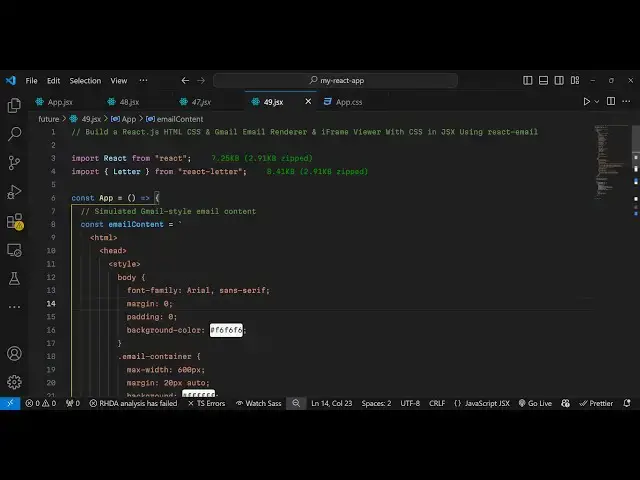
Build a React.js HTML CSS & Gmail Email Renderer & iFrame Viewer With CSS in JSX Using react-email
Jan 9, 2025

Get the full source code of application here:
https://gist.github.com/gauti123456/edd605fc0a0871b42ea549c6c906b074
Show More Show Less View Video Transcript
0:00
uh hello guys welcome to this video so
0:03
in this video I will show you a reactjs
0:05
package which is very much helpful in
0:08
rendering out HTML or Gmail emails so if
0:12
you have email that you want to render
0:14
inside your react CH application you can
0:16
use this package which is react letter
0:19
as you can see on your screen I am just
0:21
rendering out it's very simple HTML
0:23
email which consist of images links text
0:28
you will see uh it is looking like a
0:31
simple Gmail email you will see you have
0:33
visited Gmail a lot let me open Gmail
0:36
right here we have seen inbox of Gmail
0:39
if you have a specific message that you
0:41
want to read let's suppose this
0:44
message inside your inbox you have seen
0:47
these messages appearing so with the
0:49
help of this uh module that I'm showing
0:51
right here you can easily design this
0:54
awesome looking emails and you can
0:55
render it so this is actually the
0:58
package I will discuss in this video so
1:00
first of all you need to install this by
1:03
executing a
1:04
command you will also see this footer
1:07
appearing this is in gray color we have
1:09
the background here which is white color
1:11
so it is looking like a general email so
1:14
you can easily Design This and the
1:16
package which is responsible for this is
1:18
react dlet if you just go to npmjs.com
1:22
and just search for this
1:24
package the command is very simple you
1:27
need to execute this command to install
1:29
this and it's almost got 3,800 weekly
1:32
downloads so I have already installed it
1:35
so first of all I will show you a basic
1:38
example starting from scratch so first
1:41
of all you need to import this module by
1:44
using the import statement and we just
1:46
write to import the letter module from
1:49
which is there from react letter it's
1:52
almost 9 kilobytes in
1:55
size and here we will Define our email
1:59
content so so this email can be coming
2:01
from an API this can be coming from
2:03
anything but I in this example I will
2:05
just render it using a simple
2:09
HTML and
2:11
CSS so I will simply paste it this email
2:15
content and this is a very simple email
2:17
address uh which includes Simple Text
2:21
links as well if you see you also
2:24
styling it with the very simple CSS you
2:27
will see that this is a simple HTML
2:30
template email address that I want to
2:32
render it now and now for rendering it
2:35
we need to go to the jsx part and just
2:38
embed this
2:40
component so I will just style it this
2:44
parent if and just give it a padding of
2:47
uh 20 pixel and inside this I will
2:50
render out this email
3:03
and after this we will have this div tag
3:06
and just give it a style here width of
3:10
100% so it will take the entire space of
3:12
the page and inside this will'll use
3:15
this component
3:17
letter and this actually takes some
3:19
parameters so the first parameter is
3:21
take is the actual HTML email that you
3:24
want to display so here it'll be
3:26
providing the email content the second
3:29
property it take is I use iframe if you
3:32
want to use the iframe you will put it
3:35
to true the third parameter you need to
3:38
give it a title to the iframe so I will
3:40
simply say sample Gmail
3:44
email and if you want to re new
3:49
write sorry this is
3:52
rewrite rewrite external links you will
3:56
set it to
3:59
so for this we just need to define a
4:02
function for this rewrite external links
4:05
this is responsible let's suppose your
4:07
email contains some external links which
4:10
uh redirect the user to some kind of
4:13
external website for that we can define
4:15
a function and then it takes allowed
4:18
schemas and this will be
4:21
HTTP https and mail
4:25
to and then you can also give it a class
4:28
name
4:30
this class name email rapper and then it
4:33
takes preserve CSS priority to
4:37
true so these are all the option it
4:40
supports so I'm just giving you all the
4:42
options that it supports and then you
4:44
can put the width to 100% and Border we
4:48
can remove it to none so that's all the
4:52
options that it
4:55
takes so if you refresh your browser let
4:58
me just Define this function which is
4:59
rewrite external links right
5:07
here and you just need it will give it a
5:10
URL and you just need to return this
5:14
URL so if you refresh your browser you
5:17
will actually see a nice little email
5:19
which will be rendered here you will see
5:21
all this HTML CSS has been converted to
5:24
a nice little email template that you
5:26
can
5:27
see but one problem is there this if
5:30
frame is not covering up the full
5:33
browser page width and height for doing
5:36
that we need to Simply add two lines of
5:38
CSS code for this so just right after
5:41
this HTML just after this div we just
5:44
need to give it a style parameter and
5:48
just add two lines of CSS code for this
5:51
we need to Target the I frame and just
5:53
make the
5:54
width to be 100% And we just need to be
5:59
import an just add this
6:02
directive and same we need to do this
6:07
for the height as well so just after
6:10
this is
6:14
ending just add this simple CSS code so
6:19
withd 100% And just make sure that you
6:21
write this
6:22
important and now it will override the
6:24
default styling and it will now look
6:26
something like this so it is taking the
6:28
full space with and height and you can
6:30
actually see your HTML template email
6:33
has been converted and it has been
6:35
rendered successfully so in this way you
6:38
can use any email providers such as
6:42
Gmail mail anything you can render out a
6:45
very simple email which contains HTML
6:48
and CSS in react
6:50
chairs uh using this package which is
6:53
react letter so thank you very much all
6:56
the source code I have given in the
6:58
description of this video so you can get
6:59
the source code and also check out my
7:02
website as well uh free mediat tools.com
7:04
uh which contains thousands of tools
7:07
regarding audio video and image and I
7:10
will be seeing you in the next video
#Other
#Other
#Email