Up next in 10

Build a React.js Google Maps Alternative Pigeon Maps to Show Maps and Add Markers in JSX
Jan 9, 2025

Buy the full source code of application here:
Show More Show Less View Video Transcript
0:00
uh hello guys welcome to this video so
0:02
in this video I will show you a Google
0:04
map alternative free alternative open
0:07
source so you need not have to pay
0:10
anything for using it their API so this
0:13
is a simple react CH Library where you
0:16
can directly show this Maps right here
0:20
and we can add markers as well we can
0:22
zoom in zoom out you can see this is
0:24
actually a Google map you can go to any
0:26
location and you will see this is nice
0:29
little map right right here you can
0:31
navigate zoom in zoom out you can go to
0:34
any location click it and as you click
0:37
it you will see the marker marker will
0:39
be there this blue
0:42
marker so the actual Library name is
0:45
Pigeon Maps so if you just search for it
0:48
on Google just write p i g e o n Maps so
0:57
this is actually their website and it's
0:59
a react
1:00
map library and uh it doesn't use any
1:04
external dependencies and it's a package
1:07
it's open
1:08
source and uh that's the major advantage
1:12
of it you did not have to pay for
1:14
anything uh to show the maps and it can
1:17
do all the things that Google Maps does
1:20
it can show the map it can show the
1:21
marker as well and it can show the
1:24
overlay picture if you want to show some
1:26
kind of picture on the map as well you
1:28
can even do that as well so I will show
1:30
you a very simple example how to show
1:33
this map first of all so first of all
1:36
you just need to install this
1:39
package I've already installed it so
1:41
using this command npmi p i g o n
1:46
Mas this is a command so just install
1:49
this I've already installed
1:51
it so now I will show you how to show
1:54
the map so just create a simple
1:56
functional
1:57
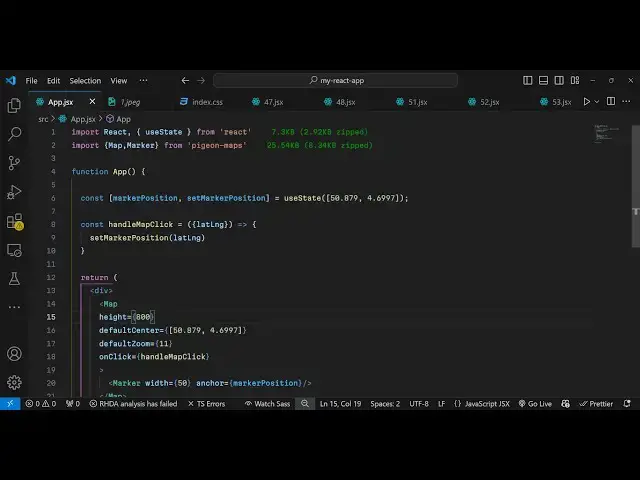
component and WR at the very top using
2:01
the import statement you import the
2:03
actual module which is the map and the
2:06
marker which is all will be coming from
2:08
Pigeon Maps so it's 25 kilobyte size of
2:12
the package and we have these two
2:15
components first is the actual map and
2:17
the second is the
2:19
marker and uh
2:21
now to show the actual map directly you
2:24
can go to the jsx and just we have this
2:28
map component it takes some options
2:31
first you can adjust the height of the
2:32
map let me say height is 800 then you
2:35
can simply default Center by providing
2:39
the latitude and the longitude which is
2:41
actually the coordinates that you want
2:43
to plot so you can simply give these
2:46
coordinates and based upon this it will
2:48
plot inside the map and then you can
2:50
even adjust the default zoom level of
2:53
the map using this option so I will say
2:56
11 and when you click on the map you can
2:58
bind this on click listener so whenever
3:01
you click on the map we will execute
3:03
this function which is handle map click
3:06
so I will just Define this function
3:09
handle map click so when you click the
3:13
map at a specific location so this
3:16
function will automatically get the
3:18
latitude and the longitude passed in
3:20
this variable so whenever you click on
3:22
the map these coordinates will reflect
3:24
the location on where you click it so
3:27
for this we will declare a simple State
3:30
variable in react CHS so which will be
3:34
holding this position so marker position
3:37
I will just declare a variable set
3:40
marker
3:42
position and we'll be using the UST
3:45
State hook initial value will be you can
3:47
put any latitude and
3:50
longitude so initially the map will be
3:52
at this location and whenever you click
3:54
the map you will have latitude and
3:58
longitude coming and then we be calling
4:00
this set marker position method and
4:02
passing this newly latitude and
4:05
longitude so it will change it based
4:08
upon where the user has clicked it and
4:11
now to show the map we will simply use
4:13
the map component sorry
4:16
marker to actually add the marker we
4:19
have this marker component and you can
4:22
adjust the width of the marker to be 50
4:25
and then we can even put a anchor tag as
4:27
well which specifies the position of the
4:30
marker it just takes two options first
4:32
is the width of the marker and the
4:35
position so if you refresh your
4:37
application now you will actually see
4:39
this map will
4:43
appear and you can see that it is
4:46
default centering at this location
4:48
whenever you load the
4:50
application and then if you can zoom it
4:52
to any location now if I want to add the
4:55
marker I can simply click it you will
4:57
see the marker will get added this blue
4:59
marker
5:00
this is a very simple example to get
5:02
started with this library inside react
5:04
CHS so you can build out awesome looking
5:08
applications related to map so we
5:10
haven't used Google Maps it's a simple
5:12
free open-source alternative pigeon maps
5:15
you can directly use it in the browser
5:18
and show the
5:19
maps and I think it's a very good
5:22
alternative so if you don't want to use
5:23
Google Maps you can use this Library
5:26
very easily to display the map inside
5:30
your
5:31
browser so thank you very much for
5:33
watching this video and if you like this
5:36
video please hit that like Buton and
5:38
also do check out my website as well
5:41
free mediat tools.com uh which contains
5:43
thousands of tools regarding audio video
5:45
and MH and I will be seeing you in the
5:48
next video
#Programming
#Maps
#Open Source