live_tv
Livestream Starting Soon
00
Hours
:
00
Minutes
:
00
Seconds
Up next in 10

Build a React.js FFMPEG WASM Video Trimmer & Compressor Timeline Editor in Browser Using JS
Jan 9, 2025

Buy the full source code of the application at Paypal in USD Currency here:
https://procodestore.com/index.php/product/build-a-react-js-ffmpeg-wasm-video-trimmer-compressor-timeline-editor-in-browser-using-js/
Hi Join the official discord server to resolve doubts here:
https://discord.gg/cRnjhk6nzW
Visit my Online Free Media Tool Website
https://freemediatools.com/
Buy Premium Scripts and Apps Here:
https://procodestore.com/
Show More Show Less View Video Transcript
0:00
uh welcome friends so in this video I
0:02
will basically talk about uh new
0:05
application that I developed which is a
0:07
video timeline editor which allows you
0:09
to trim your videos cut your videos
0:11
right in the browser itself and also you
0:13
can compress your videos to lower sizes
0:17
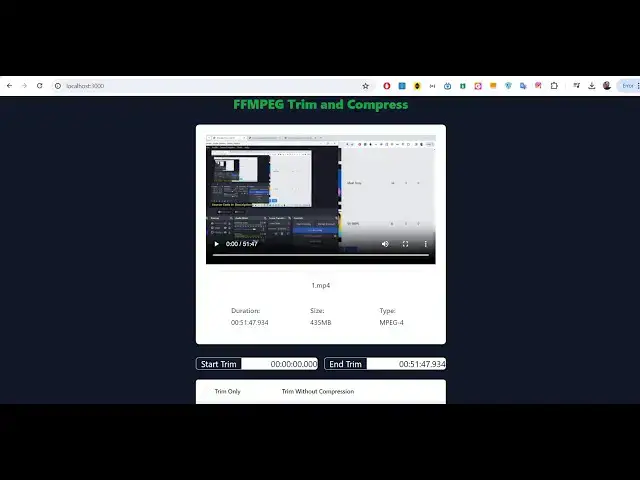
so this is actually the interface in
0:19
react CH that I developed using fmpg web
0:22
assembly Library you can basically
0:24
upload any extensions of video file Avi
0:27
MP4 mov let me select my input file as I
0:30
select this input file it will show you
0:32
inside this video player you can see
0:35
that now you can play your video
0:39
file you can navigate to any portion in
0:42
this video so it will basically find out
0:43
some properties about this video such as
0:45
the name size which is the type of the
0:48
video all this information is gathered
0:50
using the fmpg web assembly Library the
0:53
size of the video which is 152 mgab so
0:56
all this information is displayed in
0:58
this application and now comes the
1:00
triming part this is the starting
1:02
duration you need to provide in this
1:04
format and the ending duration so this
1:07
is let me want to split the video the
1:11
first minute so I will simply provide
1:14
here 01 and the starting duration will
1:17
be the starting of the video and I need
1:18
to trim the very first minute of the
1:20
video so as I provide this end duration
1:23
which is 01 it represents the 01 minute
1:27
and if you just want to trim the video
1:29
video without altering the quality of
1:31
the video you will select this first
1:33
option which is trim the video without
1:35
compressing it so as I select the first
1:38
option now it will not re-encode the
1:40
video it will just trim out the portion
1:42
that I selected which is the starting
1:44
duration and the ending duration and
1:46
there is an option which is convert
1:48
option if you click this option it will
1:50
basically do the fmpg web assembly
1:52
compression or trimming and now you can
1:55
see that your trimmed video is displayed
1:57
here and you can play this video the
1:59
very first minute of the video hello
2:01
guys itself so you can see the very
2:04
first minute of the video has been cut
2:06
trimmed and it is showed in the output
2:08
video player now you can save you this
2:11
the size is you can see that 7 megabytes
2:14
this type duration is only 1 minute
2:16
click on Save and you can play this
2:18
video file saving it inside your
2:20
computer welome so very simple
2:23
application guys but yet powerful if you
2:25
need the full source code guys Full
2:27
Source Code of this project the link is
2:29
given in the description you can
2:30
directly purchase it from my website
2:33
proc Cod store.com after you purchase it
2:36
guys you will actually get this uh full
2:39
source code you will get the zip file
2:41
after you purchase it from Google Drive
2:43
automatically you can download that zip
2:45
file and then extract the portion of the
2:48
code and this will be the actual
2:50
directory structure which will come out
2:52
after you extract it so you can see that
2:55
in the package.json file we are actually
2:57
using the fmpg web library and we are
3:01
using the react 17 at recording of this
3:04
video it is compatible with all the
3:06
versions and these are the actual
3:09
directory structure different kinds of
3:11
components are there drag and drop
3:12
component which is there for actually
3:14
uploading the file this is for editing
3:16
the video so each and every component is
3:19
responsible for its own job for actually
3:21
carrying out the video editing options
3:23
so it's a fully timeline editor guys
3:26
which is developed inside react CH now
3:28
if you want to reset option simply click
3:30
that reset button and again you can
3:33
select your video Let's suppose this
3:35
time I want to alter the quality of the
3:37
video so what I will do is that I want
3:40
to trim the very first portion I will
3:43
simply say and now instead of trimming
3:46
it without compressing it I also want to
3:49
compress the video so what I will see
3:51
there are various qualities which I
3:53
mentioned right here guys in YouTube
3:55
also whenever you are watching a YouTube
3:57
video so the video comes in various
3:59
quality 480p 180p 320p 480p so all these
4:03
qualities are mentioned right here 480p
4:06
576p 720p
4:09
180p so as you increase the quality the
4:12
conversion time will take longer so you
4:16
can see the estimated time as well 5
4:18
minutes to 70 megabytes all that
4:22
stuff if you want want to remove audio
4:25
from video you can toggle this option
4:26
and let's suppose I want to select 1080p
4:31
click on convert so it will now convert
4:33
your video it will compress it it to
4:36
1080p so it will take some longer time
4:39
guys just wait for a while after it
4:42
finishes it will actually show the
4:43
output video to you so it totally
4:46
depends upon the size of the video guys
4:49
if you are uploading a larger size video
4:52
just make sure that you wait here as it
4:54
is carrying out the conversion process
4:56
using fmpg web assembly Library which uh
5:00
techn technically you are actually
5:02
executing the fmpg command directly in
5:05
the browser so that's why it take longer
5:08
because we are re-encoding the video to
5:11
a higher quality rate so you can just
5:13
see in the browser it is doing it step
5:16
by
5:17
step you can see 8 seconds have been
5:19
encoded so once it reaches the full
5:23
minute it will actually show the output
5:26
video
5:28
here so fmpg web assembly is slightly
5:31
slow as compared to the fmpg that you
5:34
execute directly in the command line but
5:37
because it is executing it uh right in
5:40
the browser so it has some Li
5:42
limitations as well but yet it's very
5:44
powerful tool you can edit your videos
5:47
directly in the browser without
5:48
executing without installing fmpg inside
5:51
your computer and uh it's a very good
5:55
application so
6:01
so what I will do is that I will trim
6:04
the just for showing you let's suppose I
6:08
only want to trim the very first 5
6:11
seconds and here I will
6:17
simp remove this audio from the video
6:20
and compress it to
6:23
1080p so it will now take faster because
6:26
it just want to trim the very first
6:30
5 Seconds of the video so we are
6:32
compressing it to
6:47
1080p so you can see 3 seconds have been
6:50
processed and uh once it reaches the
6:53
fifth second it will actually show you
6:55
the output file you will see the it
6:58
contains 5 Seconds in the output video
7:00
and the
7:02
size is 266 kiloby so the video is
7:05
successfully compressed it is 108p you
7:08
can
7:10
basically change the quality as
7:13
well if if you want to compress this you
7:17
can select this option 480p so the size
7:20
original size is 152 mbes if you want to
7:24
compress it to a lower quality then you
7:26
can select
7:28
480p so this this will actually reduce
7:30
the size of the video so let's suppose
7:36
uh I do
7:42
480p and I want
7:46
to
7:49
compress the first 30 second
8:04
so you can see in the command line you
8:06
can see the log statements of fmpg it is
8:08
doing its
8:10
process is showing you the functionality
8:14
so once it reaches the full quota of the
8:17
minutes that we mentioned compression is
8:19
little bit slow guys but the trimming
8:21
part is really fast you just need to
8:23
mention the starting duration and the
8:24
ending duration and depending upon that
8:27
it will compress your video sorry trim
8:29
your video but for the compression it
8:31
takes some time so just make sure that
8:33
you wait inside the browser just give it
8:35
ample amount of time to actually
8:38
compress your video because for
8:39
compression I already told you re it
8:42
re-encodes the video so for re-encoding
8:44
it takes some time so it's a Time
8:48
intensive task because as you know that
8:50
editing videos take a long of L lot of
8:53
time as you also use third party
8:55
softwares you have used uh if you want
8:57
to edit videos to higher quality takes
8:59
some time so that's why it is taking
9:01
some
9:02
time
9:06
so so the link is given guys in the
9:08
description if you want to purchase this
9:11
application you will actually get this
9:13
full JavaScript code in react project
9:16
which uses fmpg web
9:19
assembly Library uh directly in the
9:22
browser it's a fully offline application
9:24
it doesn't require internet you can
9:26
directly execute this in this browser
9:28
edit your videos trim your videos and
9:31
also compress your
9:33
videos so there is no limit of file size
9:36
you can upload as as long videos as you
9:40
can there is no size limit of this
9:44
application so just make sure that you
9:46
wait for the processing to take place so
9:50
once it finishes it will show you the
9:51
output
9:56
video so you can see it has been
9:58
compressed to 1 Megabyte and total
10:01
duration is 30
10:03
second you can save this video now 798
10:07
uh hello guys Javas so now it is you can
10:10
see the video is slightly degraded
10:12
because it has been compressed to 480p
10:15
Quality wise
10:17
so you can see that so if you are
10:20
interested guys in purchasing this
10:22
project the link is given in the
10:23
description you can directly purchase it
10:25
you will actually get a zip file after
10:26
you purchase it from procore.com the
10:28
link is is given in description so
10:30
please hit that like button subscribe
10:32
the channel and I will be seeing you in
10:34
the next video
#Music Videos
#Programming
#Software
#Multimedia Software
#Clip Art & Animated GIFs
#Animated Films
#Video Sharing