Up next in 10

Build a React.js Excel or Spreadsheet Data Editor in Browser Using react- datasheet Library
Jan 9, 2025

Buy the full source code of application here:
Show More Show Less View Video Transcript
0:00
uh hello guys welcome to this video so
0:02
in this video I will show you how to
0:05
basically display the tabular data
0:08
inside this Library which is react data
0:11
sheet which is actually a spreadsheet
0:13
kind of a library where you can display
0:16
the table data and I'll be showing you
0:19
how to make a complete editor out of
0:21
this something like a Microsoft Excel
0:25
where you can add your tables and rows
0:27
so we actually have this data which is
0:30
available when you load the page we have
0:32
a button as well where you can add your
0:34
rows you can edit all these column names
0:36
you can change the values here by
0:39
clicking under the cell and you can even
0:42
add new set of data as
0:45
well like
0:48
this so in this way it is actually a
0:51
mini Microsoft Excel clone where you can
0:54
add your rows of
0:56
data by clicking inside the cell and you
0:59
will
1:01
so this is actually the package and name
1:03
of the package is react data sheet so
1:06
it's a simple react component to create
1:08
a spreadsheet you will see that it also
1:11
provides you with this demo as well this
1:14
is actually the command here I've
1:16
already installed
1:17
it and it's a basic data sheet it's kind
1:21
of Excel or spreadsheet where you have
1:23
certain
1:25
cells and you put values right inside
1:28
the cell you can even control this is
1:30
using keyboard navigation as
1:32
well and uh you can even put formulas as
1:36
well
1:39
so so you can render a table any sort of
1:42
data as well so almost 24,000 weekly
1:46
downloads are there so I will just show
1:47
you a very basic example of using this
1:49
module just make a simple functional
1:52
component and now to include this module
1:55
we will just use the import statement so
1:58
right here we will import the CSS file
2:01
as well of this package react data
2:04
sheet and it is available inside lib
2:07
react data sheet. CSS and then we'll be
2:11
importing the actual component which is
2:13
react data sheet it will be coming from
2:16
this package react data sheet and now we
2:20
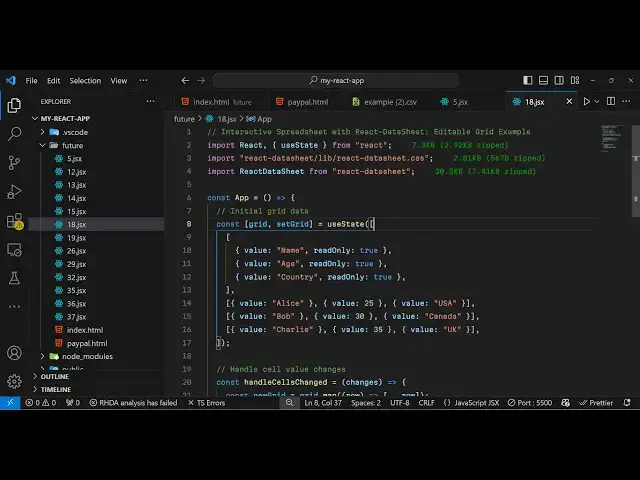
just need to declare some State
2:21
variables which will be required for
2:23
this application so grid set grid and
2:26
here you need to specify what data that
2:28
you want to display
2:30
you'll be using the UST State hook and
2:32
inside this will be having an array of
2:36
values
2:38
so you can
2:40
have any sort of data that you want to
2:43
display I will have these data right
2:45
here which will have three columns name
2:48
AG country and we it only will be read
2:50
only so you just need to provide this
2:52
property so you can't edit the column
2:54
names then we go to the rows so it's
2:57
array of objects each object each object
3:00
containing this value property and this
3:03
is a cell value inside Microsoft Exel
3:06
spreadsheet these are certain cells you
3:09
can see so we provide a value
3:13
parameter and now to display this
3:15
component it's really simple we come to
3:18
the jsx part right
3:22
here so inside the div we actually give
3:26
it a style parameter which will be a
3:29
padding of 50
3:30
pixel and we give it a heading here
3:33
which will say react data
3:36
sheet example and then we render this
3:40
component which is react data
3:44
sheet and it actually takes three
3:46
options whatever data that you want to
3:48
display the secondly is actually value
3:52
renderer it displays the actual cell
3:56
value so when you click inside any c it
4:00
will display the value we'll
4:03
see then the third value if the cell
4:07
cells basically value is changed then
4:10
you'll be binding a function which will
4:13
be responsible for making that change
4:17
handle cells change we will just Define
4:19
this
4:20
function this function will be
4:22
responsible for updating the cells
4:28
value so if you see you'll have this
4:31
component displaying you will see it is
4:34
displaying these three rows of
4:36
data these are particular cells out
4:39
there if I click inside the cell you
4:41
will see it will be highlighted and I
4:43
will be able to change the
4:46
value so it is not updating it we do
4:49
need to write that
4:50
function which is handle cells change so
4:54
if I update any cell value so the
4:57
changes will be present inside this
5:00
passed as an argument so we need to
5:02
update the value so for doing this we
5:05
use the grid and the map function and we
5:08
need to update that value like
5:12
this so again we need to Loop
5:15
through changes and it's a
5:19
function it's
5:21
actually this actually changes is
5:23
actually an array which is passed so we
5:26
are simply using the for each
5:28
Loop and for each cell row column and
5:32
the actual
5:33
value we we need to Simply update the
5:37
value so we are calling
5:42
this so essentially what what it does it
5:45
actually updates the value whenever you
5:47
change any cell value these three lines
5:51
of code so once you now
5:52
do if you want to change this value and
5:55
if you update this
6:01
and click outside you will see the
6:03
update updated value
6:06
stays so essentially now we can add a
6:10
button if you want to add a new row of
6:13
data so we have a button outside
6:17
this we have binded this onclick
6:19
listener to it add row function so we
6:21
just need to Define once we click the
6:24
button we will execute this function add
6:26
row which will be responsible for adding
6:29
a new row in
6:32
the
6:33
spreadsheet of
6:35
data just add a new row to the array we
6:39
will create a new
6:42
row and then we will using the set grid
6:45
function to add to this
6:48
array so what happens is that you will
6:50
see this button is added so if you click
6:52
the button new set of data will get
6:55
added so here you can specify any cell
6:57
value
6:59
so it's very great if you want to allow
7:02
the user to submit the data you can have
7:04
this editor a buil in react CH component
7:07
for this mini spreadsheet or mini Excel
7:10
component for displaying the tabular
7:13
data so thank you very much for watching
7:16
this video and do check out my website
7:18
as well freem mediat tools.com which
7:21
contains thousands of tools regarding
7:23
audio video and image and please hit
7:26
that like button subscribe the channel
7:27
as well and I will be seeing you in the
7:29
next next video
#Programming
#Business & Productivity Software