Up next in 10

Build a React.js Editor Project to Compare Images Using Slider & react-compare-image Library & JSX
Jan 9, 2025

Get the full source code of application here:
https://gist.github.com/gauti123456/07936bbc3514874e23f73384a4f62406
Show More Show Less View Video Transcript
0:00
uh hello guys welcome to this video so
0:02
in this video I will show you a
0:04
component of react
0:06
Chas which is used to compare two images
0:11
using a slider so let me show you the
0:14
example application so you can see on
0:16
your screen so we have uh two options
0:20
right here we need to select two images
0:22
one by one so we have selected this left
0:25
image then we select the Right
0:28
image and now you see the slider so here
0:32
you can actually compare these two
0:34
images side by side so on the left hand
0:39
side you will see the left image on the
0:41
right hand side you will see the Right
0:42
image so at one time you can see the two
0:45
images and you can compare it using this
0:48
nice little slider which is
0:50
there so this is essentially a mini
0:53
image editor and where you can compare
0:56
these two images like this so it's a
0:58
Minit specifically designed for react CH
1:01
applications so this is actually the
1:04
plug-in whereby you can compare two
1:07
images at one time using this nice
1:10
little slider and the name of the
1:12
package is this react compare image so
1:16
this is actually the module the command
1:19
is very simple I've already installed it
1:22
and it has got almost 8,000 weekly
1:25
downloads so I will just show you a very
1:28
basic example so first of all you just
1:30
need to make a very simple functional
1:33
component and then inside this we need
1:37
to import it using the import statement
1:41
so we can simply write import and Then
1:43
followed by the component which is react
1:46
compare image and it will be coming from
1:48
this react compare image module so we
1:51
are simply importing it and now to
1:55
Simply compare two images so I've
1:58
already have two images in my assets
2:00
directory which is stored in the source
2:02
directory so I'm just compared these two
2:05
images so how we can do this so right
2:08
here in the jsx we will embed this react
2:12
compare image component and that it
2:15
actually take some parameters properties
2:18
and here you need to provide the left
2:20
image so here it needs to be the
2:23
complete path so I will just import the
2:26
first image and it will be there in my
2:28
assets directory
2:30
and the name is 1.
2:33
jpg and similarly I will import the
2:36
second
2:37
image again in this so we basically
2:41
imported the path it is stored in the
2:43
assets directory now I can directly pass
2:45
the path here which is image one and the
2:48
Right image you are need to provide the
2:51
second image so if you refresh now uh
2:54
you will see this uh comparison side by
2:57
side you will see the slider coming
3:01
here you can actually see you can
3:03
compare these
3:05
images so you can
3:08
see side by side there is the slider
3:11
here and you can compare these two
3:13
images very simply so this is actually
3:16
the way by which you can do it this is
3:19
actually the component react compare
3:21
image it actually takes two options the
3:24
first the left image and the Right image
3:27
you need to provide this apart from that
3:29
we also have
3:32
actually uh you can even provide a label
3:37
as well left image label so here you can
3:41
say this is the left
3:43
image and similarly we also have the
3:46
right image label So Right image
3:49
label you can have the right
3:54
image and slider position percentage as
3:57
well we also have here need to provide a
3:59
iner value so I will provide 0.5 so now
4:03
what happens you will see these labels
4:05
appearing this is a left image this is
4:07
actually the Right image so both these
4:10
images you can
4:13
see so apart from that we are comparing
4:17
it horizontally if you want to change
4:20
the direction from horizontal to
4:23
Vertical there is a property that you
4:26
can provide here if you see the
4:28
documentation
4:30
uh I think these are all the properties
4:32
that you can pass here there is a
4:34
vertical option right here you can pass
4:38
default value is false but you can
4:41
change this to true so now what happens
4:43
is that you will compare it vertically
4:47
so now the images will appear in a
4:49
vertical Manner and now you are
4:51
comparing both the images in a vertical
4:54
manner so in this way this is a mini
4:56
image
4:57
editor uh package spe specifically
5:00
designed for react CHS application for
5:02
comparison of two images side by side so
5:05
this is actually the mini 8,000 weekly
5:07
downloads so you can install it and use
5:09
it very
5:11
simply and I've given all the source
5:14
code in the descriptions so the output
5:17
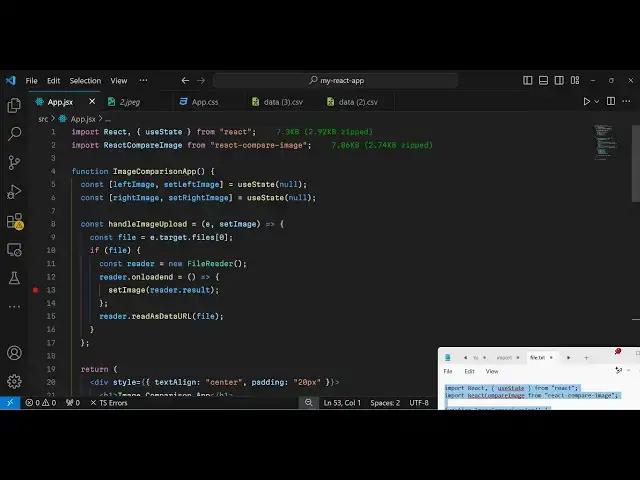
app is that we allow the user to select
5:19
two images so here we are Simply Having
5:23
a form where we accept two images we
5:26
binded this on change event holder and
5:29
this this is for the Right image the
5:31
left image so when the user uploads both
5:33
the images we then show it the left
5:36
image Right image and for this we have
5:40
declared two State
5:42
variables for storing it and then we are
5:45
simply reading the image files by using
5:47
the file reader API so now what happens
5:50
is that you need to select dynamically
5:53
both the images you select your left
5:55
image then you select your right image
5:58
and then it you can compare it very
6:00
easily using the slider so in this
6:04
way you can do this process very easily
6:07
compare two images and react chairs
6:09
using this package so thank you very
6:12
much for watching this video and do
6:14
check out my website as well free mediat
6:17
tools.com uh which contains thousands of
6:20
tools regarding audio video and
6:23
image and I will be seeing you in the
6:26
next video