Up next in 10

Build a React.js Ecommerce Product Star Rating Component Using react-simple-star-rating in JSX
Jan 9, 2025

Get the full source code of application here:
Show More Show Less View Video Transcript
0:00
uh hello guys welcome to this video so
0:02
in this video I will show you a package
0:04
which is allows to embed a star rating
0:08
so if you're developing in some kind of
0:10
e-commerce website if you have a product
0:12
website then this component will be very
0:14
handy for you you can have a product
0:16
rating component specifically designed
0:19
for react CH application so this is
0:21
actually a fully fledged component where
0:24
you can embed this and the user may rate
0:27
your component by using this widget
0:30
so it has all the styling it has a
0:33
yellow background and the user can
0:36
select how much rating that you want to
0:37
give your product so the package name is
0:41
simply if you go to npmjs.com
0:44
and just search for this package
0:48
react simple star
0:51
rating so this is essentially a react
0:54
component for adding a star rating to
0:56
your
0:57
project so
1:02
the command is very simple uh just
1:05
execute this by executing this command
1:08
and it's almost got 29,000 weekly
1:11
downloads so now to get
1:15
started you just need to first of all
1:18
make a functional component and the very
1:20
first thing we need to do we need to
1:22
import this module so you just write
1:24
import and there is a component right
1:26
here which is rating which will be
1:28
coming from this component react simple
1:30
star rating and the size is very
1:33
minimalistic which is 14 kilobytes which
1:35
is very
1:36
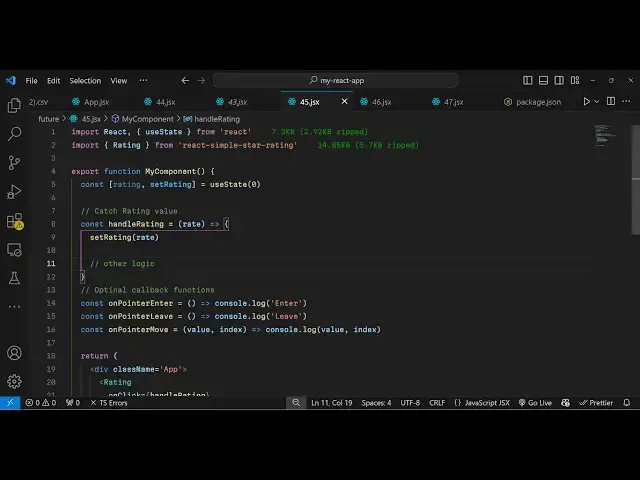
low and now we'll be creating a state
1:39
variable which will be keeping track of
1:42
the rating that the user
1:44
give and the initial rating will be uh
1:47
zero so you'll be using the U State hook
1:50
of react
1:51
CH and now inside this to embed this
1:55
component it's very easy you just embed
1:59
this by using this component rating and
2:02
it takes some
2:04
options if you just embed this like this
2:08
it will look something like
2:11
this so now it takes some options you
2:14
can even bind and on click so when the
2:16
user clicks on this widget you can bind
2:18
a
2:19
function some kind of notification you
2:21
can give to the UI so you can Define
2:25
this function so here you can do some
2:29
stuff inside your database just update
2:31
the
2:32
values so whatever rating that they give
2:36
this rating will come inside this
2:37
variable you can console log as well and
2:40
then we can set the rating
2:44
accordingly so whatever rating they give
2:48
if I just console log
2:53
it so this is one rating this is two
2:56
rating 3 4 5 so as as many stars that
3:00
they give so how many stars they give
3:03
let's suppose they give five stars so
3:05
the value will here will be five so in
3:08
this way you can update your database
3:10
accordingly change the logic of the
3:12
application and dis change the UI and
3:15
then it also have
3:17
some call back functions when the user
3:21
enters
3:23
this rating area you can also have a
3:27
function
3:30
and when they leave also we also have
3:33
this function as well and when they move
3:36
their pointer they so these are all
3:39
these
3:40
functions when they come when they move
3:42
and when they leave so all these call
3:45
back functions you can have defined in
3:48
your
3:52
application so it's not useful but uh
3:55
sometimes you will need these functions
3:57
as well just to alert the user that you
3:59
are entering this widget so kindly rate
4:03
your product
4:06
so so you can see when they they move
4:09
they leave you get the notification
4:12
right here so so this essentially it's a
4:15
very handy package if you do have a
4:17
e-commerce website where you sell
4:19
products it's a rade component available
4:21
for you in react chase you don't need to
4:24
invent your own star rating component
4:26
you can use this package and this is a a
4:29
complete example all the source code are
4:32
given in the description of this video
4:35
so thank you very much guys for watching
4:37
this video and do check out my website
4:39
as well uh free mediat tools.com uh
4:43
which contains thousands of tools
4:45
regarding audio video and image and I
4:47
will be seeing you in the next video
#Programming