live_tv
Livestream Starting Soon
00
Hours
:
00
Minutes
:
00
Seconds
Up next in 10

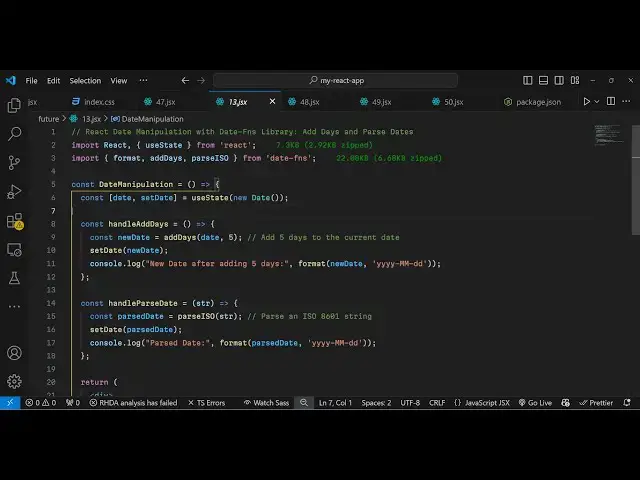
Build a React.js date-fns Library to Parse & Manipulate Dates in Browser Using JSX
Jan 9, 2025

Buy the full source code of application here:
Show More Show Less View Video Transcript
0:00
uh hello guys welcome to this video so
0:02
in this video I will show you a react
0:05
date manipulation Library where you can
0:08
manipulate with dates you can add dates
0:11
you can parse the dates as well so this
0:14
is actually the package date- FNS so
0:17
this is actually a very simple example
0:19
where we have a button right here where
0:21
we display the current date here you
0:23
will see in this format and we have this
0:26
button to add five days to this current
0:28
date so as I click the button you will
0:29
see see it will add 5 days and the date
0:32
will be updated and you can even pass
0:35
the current date as well so this is
0:38
actually if you go to npmjs.com and just
0:41
search for this package which is date
0:44
dot date- FNS this is actually the
0:48
package modern date utility kind of
0:52
package uh this is actually the command
0:54
I've already installed it so it's almost
0:56
having 17 million
0:58
downloads so I will just show you a very
1:00
basic example so just make a simple
1:03
functional component and first of all we
1:06
need to import the actual
1:10
package and the package name is date
1:13
FNS and from this package we have
1:15
various methods to format the date add
1:20
days and pass it in ISO format so all
1:24
these methods are available from this
1:26
package now to use it it is very much
1:29
easy to first of all I will declare a
1:31
variable for declaring the date so State
1:35
U State we'll use the hook and initial
1:38
value will be the current date today's
1:40
date we'll be using the date Constructor
1:43
so this will give me the today's date
1:46
now to show the date in the browser we
1:51
actually first of all we will show the
1:54
current
1:56
date and for this we'll be using this
1:58
function format function that we
2:03
imported early on if you see from this
2:06
package so this contains this format
2:08
function so here you specify the date
2:10
that you want to display and now the
2:13
format is very important so here you
2:15
will write this format which includes
2:17
the current year the current month the
2:21
current day so this is the actual format
2:24
that we specify right here so if you
2:26
refresh your application now you will
2:28
see the current dat
2:30
dat which is 2024 which is the year 12
2:35
is December 25th is the date so it's
2:38
actually displaying the today's date so
2:41
then we have a simple button to add
2:45
let's suppose 5 days to the current date
2:48
so you'll bind this on click listener so
2:51
when we click this button we will
2:53
execute this function handle add days so
2:57
this function will be responsible for
2:58
adding the dates so we'll just Define
3:00
this function right here so const handle
3:03
add this we will Define this function so
3:07
inside this function we declare a new
3:12
date so we actually call this function
3:16
add dates which are coming from this
3:18
package it is used to add the dates we
3:22
put the current date which is in this
3:24
date variable we put a comma and five so
3:27
it will add five days to the current
3:29
date
3:30
and then it will update it using this
3:33
function hook
3:34
function and it will be the new
3:39
date so now if you see we have added
3:42
this button so once you click the button
3:45
the date will now get updated
3:46
accordingly so you will see that so now
3:49
we have a second button which will be
3:52
responsible for passing the
3:54
date so in date FNS you can even pass a
3:58
date as well
4:04
so here I will just write a simple
4:07
function here you can provide a
4:13
date accordingly so when you click this
4:16
button now we will simply bind a on
4:19
click
4:21
listener so here we are providing this
4:24
date here in this format if you
4:26
see and now we need to convert this to a
4:32
so for this we actually need to declare
4:36
this function so this function will
4:39
responsible for converting
4:42
this this format that you see right here
4:46
to an actual date so for this we are
4:48
using this paring so we are paring this
4:52
string which is a ioso this string and
4:55
converting it to a actual date
5:05
so in this way you can
5:07
pass the dates so it's a fully date
5:12
manipulation library or package you can
5:15
directly use inside react
5:21
CH so thank you very much for watching
5:24
this video and do check out my website
5:26
as well free mediat tools.com uh which
5:29
contains thousands of tools regarding
5:31
audio video and image and I will be
5:33
seeing you in the next video
#Educational Software
#Computer Education
#Other