Up next in 10

Build a React.js Country Dropdown Input With Flags Using react-country-dropdown Library
Jan 9, 2025

Buy the full source code of application here:
Show More Show Less View Video Transcript
0:00
uh hello guys welcome to this video so
0:02
in this video I'll show you a react CH
0:04
application here you can integrate the
0:05
country picker uh with flags and you can
0:09
get the information about a specific
0:11
country using the select picker and here
0:13
you can search for any country right
0:15
here and you can just write select this
0:18
country and you will see the country
0:19
details which is the name of the country
0:21
and the country code so in this way you
0:23
can select any country of your choice
0:26
and this will change I will show you the
0:28
simple component inside react is how to
0:31
build this component how to integrate
0:32
the country select field so it's a very
0:35
simple component and you can even see
0:37
the flags of the countries as well so
0:39
all the countries in the world we are
0:40
getting the flags and displaying the
0:42
details so it is returning this
0:44
information from this component and I
0:48
will show you how to do this the package
0:51
name is very simple which is react
0:53
country dropdown so if you just search
0:56
for this package in npmjs.com
1:03
so this is I think is the package react
1:06
country
1:08
dropdown so it's basically a simple
1:10
react country selection drop- down
1:12
component and it's almost having 642
1:16
downloads and this is actually the
1:18
command I've already installed it so I
1:20
will just show you a very basic example
1:22
of how to include this so just make a
1:25
simple functional component and just
1:27
include the module using the import
1:29
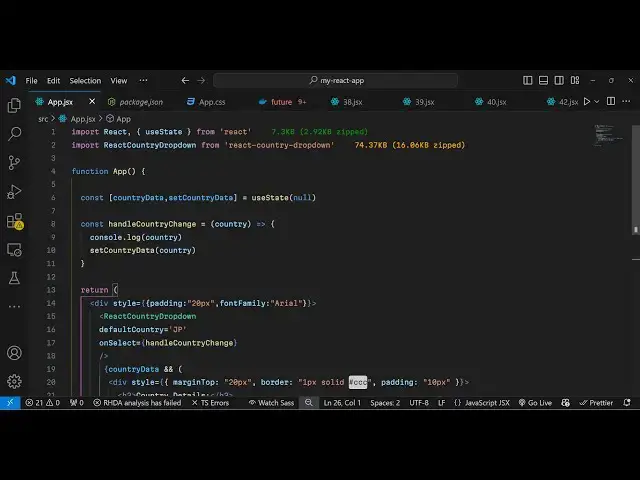
state statement react country drop down
1:33
so it will be coming from this package
1:36
74 kilobytes of size of this so inside
1:40
the state we will declare a single
1:42
variable just to keep track of which
1:44
country the user is
1:47
selecting So based upon that we will
1:49
show the information about that specific
1:52
country so we use the UST State
1:55
hook and now to show this country picker
1:58
inside the div
2:01
let just make a simple custom Styles
2:04
give it a padding of 20 pixel and a font
2:07
family of
2:12
areas and here will'll be including this
2:14
component which is react country drop
2:18
down if you do this now uh refresh
2:22
nothing will happen but because we do
2:25
need to pass some options to this
2:26
component the very first option is
2:28
actually the default that you want to
2:30
show so this is a twood digigit country
2:33
code so JP stands for Japan so then we
2:37
have the second function which is a call
2:39
back function so when we select a
2:41
particular country this function will
2:43
execute handle country change for the
2:46
drop down so if you select a country
2:49
from the drop down this function will
2:51
execute so inside this function handle
2:55
country
2:56
change so inside this function we will
2:59
get get the country which the user has
3:01
selected directly inside this
3:04
parenthesis so now we can console log it
3:08
just to see if it is working or not so
3:11
if I just refresh now you will see this
3:13
field appearing and if you search for a
3:15
country select it and go to inspect
3:19
element console you will see this object
3:21
right here and it basically gives the
3:24
information about that specific country
3:26
capital citizen code currency is this is
3:30
actually the flag of this country SPG
3:33
name of the country region time zone so
3:36
all such information is returning to us
3:38
in a Json response so now we can simply
3:41
display these
3:42
information so right
3:46
here so what we can do we can set this
3:49
data in the hook function set country
3:52
data country so now you'll be simply be
3:55
using some conditional jsx so if the
3:59
we will simply say that if the data is
4:03
available if the country data is
4:05
available in that case we need to
4:09
show the
4:13
information in that three tag we will
4:16
say the country details so we can simply
4:20
print out the country details using this
4:23
object that I showed you which contains
4:26
name and code so if you just see now if
4:29
if you select a particular country you
4:31
will see this box holding the name and
4:34
the country code you can select any
4:37
country of your choice so in this way
4:39
you can integrate this a nice little
4:41
react CH component to actually integrate
4:44
the country select component drop down
4:46
which contains all the countries in the
4:48
world alongside with the flag as as well
4:50
and you will get all the information
4:52
about that specific country so this is
4:55
actually the package react country
4:58
dropdown so thank you very much for
5:00
watching this video please hit that like
5:03
button subscribe the channel and do
5:05
check out my website as well freem
5:07
mediat tools.com which contains
5:10
thousands of tools regarding audio video
5:12
and image and I will be seeing you in
5:15
the next video