Up next in 10

Build a React.js content-editable Library to Change the HTML & Content of Elements in Browser
Jan 9, 2025

Buy the full source code of application here:
Show More Show Less View Video Transcript
0:00
uh hello guys welcome to this video so
0:02
in this video I will show you how to
0:05
edit the content editable package inside
0:08
react CH so if you want to edit the
0:11
content of your any tag you can have a
0:14
div tag heading or anything that you
0:17
want to edit inside your react
0:19
application so it's it provides you a
0:21
very unique and very good way to edit
0:25
this content so let's suppose I have
0:26
this div I need to edit it contents
0:29
dynamic
0:30
so if you it can be a Blog it can be a
0:34
title it can be anything that you want
0:36
to edit you can do it programmatically
0:38
as well so whenever you change the
0:40
content it will be changed it will be
0:43
firing some call back functions and then
0:45
you can perform this updation
0:46
dynamically as well so in Java in pure
0:49
JavaScript you can do it very easily but
0:52
specifically for react CH application
0:54
there is this package available for us
0:56
which we can use it to dynamically
0:58
change the content of the element
1:00
of it's content editable package so the
1:03
name of the package is if you go to
1:05
npmjs.com and just search for this
1:08
package which is
1:09
react content edit table this is
1:13
actually the
1:15
package so just search for this package
1:21
and so if you want to create an element
1:24
with editable contents so you can
1:26
install this package this is a package
1:29
here react content editable I've already
1:32
installed it it's a very popular package
1:34
120,000 weekly downloads so I will just
1:38
show you simple example step by step
1:41
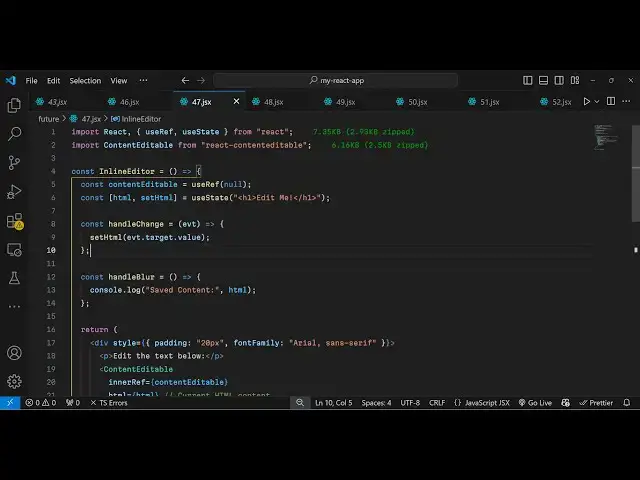
just make a simple functional component
1:43
and then at the very top you need to
1:45
import this package content editable
1:49
which will be coming from this package
1:51
it's a very minimalistic package 6
1:54
kiloby size and right here we'll be
1:58
declaring a state
2:00
aable I will just call this as content
2:03
editable and it's a Boolean parameter so
2:06
you reference you use the user F hook of
2:09
react
2:09
CH initial value will be null and then
2:13
another variable for keeping track of
2:15
the HTML of the element initial value
2:19
will be using the UST State hook it will
2:21
be having this H1 heading which will say
2:24
to us that edit me or change
2:27
me so now inside your jsx you can
2:31
display this component so I will just
2:34
give some default styling to the div tag
2:36
and I will just give it a padding of 20
2:42
pixel and then I will give it a font
2:45
family as
2:47
well of aial sand
2:51
serif and inside this you will have your
2:54
paragraph it will say that you can edit
2:58
the text below
3:01
here you can have any element that you
3:03
want to edit so you will wrap everything
3:06
inside this tax which is content
3:08
editable so whichever element that you
3:11
want to edit you will wrap everything
3:13
inside this component that you imported
3:15
content editable and now it takes some
3:18
options that you want to attach so first
3:20
option it takes is the inner reference
3:23
so here we have declared the reference
3:26
you'll see at the top we are simply
3:28
attaching this reference and secondly
3:30
the HTML that you want to edit so this
3:34
is my HTML element I will attach it the
3:37
state variable and disabled it will not
3:41
be disabled so I will put this disabled
3:43
to false and I will just bind a
3:46
non-change event handler as well so
3:48
whenever the content is changed of this
3:50
element we will bind this handle change
3:54
function which will execute whenever you
3:56
change the content of this element so
4:00
now I just need to Define this function
4:02
which is handle
4:03
change so it will actually have the E
4:07
parameter automatically pass to
4:10
it and then we can set the HTML update
4:14
it which is e.
4:16
target. value very
4:18
simple and if you just refresh now so
4:22
you will actually
4:23
see there is this here you can add it
4:27
now
4:30
and if I just console log this value as
4:38
well so this handle change executes
4:41
whenever you change your content so
4:44
whenever I'm changing it you will see
4:46
automatically it will fire every every
4:48
time it will return the HTML updated
4:51
HTML so in this
4:53
way you can do the updation process very
4:56
easily using this package and one more
4:58
function it supp is for blurring so
5:01
whenever you blur you can also B an
5:05
handle blur function as well so when you
5:07
blur your element as well then also you
5:10
can have this
5:12
function you can write this function
5:17
so so this is used typically whenever
5:20
you want to
5:22
update so you will have your saved
5:24
content available in this variable HTML
5:27
and then you can perform the updation
5:28
using your database
5:31
anything and then you can put the tag
5:33
name here uh you can give any tag name
5:36
let's suppose div you can even provide
5:38
custom styling as well you can give your
5:41
own custom styles to it just style it
5:44
accordingly using the style object so
5:47
I'm just attaching a simple border right
5:50
here so in a gray background color so in
5:52
this way you can do the customization
5:55
and you can edit the content editable
5:58
package using reactjs
6:00
so thank you very much guys for watching
6:02
this video and do check out my website
6:06
as well uh freem mediat tools.com uh
6:09
which contains thousands of tools
6:11
regarding audio video and MH and I will
6:15
be seeing you guys in the next video
#Other
#Other