live_tv
Livestream Starting Soon
00
Hours
:
00
Minutes
:
00
Seconds
Up next in 10

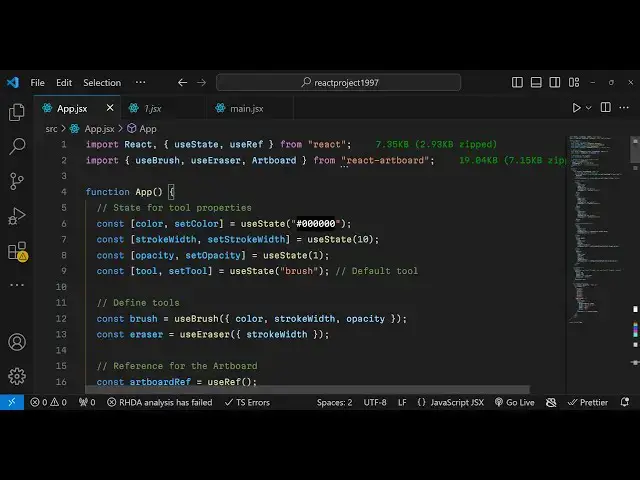
Build a React.js Canvas Drawing & Paint Editor Using react-artboard Library in Browser Using TS
Jan 9, 2025

Get the full source code of application here:
https://github.com/ascorbic/react-artboard
Show More Show Less View Video Transcript
0:00
uh Hello friends welcome to this video
0:02
so in this video I'll be showing you a
0:05
drawing component in react CHS where you
0:07
can use this Library
0:09
module uh react artboard the name of the
0:13
module and it has live demo that you can
0:16
try I have given in the link in the
0:18
description this is actually their
0:20
application and it's a fully fledged
0:22
editor you can actually it's a fully
0:24
drawing app and you can just see you can
0:27
change the color here using the Color
0:29
Picker and basically it's a full drawing
0:32
app if you are a designer you can
0:35
actually make a cool little painting
0:37
using this pencil you can see that so
0:42
you can see the shading of the pencil so
0:44
as you just draw if you are a
0:47
professional painter you can actually
0:49
use this tool quite handsomely and
0:53
design a lot more professional drawings
0:56
so basically this is actually their tool
0:59
that you can try I have given the link
1:01
in the description it's a newly actually
1:04
module a drawing module and you can
1:07
export this canvas after you make the
1:10
drawing you can export this into a PNG
1:12
file as well there is a button as well
1:15
available you can see how beautifully
1:18
this is looking and it is very easy you
1:22
can adjust all these options you can
1:23
change the color as well let's suppose
1:25
if you want to try a different color a
1:27
green color so you can see
1:33
you can mix and match colors
1:36
accordingly so we have this one so this
1:40
is a different shade pencil you will see
1:43
this is the second brush we have the
1:45
third brush here this is this one like
1:47
this if you needed this this brush this
1:50
is a fourth brush here you will see this
1:52
is a fourth brush you can adjust the
1:55
size here by using the slider you can
1:58
adjust the SL uh the brush
2:01
size this is the fifth brush we then we
2:07
have the Eraser if you want to erase
2:09
something you can erase it you can
2:11
adjust the size of the
2:14
Eraser like this you can erase
2:17
it so it's a fully fleshed drawing app
2:20
guys uh and you can integrate this
2:23
inside your react application I will
2:25
show you in this video how to do this so
2:28
but before let me show you how it tools
2:30
work so you can just see how easy it is
2:35
so then you can
2:37
see so in this way guys you can see how
2:40
beautifully it is having you can do
2:43
professional drawings here using this
2:46
tool so I don't I am not a professional
2:48
designer so I can't use this tool to the
2:51
fullest but you can try this tool so
2:53
once you actually uh draw you can export
2:57
this there is a download button
2:58
available you you can click the download
3:00
button and then it will export this
3:02
canvas into actual image file so now
3:05
your canvas has been converted into a
3:08
image file so the name of the module is
3:10
react artboard if you just go to the
3:14
npmjs let me show you just search for
3:17
this module which is react
3:24
artboard this is actually the name of
3:27
the module
3:29
a realistic paint component for react
3:34
Chase it's a newly library and very new
3:38
library you'll see only one weekly
3:40
download is there but still it's a very
3:42
professional looking module and you can
3:46
integrate this inside your react CH
3:47
application by simply requiring it you
3:50
have required this require react add
3:54
hardboard so this is a full app you can
3:57
run this app as well
4:04
so they have the GitHub repo available
4:07
so I have given the link in the
4:09
description you can check out their
4:11
GitHub repo this is a fully fleshed app
4:14
that they have designed in the react
4:15
ches and they have deployed this you can
4:18
try this app right here if you need the
4:20
full source code they have given this
4:23
example which contains these files here
4:26
this is a typescript file in react CH
4:28
this is HTML this is a CSS file so this
4:31
is a fully fleshed example and uh they
4:34
have in C nice little documentation you
4:37
can integrate this tool inside your
4:39
website so try this module guys I just
4:42
wanted to make a little video on this
4:45
topic it's a very good uh component for
4:50
drawing purpose so thank you very much
4:52
for watching this video and do check out
4:54
my website as well free mediat tools.com
4:56
which contains thousands of free tools
4:58
regarding audio video and
5:00
and I will be seeing you in the next
5:01
video
#Visual Art & Design
#Design
#Painting
#Drawing & Coloring