live_tv
Livestream Starting Soon
00
Hours
:
00
Minutes
:
00
Seconds
Up next in 10

Build a Next.js FFMPEG WASM Timeline Video Editor to Cut & Trim Videos in Browser Using TypeScript
Jan 9, 2025

Buy the full source code of application here:
https://procodestore.com/index.php/product/build-a-next-js-ffmpeg-wasm-timeline-video-editor-to-cut-trim-videos-in-browser-using-typescript/
Hi Join the official discord server to resolve doubts here:
https://discord.gg/cRnjhk6nzW
Visit my Online Free Media Tool Website
https://freemediatools.com/
Buy Premium Scripts and Apps Here:
https://procodestore.com/
Show More Show Less View Video Transcript
0:00
uh Hello friends welcome to this video
0:03
so in this video I basically talk about
0:05
how I developed this uh video cutter
0:09
application with the timeline inside
0:11
next CH next CH as you all know it's a
0:15
framework for building both server side
0:18
and client side application so it's a
0:20
full stack application video cutter
0:22
application right in the browser itself
0:25
it's a video editor where you can
0:26
actually select your video file it can
0:29
be either extension MP4 Avi all the
0:32
extensions are supported let me pick
0:34
this file you will see that guys as the
0:36
file will play right here this is actual
0:38
video file and it has automatically
0:42
constructed the timeline here you will
0:43
see that at the bottom of the video as I
0:46
load the video it has automatically
0:48
created this awesome little timeline
0:50
with the help of this timeline guys you
0:52
can uh trim whatever part that you want
0:55
to cut from the video using the mouse
0:58
you can control this timeline you can
1:01
drag and drop whichever part that you
1:03
want to drag so you have seen these in
1:06
video editors guys in desktop
1:07
applications in video editor we have
1:09
some timelines available so as you
1:11
select the video or timelines are
1:13
automatically created so we are also
1:15
doing the same thing right in inside
1:17
this application so as you load the file
1:19
here you can drag and drop and you can
1:22
basically select whichever portion that
1:23
you want to select so this portion will
1:26
be trimmed out so there is a trim Button
1:29
as you click the trim button guys fmpg
1:31
web assembly Library will trigger and it
1:34
will actually actually trim out this
1:36
portion as we click this guys you will
1:38
see that those 5 Seconds have been
1:40
trimmed so the length of the video is 6
1:42
seconds so the video is successfully
1:45
being trimmed you can see that you can
1:47
now play the video right here and uh now
1:51
you can download this video by clicking
1:52
the download button and now you can play
1:54
this video right in the browser in the
1:57
player you can see that now the video is
1:59
L guys you will see that 6 seconds so
2:02
the video is successfully trimmed guys
2:04
you can basically pick any video of your
2:07
choice it totally depends upon you you
2:10
just need to select the video and uh you
2:14
can pick any video of your choice it
2:16
needs to be MP4 Avi any all the
2:19
extensions are supported so as you just
2:21
pick the file you will see that 40
2:24
seconds so there is not a length limit
2:28
guys here uh you can pick as much long
2:31
video that you want to automatically it
2:34
will create the timeline here you will
2:35
see that this project is developed
2:37
inside next CH which is a very good
2:40
framework Progressive framework we are
2:42
using fmpg web assembly library and you
2:45
can see that you can if you want to trim
2:47
this uh 14 0.14 starting time and 0.27
2:52
you can just control it with the mouse
2:54
it makes it very much easy and then
2:56
click the trim button and now that
2:58
portion is successfully trimmed you can
3:00
see the speed guys as soon as I click
3:02
the trim button the video has been
3:04
trimmed because we are not re-encoding
3:06
the video we are simply cutting this
3:08
video by using the start time and the
3:09
end time using fmpg web assembly Library
3:12
it's a very awesome project guys it's a
3:14
single page application video editor
3:17
which allows you to trim or cut your
3:19
videos using start time and end time
3:22
it's a video timeline editor you will
3:25
see that it constructed nice little
3:26
timeline according to the length of the
3:29
video you you can control it with the
3:30
mouse uh basically whichever portion you
3:33
want to trim whichever portion you want
3:35
to cut simply click the trim button now
3:37
the video has been successfully trimmed
3:39
so it's a single page application coded
3:41
inside next years if you want the full
3:43
source code guys Full Source Code of
3:44
this application the link is given in
3:46
the description so you will actually get
3:48
this full source code this is actually
3:51
coded inside typescript in next CH we
3:54
are using fmpg web assembly Library so
3:56
after you make the payment guys inside
3:58
my website Pro P store.com the link is
4:00
given in the description of the video
4:02
you will get the zip file automatically
4:04
from the Google drive after the payment
4:06
you will be redirected to Google Drive
4:08
where you will get the zip file you just
4:10
need to extract the zip file which will
4:12
actually contain this directory
4:14
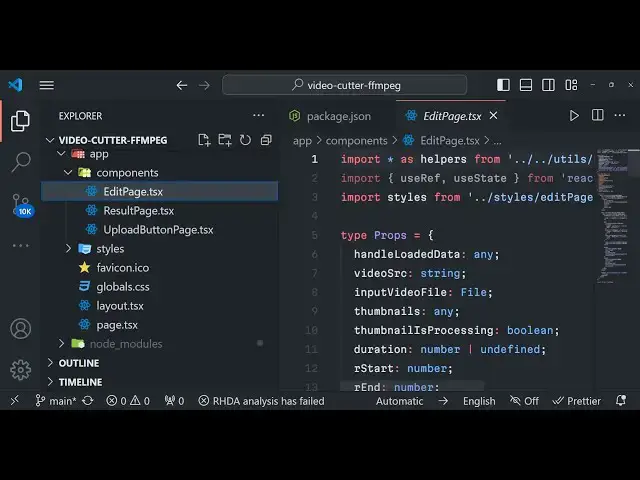
structure you will see that this will be
4:16
the app folder which will actually
4:17
contain the components folder Styles
4:20
which will actually contain the CSS code
4:21
for this application and this is a
4:24
layout file this is a page. TSS file
4:26
page. TSS file is the homepage of the
4:28
next year's application as you all know
4:31
and then we have various components out
4:33
there
4:34
uh this is the edit page result page
4:37
upload button page all these components
4:40
are there this is the public folder
4:41
utils folder so this is actual full uh
4:45
source code guys it's a fully next year
4:48
project you can customize this
4:50
accordingly if you have the source code
4:52
you can get this source code it's a
4:54
fully fleshed video editor video cutter
4:57
with with timeline using f fmpg web
4:59
assembly library in next year click the
5:01
trim button you can see that instantly
5:03
the video has been cut then you can
5:06
simply download the video by clicking
5:07
the download button the video will
5:09
download as an attachment in the browser
5:12
itself so we are actually use this fmpg
5:15
web assembly Library guys if you don't
5:17
know about fmpg it's a open source audio
5:21
and video processing library for command
5:24
line you can simply install this library
5:26
on the command line the command is very
5:28
simple to actually convert
5:30
uh video from one format to another or
5:33
you need to compress video cut video all
5:35
those operations you can perform using
5:37
this fmpg open source library and uh one
5:41
way if you want to use it in the browser
5:44
we have this solution fmpg web assembly
5:48
web assembly as you all know it's a
5:51
intermediate between the high level code
5:54
or the machine language code so this uh
5:59
is actually developed by this is a open
6:01
source Library which allows you to
6:03
actually use fmpg right in the browser
6:06
itself so we are actually using it as a
6:08
base Library you can read more about it
6:11
in their official website so we are
6:14
actually using this as a base library in
6:16
next CH to actually code this awesome
6:18
application if you need the full source
6:20
code the link is given you can directly
6:22
purchase it coming back to the code guys
6:25
uh you will see the package.json file
6:26
you will actually see the at the rate
6:28
fmpg core Library we are using this fmpg
6:32
core library then we are using the next
6:34
CHS 13.4 it is compatible with the
6:37
latest version as well or in the older
6:39
version as well so this project is
6:41
compatible with the latest version or
6:43
the older version as well
6:45
so we are also using react and
6:48
typescript you will see that all the
6:50
files are coded inside typescript
6:52
typescript if you don't know about it's
6:54
a super superscript of JavaScript so it
6:58
has more valid rules so it is super
7:03
super set of JavaScript so it has more
7:08
features than JavaScript it makes coding
7:10
very easy so we have this layout file
7:13
page. TSS file you will see that this is
7:16
the actual command that we are running
7:17
right here we are writing the file here
7:20
and we are basically this is the actual
7:21
command that we are running guys you
7:23
will see that fmpg command the starting
7:25
time we are converting this time to
7:27
string and then we are Prov providing -
7:30
I this is the input file name and dasht
7:33
and then this is a offset we are re we
7:36
are not reining the video we are copying
7:38
the encoding like this- C copy and this
7:42
is a output file like this then we are
7:44
saving this file and basically reading
7:47
it as a base 64 code we are doing it
7:51
converting it to the blob object data.
7:54
buffer type is equal to video/ MP4 and
7:57
then we are setting the trim video to
7:59
data URL so we are actually using the
8:02
concept of react chairs also here in
8:05
next chairs it's a client side component
8:07
you will see that at the very top we
8:10
write use client so this makes this
8:12
component as client side so at the very
8:15
top we use use client so it's a client
8:17
side component in next CH and uh we have
8:21
different components this is the edit
8:22
page this is a result page this is
8:24
upload button page so various components
8:26
are there we also have the utils folder
8:29
which also contains some helpers
8:31
functions to actually download the video
8:33
file all that stuff so it's a very
8:35
awesome project guys I should definitely
8:37
conveys to definitely purchase it it's a
8:39
very good starting point if you are not
8:42
comfortable with the fmpg it will be a
8:45
great booster and it it will make you
8:48
learn fmpg very good because it's a
8:51
fully coded project that you have video
8:53
editor with timeline to actually trim
8:56
and cut your videos with awesome little
8:58
timeline which which comes right here so
9:01
it will actually boost your performance
9:03
so definitely purchase it the link is
9:05
given in the description you will
9:06
actually get this full source code and
9:09
uh if you have some problem you can
9:11
contact me at my email address and uh
9:14
after the payment is done if you have
9:17
some problems in deploying this code you
9:19
can also contact me but uh it's a very
9:22
awesome project you will not face any
9:24
problem the link is given in the
9:26
description after the payment you will
9:27
be redirected to Google Drive where you
9:29
will get the zip file and you just need
9:31
to extract it and simply run this
9:34
command which is npm run Dev if you
9:36
don't know so simply run this command
9:38
guys after you npm run Dev so this will
9:44
actually it will start your Local Host
9:50
3,000 so it will start your Local Host
9:53
3,000 server add it so you will see
9:56
video cutter so you need to select the
9:59
video file
10:01
and in this
10:09
way so in this way guys you can
10:13
actually any video you can take guys
10:15
depending upon the length of the video
10:17
it will actually construct your timeline
10:20
so you just need to wait for the
10:22
timeline to be constructed once the
10:24
timeline is constructed you can actually
10:26
uh cut video trim video based upon it
10:29
right so in the inspect element if you
10:33
see guys it actually is executing fmpg
10:37
if you see in the console also basically
10:41
fmpg web assembly is doing its job here
10:45
in constructing it you will see
10:47
that so the timeline you will see that
10:50
it is
10:53
constructed so once the timeline is
10:55
constructed it becomes very much easy to
10:57
actually trim the video so simply select
11:00
whichever portion that you want in the
11:02
video by using the mouse starting and
11:05
the ending time click on trim it makes
11:07
it very much easy you will see that the
11:09
video has been trimmed click on download
11:11
then this trim portion will be
11:13
downloaded so this makes it very much
11:16
easy guys with this timeline editor so
11:20
you don't need to use any third party
11:21
software you can code your own text
11:25
video editor similarly fmpg web assembly
11:28
with time online so definitely purchase
11:31
this this will be a good good project to
11:33
actually learn how I developed this
11:35
video editor using fmpg web assembly
11:38
next years it will be a good starting
11:40
point if you are applying for a job or
11:41
if you are a student you can basically
11:44
just show this inside your resume after
11:46
you purchase it you will get full
11:48
commercial right you can actually use my
11:50
code or deploy it to any application on
11:52
money as well so thank you very much
11:55
guys please hit that like button
11:57
subscribe the channel as well and I will
11:58
be see seeing you in the next video
#Software
#Multimedia Software
#Clip Art & Animated GIFs
#Animated Films
#Video Sharing