Up next in 10

Build a GeoGuessr Game Clone in Javascript Using Socket.io & Google Maps API in Browser
Dec 10, 2025

Buy the full source code of the application here:
https://procodestore.com/index.php/product/build-a-geoguessr-game-clone-in-javascript-using-socket-io-google-maps-api-in-browser/
Show More Show Less View Video Transcript
0:00
Uh hello friends. Today in this tutorial
0:02
I will be showing you a clone that I
0:04
made of geopressor geogesser game which
0:07
is basically if you know this is a
0:09
official game which allows you to guess
0:12
places around the world inside Google
0:14
map API. So this is their official
0:16
website. It also supports single player
0:19
multiplayer as well. The thing about
0:21
this game is very popular. It is
0:23
released in 2013 and if you want to play
0:26
multiplayer you need to upgrade to their
0:28
pro plan. So this is the game we
0:31
developed guys inside uh socket.io and
0:34
Google maps API. Let me show you the
0:36
demo of the application. So this is the
0:38
demo here guys. We have uh try to uh
0:42
match the features here. You can create
0:44
room. You can even join room as well
0:46
using socket.io. And let me give my room
0:50
name. Let's suppose my room. And then
0:52
you need to select the places from which
0:54
you need to uh choose the places will
0:58
come. Let me select Asia here. And here
1:00
you need to specify the number of rounds
1:02
that you need to play. Let me specify
1:04
four. And how many members can join
1:07
inside your room. Let's suppose I want
1:09
three members to join at max. And the
1:12
time limit is in seconds. How many
1:15
seconds you want to play each round? Let
1:18
me specify 60cond. So if I now confirm
1:21
guys, you will see it is now see it is
1:24
saying that waiting list. If you click
1:26
the start button,
1:29
so your round will start guys. You will
1:31
see that basically
1:33
these places will come here
1:34
automatically and you need to guess this
1:37
place. So wherever this gl uh place is
1:40
so you can just zoom in basically you
1:43
can just uh see the places
1:47
you can get an idea by looking at the
1:49
shop number shop uh language as well
1:52
which
1:54
if you want to do this you need to tap
1:57
on the button here on the map if you see
2:02
so wherever this location is you need to
2:04
tap on the Google map which is
2:06
displaying here So uh you need to
2:09
correctly guess which location is this
2:11
in the Asia. So you can just tap on this
2:15
just zoom with your mouse here like
2:17
this. So let's let me guess this
2:19
location at max I
2:22
you can just uh see the location is
2:31
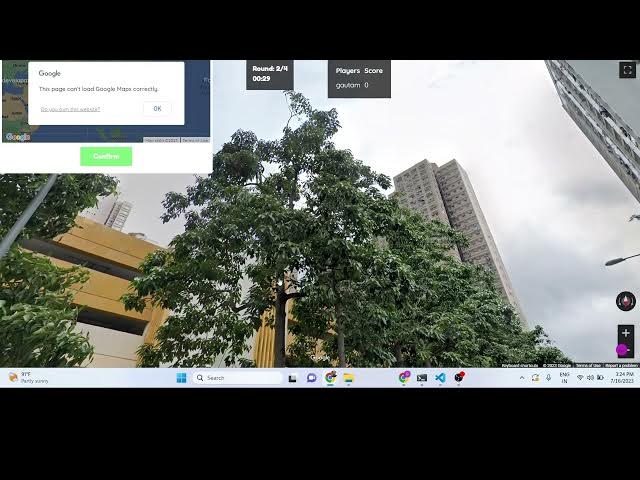
so round two. So 60 seconds were up
2:33
guys. So that's why I was wasn't able to
2:36
answer it pretty well. So that was the
2:39
round two started. You will see that my
2:41
score is uh zero here. So now I need to
2:45
complete it within 60 seconds to get the
2:48
points. I can zoom in right here. You
2:50
can see that every time a random
2:52
location comes here, I need to guess
2:54
which location is this. So
2:58
it is making use of the Google map API,
3:00
Google Street Maps API guys. You can see
3:02
that socket.io.
3:04
So
3:06
you can see this is I think it's uh
3:09
China related. So what I will do is that
3:11
I will simply
3:13
say this is somewhere in China and I
3:17
need to confirm. So what it is saying
3:20
that you are 118 1 kilometer out. So it
3:26
was the correct location was in Hong
3:28
Kong and I misspelled it. So my points
3:33
are 200 because uh my answer was correct
3:36
but not that correct because
3:40
so if your guess is right then uh you
3:44
can see 200 points are allotted to me
3:46
because my guess was pretty much right.
3:49
So that's why you can see that. So it
3:52
also gives you the uh second uh
3:54
kilometers in which your guess was.
3:57
Click on next. And now some other random
3:59
location will come here guys. So it's a
4:01
very fun little game that I developed
4:03
guys inside socket.io and Google maps
4:05
API street maps API. If you are
4:07
interested you can go to the description
4:09
of the video and check out the source
4:11
code. You can buy the full source code
4:13
and you can see basically
4:17
these random locations are coming. We
4:19
are displaying it right here.
4:22
And uh this
4:25
location I don't think so
4:30
there is not any sort of clue right
4:32
here. We can have
4:37
let me just
4:40
have South Korea here. Click confirm.
4:44
Okay. You can see that guys. It was
4:46
right here in South Korea. You can see
4:48
my guess was pinpointed. It was just
4:52
right here. So I awarded 400 points
4:55
here. So I was in 600 points. You will
4:58
see that.
5:01
So click on next. And now one other
5:03
location will come here. You can see
5:05
that.
5:09
So this is a very fun little game guys.
5:11
So this will also test your knowledge as
5:13
well. If you are want to guess locations
5:16
around the world, this will test your
5:19
knowledge. And uh let me guess here uh
5:24
Thailand here.
5:26
Okay, this location was in Philippines.
5:30
So that was a incorrect answer. So you
5:33
can see I awarded 150 points. That's
5:36
all. Click on finish. So now it will
5:38
give you guys uh 750 first. So you can
5:42
even play with uh multiple people guys.
5:44
As I already told you this uh you can
5:47
even open this URL in another window.
5:50
Let's suppose I open this inside another
5:52
window. As I'm using socket.io. So this
5:56
will we need to click the join room
5:58
button and you need to select the name
6:01
here and the room name. Let's suppose my
6:04
room this was. Click on join. So now two
6:08
people have successfully joined in.
6:10
Guys, you will see that in two
6:12
concurrent windows. You will see that to
6:15
one window I am playing with Gotham. You
6:18
can see that another window we have John
6:21
playing. So in real life scenario these
6:24
players can be playing all over the
6:26
world. These are connected with each
6:28
other. As I click here start. So now in
6:31
both the windows
6:34
the same location will be shown to the
6:37
user. So it it is up to the user which
6:40
is playing. These two users are playing.
6:42
You can see the clock is running here.
6:44
This is round one here which is starting
6:46
here. You can see that. So the this is
6:49
round one which is starting and uh
6:55
so now you can see that guys basically
6:57
round one is starting here and uh you
7:01
need to guess here whichever location if
7:03
you tap
7:07
confirmed.
7:09
You can see that. So if I confirmed
7:11
right here,
7:16
so whichever user has created the room,
7:19
they have the functionality to basically
7:21
click on the next option. So so now
7:24
round doom will come. So in this way
7:26
guys, you can play with multiple users
7:27
around the world. And uh this is a
7:29
really good uh game that you can test
7:32
their knowledge. So multiple people this
7:34
is not restriction uh anymore people can
7:38
whenever you create the room you can
7:40
play with hundreds of people hundreds of
7:41
people can play with simultaneously.
7:45
So this will test the knowledge of every
7:47
one people. You can see the clock will
7:49
run. So this clock you can uh customize
7:53
all these options whenever you create
7:55
the room. So it is totally up to you
7:57
which option you need to select here. So
8:01
that was the thing guys. If you want the
8:04
full source code, the link is given in
8:05
the description. So this is the full
8:07
source code. So basically uh we have the
8:10
index.html file. Here we are running the
8:13
bootstrap Google map API. So here you
8:16
need to fill out your own details guys
8:17
which is Google map. You need to have a
8:20
Google cloud console account for this.
8:22
If you don't have a Google Cloud Console
8:24
account, you can simply go Google Cloud
8:26
Console
8:29
and create a free account here. And
8:31
basically, you need to create an API key
8:34
for your Google Maps API. Then you need
8:36
to replace it wherever it after you do
8:39
this, you need to replace it
8:42
right here. So this is the JavaScript
8:45
code guys which is happening here. We
8:48
are also using location picker and we
8:50
also be using socket.io. So all these
8:53
libraries are being used guys. So
8:58
the link is given. Thank you very much.
9:00
So this is the geoger game and I will be
9:04
seeing you in the next video.