live_tv
Livestream Starting Soon
00
Hours
:
00
Minutes
:
00
Seconds
Up next in 10

Build a Full Stack User CRUD Web App in Bun.js & React.js With MongoDB Database in TypeScript
Jan 9, 2025

Buy the full source code of application here:
https://procodestore.com/index.php/product/build-a-full-stack-user-crud-web-app-in-bun-js-react-js-with-mongodb-database-in-typescript/
Show More Show Less View Video Transcript
0:00
uh hello guys welcome to this video so in this video we will be building a full full stack web application user C kind
0:08
of application in bnjs and reactjs so bnjs as you all know
0:14
it's a great alternative to nodejs it is used to build out my backend API server
0:20
where we will be storing these user details in the mongod DB database and in the reactjs front end we are actually
0:26
using reactjs to actually make to display these data and making request to
0:32
the backend API which is hosted by banjs and we are displaying this using Tailwind CSS in the front end you will
0:38
see we have the username email address we have added option we can even delete the users as well and let me show you in
0:46
mongodb right here we have the database right here of bunar app inside this we
0:52
have a table of users where we are storing the user information such as ID is the primary key it is automatically
0:59
inserted name email address so currently if I refresh now there will be a single
1:04
record because we deleted that record so there is a single record in the table and also if I refresh the application
1:11
there is a single record it uh as I click the delete button without page refresh it automatically deletes it now
1:20
the data is deleted from the table as well nothing is present so I can basically type the name and then I can
1:28
provide the email address what it will do it will make a request to the backend
1:33
API it will actually insert this record in the table and we are using bnjs in
1:39
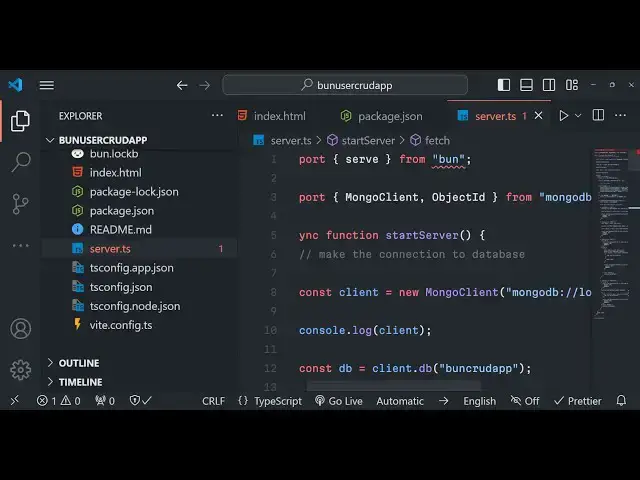
our server. TS file we using typescript along with the bnjs to actually build
1:45
out this backend API it is uh the server is listening on Local Host 3000 and our
1:51
back uh front end server is running you will see post request is created with
1:56
body name email address and also if you check the browser console we also get a
2:03
message if I type the name right here and the
2:10
email click on the create option you will see two records will be
2:15
inserted so in this way you can see that two records are there we can now click
2:22
the edit options if you want to update the details so automatically pre-filled
2:28
it will have the name right here and the email address of whichever record you want to edit it simply I can change the
2:35
name one botom 1 2 3 and change the email as well click on update and now
2:40
the inserted values will be get updated instantly if I refresh the database this
2:45
entry will also get updated similarly we have the delete button as you click the delete button that entry will be deleted
2:53
from the interface and also from the backend API the table as well you'll see that so we will try to build this user
2:59
current application create read update delete all these four operations we will perform I will show you step by step how
3:05
to build this for this tutorial we are using bnjs as I told you it's a fast
3:11
allinone JavaScript runtime environment similar to nodejs it's a great alternative to it and it is growing
3:18
popular day by day so you should invest time in bungs as well so lot more
3:24
developers are using it it's a great alternative to nodejs and also Doo JS Dino is not that popular but BJs is very
3:31
much so now let's get started I have given the full source code in the description of the video you can
3:37
directly purchase it with full documentation and support I will support
3:42
you once you purchase it if you have any sort of problem you will get this full directory structure full documentation
3:48
as well so the link is given you can directly purchase it from Google Drive you will actually get a zip file after
3:53
you make the payment from Pro Cod store.com so the link is given in the description to purchase the full source
3:59
code so now let's get started guys by building this project so what I will do
4:05
I will simply close this project and I will simply close this as well I will
4:11
navigate into my projects directory and here I will simply make a new brand new
4:16
bungs project so for this what we need to do we will navigate to our project
4:24
directory and right here we need to Simply invoke a command which is bun create
4:30
react because we are uh using react JS as the front end if you are using a different front end view JS you will
4:36
write like this but we are using react so I will simply type react and then the followed by the name of the app my bun
4:44
crud I can just to it so this is actually the command bun followed by the
4:49
create command then react and Then followed by my bankat so in this way you
4:56
just need to this is your name of the project so if you just enter it so it
5:01
will simply say to you to create a project using Create reactor run BN
5:07
create react app or if you want to create a react CH using wheat engine wheat is slightly faster guys if you
5:15
don't want to use the buil-in create react app V if you don't know about it it's a similar to webpack but it's very
5:22
fast it's a development environment to actually build your projects so this is their documentation official website
5:30
you can build out UJS uh SW reactjs all these front end apps using V so I will
5:37
be building it using V so simply I will simply say I will modify this
5:43
command bun create vat simply I will
5:48
type this command bun create vat simply type this
5:56
command and now it will ask you some options what is your project name so you can modify the project name let me give
6:03
a different name bun user crud app and then here you need to select your
6:09
framework either you are using vanilla JavaScript or VJs react preact lit SW
6:15
solid quick so I will be using our react so here you need to spell typescript
6:23
you're using or JavaScript I will be using typescript and then I will be it has you
6:29
can see it has scaffold a sample project I will CD into the directory and then I
6:36
will say bun install so now it will not use npm it will install the bun right
6:41
here it will install all these packages so once it is installed it will give you
6:47
a notification message you will see that so it is really fast as compared to npm
6:53
so now we can simply open it inside vs code so this will look something like this it has created this app. TSS file
7:01
this is the react Chase project now to run this it's very simple we run
7:07
bun we run the command npm run Dev this will start the vat development engine
7:14
which is Local Host 5173 if you see that so we are actually invoking this command
7:20
if you see package.json this is actually the command that we are
7:26
running npm run Dev so this will actually start the V development velopment engine so it is now running
7:33
this so you can simply open Local Host
7:40
5173 you can see this is actually your sample react CHS app running on this so
7:47
what we need to do guys we also need to create a server. TS folder right in the
7:53
root directory so just I will create this file server. TS so we will using
7:59
typescript for building our backend API so just make this dots this is extension
8:06
now to actually build your bungs server it's very easy we will be importing the
8:11
serve method from the base package bun and then after that we just need to
8:18
say we need to import client and object ID from the package mongod DB
8:31
so both these packages we do need to install so what we need to do we need to invoke this command which is uh right
8:37
inside this we will say bun add add theate types node and
8:45
mongodb so mongodb is actually the package in bnjs to actually interact with the mongodb database and just add
8:52
this bun add followed by the package so these two packages we need simply enter and it is actually
8:59
installing these packages so just wait for the installation to finish so once it is installed it will
9:06
actually install this you will see that so now it has successfully installed
9:12
this so now we can start our basically a Asing function start
9:22
server and we will basically call this function right here so inside this
9:27
function what we need to do we just need to start a basic server so you'll use this serve
9:33
method and uh right here inside this it takes two arguments
9:39
first is the actual function we will call this function as
9:44
Fetch and the second argument it takes is the port number we'll be running this
9:49
server on port number 3,000
9:54
so this is actually it takes I think uh uh just let me cross check sorry is
10:01
equal to is not there because we using typescript support colon 3,000 So This
10:08
Server will start on Port 3,000 and we can actually make a simple get request
10:13
right here so we can actually make inside this fetch method we can simply say if
10:20
condition if the method triple equal to get so if the method is
10:26
get then in that case this method here will be passed right here if you
10:32
see uh we first of all need to get the request whatever the request has come
10:38
the URL so we can say new
10:43
URL and then we can say request. URL so after that we can extract the
10:50
path and the search params from this URL we are using
10:56
destructuring and based upon that we can actually check is simple path so if the
11:03
user let's suppose the user write a path for starting application so I make this path
11:12
/ API SL users if
11:17
this is the path right here then we can simply make a simple get
11:23
request if this is a get request in that case we can simply return a message back
11:29
to the user so we can even get this method as
11:35
well right here you can get the method by using the
11:41
request. method property request. method property so here we can simply check if
11:46
the method is get if if it's a get request then in that case we can simp
11:52
simply return a response back to the user so you can use the return new response and here we can simply
12:00
return an object to the user simply a object hello
12:08
world and we need to json. stringify whenever you are returning any object we
12:14
do need to actually use json.
12:24
stringify that's all so we have simply made a simple backend server guys using
12:30
bnjs it's very simple it is slightly complicated if you're using nodejs but it's I think it's very easy if you have
12:36
the syntax we just made a Simple Start server Asing function and it takes we
12:42
using this serve method which comes from the bun JS Base Library and here it is taking the first function as a fetch
12:48
function here and the second argument is the actual port number on which the back end API will run and in this fetch
12:55
function we actually get the URL which the user writes and then we check if the method is a get request or Port request
13:02
by using request. method property and this is actually the path here we are configuring it/ API users if I want to
13:10
run this bnjs you can simply run Bun Run followed by the file name so here the
13:16
file name is server. TS so if you just type just enter it so now the server is
13:22
listening on Local Host 3000 if I go to that/ API SL users you will see that a
13:30
backend server will be returning this message hello world so this message is returned to us whenever we visit Local
13:36
Host 3,000 API users so we have successfully made a backend API route
13:42
using bnjs so in this way you can do this and now we will simply delete this
13:49
we don't need to return hello world instead for the time being I
13:55
just make this and write some more things right
14:01
here so first of all we do need to inside the start server method we need to make the connection to the
14:08
database mongodb database so right here so we are actually using the mongodb
14:14
compass software which actually allows you to configure your mongodb tables so it's a
14:21
guy kind of a software it's completely free just type
14:26
mongodb compass and simply download this so this comes with this uh UI GUI
14:32
Library graphical user interface so install this and simply click on the connect
14:39
option so you will be granted so this will be the connection string that you will get the typically mongod DP
14:45
database runs on 27017 port number so click on the connect option you're connected now you need to create a new
14:52
database so we simply create a database for this application which will be bun
14:58
cored app this will be the database we create and here we need to Simply create a test collection this is required
15:06
whenever you create a database so simply click the the database is created now
15:11
you'll simply write this inside our code now to connect it
15:16
so we'll make a simple client we'll use the
15:21
client we are simply using client which comes with mongod DB and here you
15:26
need to specify the string so here you specify the string Right Here mongodb
15:31
Local Host 27017 and also here we need to specify
15:37
the database name as well client. DB and whatever database name that you have
15:42
given so mine is bun user CR you can cross verify this bun C app sorry bun C
15:52
app after you specify this now we can simply create the collection the table
15:58
this will automatically get created users this user table will get created automatically whenever you run this code
16:06
and uh so after this guys what we need to do
16:12
we also need to write here let me delete this for now so right
16:19
here after you get this information from the fetch method whatever URL the user
16:25
has hidden and the path name and the search parameter we also need to add our
16:30
course headers which is really necessary because if you don't write these headers
16:38
in the backend dat you will get a cross origin resource sharing error whenever you call these methods from the react
16:44
front end you will get a cross origion resource sharing error in the browser console so it's necessary that you add
16:50
this so it's mandatory so need to add these headers object so in no in nodejs
16:58
Express also we do this by it has a built-in course module but in BJs we do
17:04
need to manually do this these headers excess control allow
17:15
origin star and
17:21
access you can even this star means that you are allowing request from all the
17:27
front end so anybody anybody can make request to your backend API so if you only want to allow a specific URL you
17:33
can just type here I will be calling it from 5173 so I can only provide the
17:39
specific URL will only make request to my backend API so we restricting the access this is really good practice to
17:46
actually just allow the access to a simple only applications that you are on
17:52
so here we are allowing the methods get post put delete and options these are
18:01
the five methods we are allowing the access the third header is Access Control allow
18:10
headers so we are allowing the headers which will be content
18:16
type and the last one is Access Control maximum AG so what is the maximum age of
18:24
these headers so I will say 36 86,4 400 seconds which typically is
18:31
24 hours so these are the headers object
18:38
right here and right here we'll simply have a if condition right here if request
18:44
method is set to options then in that case we need to return the response as
18:50
uh null and we need to pass these
18:55
headers we just need to write this configuration Cod guys this is just done for course origin prevent that error
19:02
from happening now we are here inside our / API SL users
19:09
so if if the user hits let's suppose if the user hits / API SL users so here we
19:17
will simply make a simple request to actually return all the users
19:23
which are currently present in the table so we will make this uh code we will
19:29
write the code for this so for doing this it's very easy so if this is a get
19:37
request so for doing this we will be console logging a message as well on the console that get
19:45
request for retrieving all
19:51
users from the table and now to get this users we can
19:57
simply say all users await so just make sure this method is async that's why we
20:03
put async function right here you can use a weit here and then you can simply say await the
20:10
users and it contains this method mongodb uh find method and it will find
20:17
all these users convert them into a array and then we can return this as a
20:22
response back to the user as Json so return new response
20:30
json. stringify and uh all
20:36
users and the second parameter will be the status property status is 200 for a
20:43
successful response and the we'll pass the headers as well this is really important you need to pass these headers
20:48
that you configured which is the course errors so if you don't pass these headers you will get a course
20:54
issue so if you directly write this inside the browser / AP /
20:59
users you need to restart the application just restart it whenever you make any sort of change Bun Run server.
21:08
TS so now you will see currently if you go to Local Host 3000 API user currently
21:14
it actually returns empty because nothing is present in the database if you
21:20
refresh Bard app
21:30
you can see a console log request is also being made get request for retrieving all these users from the
21:41
table so we have this database if you see bun
21:47
app and now we just need to retrieve these users so how we can do that let me
21:53
just uh insert some test users
22:00
uh now guys for the time being what we will do I will just inside this get request I will simply insert a sample
22:07
user just to show you in the table so now what we do basically we insert a
22:14
sample user we can simply Define a user and we do have a
22:19
method to actually insert a user so we can simply write here await followed by
22:26
the table name collection name which is user and mongodb does contain this method which is
22:32
insert one one record and here we will provide our object which will contain
22:38
two Fields the first is the name of the person and the second one is the email so here you don't need to provide the
22:44
schema you can directly insert it automatically mongodb will create the table and insert this
22:51
record and automatically the primary key will will be automatically added so here we are not providing the primary key you
22:58
can see that we Define the user that's all we using this insert one method which is provided by mongod DB package
23:05
that we imported early on client it has this now after that it will find
23:13
this and return this as an array if I now restart the server and navigate to/ API / users now
23:21
it will create one record right here you will see automatically this primary key will be returned to us this is a name
23:28
that we provided email address as well if I show you basically if I refresh a table will be created a collection user
23:36
currently there is a single record available so that's why again if I refresh it will again create the same
23:41
record and now there are two records available in the database you will see that so if I refresh now now there will
23:49
be two records so we are actually inserting it and we are getting these records right here from the table using
23:55
bnjs now we'll be doing it programmatically using react Chas so right inside of react Chas project just
24:02
go to app. TSX and you can just remove everything from
24:09
here you can just have a simple heading hello world we can delete everything from here
24:17
we don't need this and now one module guys we do need
24:23
to install here which is concurrently if you don't know about this module it allows to run multiple commands as at
24:30
once so if you have a different front end and different back end then
24:35
concurrently makes it very much easy to run commands concurrently at the same time this is the package 4 million
24:42
weekly downloads are there so you can just install it as a Dev dependency npmi
24:47
D- sa- Dev concurrently this is a command npmi D-
24:53
save Dev current currently so simply install this so it will actually install
24:59
it and there is actually
25:05
a library sorry command that you can use in concurrently to
25:21
actually to actually run the project so this is actually the command so this is
25:27
a script that you need to write a start script so just after it
25:32
installs go to your package.json file and uh just add the start script
25:39
paste it so what this it is doing it is concurrently followed by it is running
25:45
this command Bun Run server. TS and npm runev it is running these two commands
25:50
at the same time so I can just now need to just say npm Run start it will start
25:56
my react Chase application and also the bun run server. TS it will start the back end and the front end at the same
26:02
time you can see that so it makes it very much easy now we can navigate to the react Chase
26:08
project so this is app. TXS you will see that
26:23
so hello world is say you can see that so if I navigate to the API this also
26:31
will be running so now the API is also running at the same time and the front end
26:36
application is also running so just install that module so now guys coming back to the react ch right in the app
26:44
level component we will simply Define a interface as we are using typescript so
26:49
this interface will include three properties first is the actual ID primary key of the table the name which
26:56
will be of type string again and the email address as well so these
27:01
three fields we will be storing it in the table so we are simply defining a simple interface in typescript so after
27:08
we do this we need to declare a state variable which will be user set user and
27:15
here we'll be using the UST State hook which is provided by react it automatically imported and here we just
27:21
need to define the here we need to pass the user interface that we find right
27:29
here and this will be a array right here like this and in the parenthesis we just need
27:36
to say the initial value will be an empty object so not this one square
27:42
brackets so here we are defining this we are passing this interface which contains these three properties ID name
27:49
and email to this U State hook so the default value will be empty object so
27:55
after you do this we need to also have a use effect hook use effect so if you
28:03
don't know about use effect guys it actually runs every time runs for the
28:09
very first time when the component mounts it's a life cycle method so here
28:17
we in the argument here we need to write here square bracket so this simply means that the it runs for the very first time
28:25
when the component mounts so right here we need to actually execute a function right here fetch user
28:31
so right here in the you'll Define this function fetch users so this will be a Asing
28:40
function and right here you'll make a backend request to the bungs API your
28:45
fetch request HTTP Local Host 3000 SL API SL users
28:53
making a simple fetch request and then we will getting this data response. Json very simple and then we
29:01
set set users whatever the data is coming so we can simply say console of data just to check so if you just
29:08
refresh your application make a request it will run and you will see a array
29:13
will come right here so total eight records are present we'll see that so
29:19
all these records will have properties name and email right here so now to
29:24
display them on the screen it's very simple what we need to do right
29:30
here in the components we need to make a components folder right here and just
29:36
make a first component as user list. typescript and just make it functional
29:44
component so here we'll be using the we'll be including this component right
29:50
here user list just import this at the very top VSS code will
29:57
automatically do us so user list is showing right here if you see so now here we need to Loop through all the
30:03
users which are there and show it so how to do this it's very simple we got this set user right here
30:11
if you see we have initialize the state by using the set users now what we need
30:17
to do when we are calling this user list we just need to pass this users object
30:23
as a prop like this
30:30
so now we need to as we Define the component we do need to
30:39
actually expect this argument so right here we will be
30:45
AC accepting this uh to be we'll be destructuring it users so we
30:54
will be accepting this users to be passed as a prop so I think you can just write like
31:06
this
31:14
so users is declared but its value is not used you can even write the first
31:19
way as it is this is this is perfectly fine you can write this you need just
31:24
need to use this value so now to use this inside the jsx what we can do we
31:31
can have our div tag and here we can use our map function to actually Loop
31:38
through the user so right here we can Define the key
31:43
parameter so this will be the id user. id and uh
31:50
user doore ID sorry
31:58
user implicitly has any
32:07
type okay just make it any right here just write doore any because we are in
32:13
types script so we just need to make sure we Define the type as well of the
32:18
variable so right here after we do this uh we can Define it inside the paragraph
32:25
user.name and in the second here we can Define user.
32:34
email so if you see now we are actually displaying these values like
32:40
this so we also need to use Tailwind guys so what I can do is that go to
32:47
Tailwind CSS and include the CDN for this so just directly include this play
32:55
CDM copy this and just go to your react public HTML file like index.html just
33:03
after the title paste the CDM and right here we can actually give classes to
33:10
it so give these class name uh which will be padding
33:17
for so these are all Tailwind
33:26
classes shadow SM and to this if you just refresh it
33:32
will allow these classes uh now it has some Shadow as well you'll see that so
33:38
we also need to give this class which is text large font
33:45
medium and also to this also text small text Gray
33:53
600 so now you can see that uh we are actually whatever is there in the table
33:58
right here these much of records are there we also need to add two more buttons to these which is the addit
34:04
button and the delete button so for each one so after this paragraph We just need
34:10
to add these two buttons first button will be responsible for edit the second one will be for
34:24
delete so we need to give it the classes class name is uh MR2
34:31
PX4 py2 and background will be yellow 500 text
34:39
White and the button will be rounded it will also have the shadow
34:45
when we hover onto this the background will change to
34:54
600 and similarly if you just see we have the edit button ready similarly
35:00
we need to give it the classes to the delete button as well so just the
35:06
background color will change to red color apart from that all the things are
35:16
constant so background color we have changed to red color so you will now see we are
35:23
actually uh displaying all the details all the decord from the table in our
35:28
react CH front end now we just need to add a simple user
35:34
form where we actually allow the user to do
35:40
this to add a user so for doing this we need to go to app. TXS and right here we
35:47
need to actually make another component in the components folder so just make
35:52
this component as user form. TSX
35:58
so again this will be a functional component and inside this component I just need to write uh before
36:07
this user form it will be
36:14
imported like this
36:21
so now inside this component guys we need to pass uh three methods fetch
36:27
users as properties as props so these three props will be first one for
36:35
fetching the number of users editing user for actually updating the deals for
36:41
now I am just uh uh fetching the user we are just providing this method name
36:48
fetch user like this so now we need to Define this
36:54
component so here we'll be defining a simple interface user
37:00
form props and it will actually contains three properties first is the fetch users
37:07
method which will be passed as a function and editing user which will also be passed as a function which is
37:15
will be of type user if it is not defined then it will value will be null and set editing
37:23
user so these are all used for update process
37:29
and here we'll Define the user to be type if the user is not present then
37:37
null this is all types script guys we do need to Define the types of the variable that's why you
37:45
are it is saying that cannot find the name user so again we need to again Define this interface of
37:53
user so inside this we have the ID field of typee string name of string and email
38:01
of string you can see we have defined these interfaces so right here whenever
38:07
we actually are getting inside this we are having these three properties past
38:13
fetch users editing user and uh set editing
38:20
user as properties so whenever you passing it for now we are simply passing
38:25
fetch user so I will simply delete this so you're passing this fetch users and right here we need to declare
38:32
some state for our application so first will be the name field set name use
38:39
State again we use it initial value will be null and the second variable will be
38:44
for storing the email address email set email use
38:50
state will be nothing so we have declared two two variables name and
38:55
email for storing it use state is imported from react again you'll be
39:00
using the same hook use
39:06
effect so here we will simply say uh we will
39:12
basically mod just uh set name set email we will just
39:19
uh reset the values set name to set email to as it is
39:30
for now we will not write this when when it comes to update operation then our we will write the use effect for now we
39:37
just need a simple form inside jsx to actually allow the user to enter a brand new entry in the
39:44
form so we will have a form and inside this we will have the on submit handle
39:53
submit this function will execute when we submit the form so we need to Define
39:58
this function const handle
40:05
submit e parameter will be passed right here so e will be of type
40:15
any so for clearer thing you can simply
40:22
write react. form event so this is the react. form event
40:28
and just make this function as
40:33
async so now inside the jsx we just need
40:40
to have a d
40:46
section margin bottom two and here we'll be having a label to
40:53
actually allow the user to enter the name so block text SM font
41:01
medium text Gray 700 these are all Tailwind
41:07
classes so the label will be simply named and after this we will have a
41:12
simple input field where we are allowing the user to enter the name the value will be simply whatever is the
41:20
name and we'll be giving a class to it mt1 block W full
41:29
PX3 py2 border gray
41:38
300 let it make it rounded as well Shadow on small devices
41:44
Focus outline none outline
41:50
none Focus ring Indico
41:56
500 Focus border
42:03
Indigo so this tutorial is not about Tailwind guys so what I will do these are lot of classes but I will all the
42:10
source code you will get I will simply pasted the classes you
42:15
will see you will get this nice little name input field where you will allow
42:20
the user to enter the name similarly we will do we simply copy paste to Simply
42:26
Save some some time paste it I will simply change it to email and here we
42:31
will simply allow the user to write email address so now we'll here write
42:37
name and email and after this
42:45
we have a simple button to
42:51
actually add user and uh you will simply bind a this button will be of type
43:02
submit and PX4 py2 these are all Tailwind classes once again BG blue 500
43:09
text white rounded medium devices Shadow SM devices
43:17
small devices hover you will change it to this
43:24
color this is actually the interface which is is ready guys we have simple form we will now to if you see we can't
43:33
enter anything inside this form this is because we need to
43:38
actually set a onchange event handler to this input field so we have this
43:44
attribute inside the react Chas on change so here we need to attach these
43:49
so e and then we say uh set name to be
43:56
whatever the value written e. target. value same thing we need to do it for
44:01
the email field as well so this will be input type
44:06
email so on
44:12
change so set email e. target.
44:22
value now we can write anything right here you will see this validation please include at theate
44:29
symbol so as we click this uh nothing will happen but we now need to Define
44:34
this function which we handle submit this function will execute which is handle submit so e parameter first of
44:42
all we do need to prevent the auto submission of the form we can say e. prevent default and
44:50
then we need to make a simple backend request to actually add a
44:58
new user to the backend table so for doing this we can say await fetch
45:04
request HTTP Local Host 3000 SL API
45:12
users and here the method here will be post and here we need to pass the
45:20
headers so headers will be simply content type
45:27
application SL Json and here we need to provide the body so body will include actually json.
45:36
stringify the object whatever object that you are passing so we are actually passing the
45:43
name and the email so this is there in the these two variables we are setting it using the
45:50
set email function and set name function right here on change so when the value
45:55
is changed so everything will be there just format the
46:01
document and Then followed by after this after this is
46:12
done we can just
46:18
uh this is my function right here if you see fetch request after this we can reset the
46:25
values after the form is values are submitted so we can simply say set name
46:31
to be nothing set email to be also nothing that's all so if you just
46:38
refresh now type the details but you will see
46:44
nothing will happen as I click add user it will make this request but uh it is
46:50
saying that uh has been blocked by course because we haven't written this request in the
46:57
backend API of BJs so go to your server. TS file and just need to make this
47:03
request post request because we only have this
47:09
uh only a get request is there so here we are if you see in the user form we
47:16
are actually making a post request in this route /i/ users so we do need to
47:23
Define this request so we will have a simple if condition
47:30
once again for the method this time we will be checking for a post request which will be coming so
47:37
right outside this if condition we will have another if condition if the method
47:44
comes out to be Post in that case we need to destructure
47:51
the uh the body request or Json like this and then we can simply simply
47:57
console log message post request
48:02
uh with body this is actual body which is coming now we just need to insert the
48:08
data so we can say that cons result and await users. insert
48:17
one body and then we can simply return a
48:23
response return new response uh json.
48:29
stringify result and then the status status here
48:36
will be 2011 for successful insertion and we also need to pass
48:41
headers as well that's
48:50
all uh that's all that we need to do guys and what I will do is that I will simply delete this
48:58
table to start from scratch drop collection so now there is no table present if you refresh your
49:05
browser in the front end nothing will be present if you just go
49:15
to okay I think we uh forgot to do one thing uh in the get request I am still
49:20
having this line which is inserting these records I will delete this line we
49:26
don't need this now we can delete
49:32
this so again you can drop the
49:38
collection so now there is no table present guys so as you refresh now nothing is present
49:45
in the application okay I I get the point I need to restart the server whenever I
49:52
make changes to our bungs server file so just you need to restart
49:58
that so now we do need to drop this
50:05
collection so if you refresh now there will be no data present this will be the
50:11
thing right here if you now enter the name email address click on add
50:18
user now if you refresh there will be one record added and if you check the table as
50:23
well refresh it table will be created and one record will be inserted you will
50:29
see that so we are now actually able to insert records using this form field
50:34
that we provided in the react front end and we are calling it The bnjs backend API so one problem is this guys if you
50:42
see have as you actually submit the record click on this button it is not
50:49
automatically instantly adding or reflecting it the UI we need to refresh the page for tackling this it's uh very
50:56
easy go to your user list uh sorry user
51:01
form component so right here we need to call the fetch user
51:09
function right here call this function fetch user function this will
51:16
instantly update the UI without having to refresh the page so it will actually call this fetch user
51:22
function so here we are if you see we here we are calling this component app.
51:29
TSS we are passing this fetch user function now we just need to Define this we have already defined this function we
51:35
are passing this as a property to this component user form fetch user we are calling it this will actually call this
51:42
function it will actually return all the records from this database if you refresh
51:48
now if I add the record here brand new record let me add my own name goam and
51:57
Gotham gmail.com click on add user you will see
52:03
that now this record is successfully added without refreshing the page we are adding it so now guys in the next
52:10
section what we will do we will tackle the process for handling the edit operation and the delete operation so
52:16
when we click these buttons nothing is happening in the next section we will tell you how to tackle
52:21
this uh now guys in this section we will be tackling about uh first of all I will show show you the delete operation
52:28
delete operation is little bit easy you need to go to the user form component
52:33
user form. TS6 and here you'll simply bind a click Handler to the delete
52:39
button so if you see not in the user form user list component in the user
52:46
list component if you see we have a delete button right here and we will simply bind a on click listener to this
52:53
button so we will be giving a on click so whenever you click this this function
52:58
will execute handle delete and this function guys user you
53:04
will be passing the current user the ID property underscore ID as an argument to
53:11
this function so this function is not defined we need to whenever we are calling this user list component right
53:18
here we just need to pass this as a function handle delete so right here
53:25
whenever we are calling the user list component we need to pass this handle
53:30
delete as a prop this function handle delete so now we just need to Define
53:37
this handle delete function right here at the very
53:44
top so here we are defining this handle delete function guys if you
53:50
see this is a function that we are passing right here handle delete and we
53:55
need to get this function right here so just pass it handle
54:08
delete like
54:14
this so just make sure while you are calling this make this interface make
54:21
interface right here once again interface user this will actually contain three prop
54:31
properties name will be of typ string email will be of typ string so here we'll be
54:38
simply inside this component user list
54:44
component we will have this user list props component and
54:50
uh we will have this uh I think this is user list component
54:56
we haven't made this that's why the error is happening we just need to repeat the same process we did this
55:03
inside the user form component if you see we made this user form props some
55:09
user same thing you need to do this for this also so I just made this you'll see that after you do this you just need to
55:17
pass it as a property so you just need to write like
55:23
this simply let me
55:31
let me write it and explain to you what is happening right here you will see that this is a user list prop it is
55:37
taking it is taking this user interface that we defined user option handle edit
55:42
we haven't passed so at this moment of time we are only passing handle delete so whenever the this function will get
55:50
automatically called handle delete so right here whenever we are calling it handle delete
55:59
so here we need to add the missing attribute handle
56:10
delete so user list component right here let me just delete it for now handle
56:18
edit so now this error will not take place so we just need to Define this function right here handle delete so
56:25
what this function will do it will actually make a simple fetch request to
56:31
the backend bnjs API here we'll be passing the ID as a string to the you
56:37
make a simple await request fetch HTTP Local Host 3000 SL API
56:47
users and here you say question mark ID is equal to we pass the
56:53
ID just make this as a back
56:59
symbol so that we can pass the dynamic variables so inside this object we will
57:05
pass the method to be delete and after that we can simply
57:11
fetch again call this fetch users method to actually update the UI after we
57:17
delete the user so now we need to actually make this request in the back end so just open
57:22
your server. TS file and write in inside this we will actually make a another if
57:29
if block this time it will be for the delete request so we have this get
57:34
request you have the post request and now you'll simply make
57:43
the method for if the method is equal to Triple equal to delete so in this way
57:49
you will compare if uh the ID is not there then we will
57:55
simply return a response back to the
58:01
user that uh ID is required for
58:09
deleting and here you'll pass the status to be 400 and pass also pass the headers
58:16
this ID that you see we will be getting this ID right at the
58:21
top so we can actually get this ID using this uh
58:27
search params and get ID you'll get this ID by using search
58:36
params so we'll be getting search params and part name from the URL which is submitted by the user and then we'll get
58:42
this ID parameter and here we are simply checking if ID is not defined then we are simply returning this message to the
58:48
user that ID is required for deleting so after you do this we just need to if the
58:53
ID is is passed by the user in that case we will simply make a console request
59:01
delete request doing so after this we can
59:08
simply in TR catch
59:14
block so in the tri block we can simply say await users and it contains a method
59:21
delete one and here we'll passing the ID parameter to be new object ID
59:29
so object ID is basically available in mongodb we have imported this from this
59:35
mongodb package so it converts your ID into object ID
59:42
like this and after you delete this you can simply return back the response to the
59:50
user return new response you use the json. stringy file
59:57
pass the result and the status property to be 200 and headers also that's all
1:00:04
this is all for the delete request and if you now refresh your application click on
1:00:14
delete uh I think you need to restart your server that's why you are saying expected a response object okay just
1:00:21
need to restart
1:00:28
so now you can see that as I'm clicking the delete button the users is deleted and we are actually getting delete
1:00:36
delete request doing and it returns a Json response to
1:00:42
us so only one record is present first was two records so we are one by one
1:00:48
deleting the request so if you check your table there will only be a single record available you will see this is a
1:00:54
single record now we are fetching the records from the table we are can add a new record by providing name and email
1:01:02
address we can even delete them as well just put dot
1:01:07
here we can addit addit functionality is remaining we can delete this add this or
1:01:13
read this from the table now in the next section guys we will be tackling the how
1:01:18
to update a record if I click the edit button prepopulate the values and then edit or update it
1:01:26
so now guys at last we will be tackling about the how to update a certain user
1:01:31
in the last section we look at how to delete it add this now if I click the edit button I need to show the update
1:01:39
button so how to do this it is slightly complicated if you just go to your app
1:01:45
component app. TSS file so here we need to define a state where we will be
1:01:51
storing about our edited user so just Define the state editing user set
1:01:57
editing user and initial state of this will be U State
1:02:03
and we do need to Define our user right here and we will simply pass it here the
1:02:11
user initial value if it is not defined then in that case we will put
1:02:20
it user I think this is
1:02:30
your okay user null I think we need to write like this
1:02:36
so let me paste it this simply means that uh we have
1:02:41
defined this use State like this and for the editing
1:02:47
user so this is actually a variable where we will be holding the reference of whichever user we need to edit or
1:02:54
update so this is required so after you do this we also need to pass one more
1:03:02
method to this user list component this method will be equal to
1:03:08
handle edit so here we'll be passing this function handle edit we do need to actually Define this
1:03:16
function similarly in the last section we defined for handle delete so handle
1:03:23
edit this will again be a Asing function and now in the user list component we do
1:03:30
need to add a property here which will be handle
1:03:41
edit user will be passed to this of the type user and it will not return
1:03:47
anything so vo so after this we just need to add this handle edit
1:03:57
so you can now see there will be no error right here we are passing three functions to this component handle
1:04:03
delete handle edit and the number of this is array the users array three
1:04:08
properties we are passing it now we just need to Define this handle edit function
1:04:13
this will simply change or it will
1:04:19
actually the user will be passed here to this function as an argument whichever user the user selects
1:04:26
so we simply need to here we need to say set editing user and pass the user to it
1:04:31
that's all this is all the logic that we need to Define here so we actually are defining set editing user we are calling
1:04:37
this and we are equaling the editing user to whichever user the uh it has been passed to this function like this
1:04:45
so after we do this now we need to go to the user list component and right here
1:04:50
we need to bind it in the added fun button right here we need we need to
1:04:55
similarly bind a onclick listener so whenever we click the edit
1:05:00
button in the browser this onclick will execute and here we need to Simply
1:05:06
Define or call the function handle edit and pass the user that's
1:05:12
all so as you click this button as we click this button this function will
1:05:18
execute you can console lock the user as well so if you try to click the edit
1:05:26
button now you will see this uh object will be passed a user object
1:05:32
whichever object that you select email will be passed name will be passed and the ID this is the ID that we need the
1:05:39
primary key in order to update the record so now we are getting this user we are editing set editing user to user
1:05:46
so now it becomes very much easy we now need to after we do
1:05:52
this we now need to go to the hand user form component so inside this user form
1:06:00
component guys we now need to define a new state for update
1:06:08
process so whenever we are calling this app. TSX like
1:06:16
this so here we are passing the user form we are calling the user form and
1:06:22
here we need to pass uh a property editing user this will be
1:06:28
a simple editing user passing the user whichever we just equal to set editing
1:06:36
user we are simply passing to this user form component so whichever user the the
1:06:41
update operation is going on so we are simply passing this editing user to this component and the second thing we need
1:06:47
to pass is this function set editing user as well this function so this
1:06:54
function we also need to pass class so set
1:07:00
editing user and set editing user so this this
1:07:06
may sound slightly complicated guys but you just need to do it and you need to go to user form and if you see we have
1:07:14
defined this editing user and set editing Cho in the interface and right here we need to add this set editing
1:07:22
user and editing user
1:07:29
so just make sure you define like this change this and now you can see
1:07:36
that so this is a user prop we are using this interface which contains these
1:07:42
three properties fetch user editing user and set editing user so right
1:07:50
here here whenever inside the use effect hook whenever you are calling this use
1:07:56
effect hook we do need to now make this use effect hook this will only
1:08:03
execute when the editing user value is
1:08:08
changed this is a slight question mark right here we are passing editing user as a dependency so this will only
1:08:15
execute whenever this property is changed editing user has been changed so this will execute only for update
1:08:26
operation so here right here we need to check if the editing user is present if
1:08:31
the editing user is has a value in that case we need to say set name to editing user
1:08:37
dot name and set email to be editing
1:08:42
user. email in the else block we just need to reset the value set name to be none and
1:08:49
set eail to be none that's all this is all
1:08:56
the rest of the process will remain the same and now we need to go to the form right here and conditionally changed the
1:09:02
label of the button based upon whether the user H editing user has a property
1:09:07
or not so right here instead of hard coding add user we can simply check if
1:09:12
the editing user has a value in that case question mark tary operator will come then have update as a label if the
1:09:21
editing user is not defined in that case simply say add user like
1:09:27
this so if you now see add user will be there as I click
1:09:33
the edit button the values will come automatically right here if you see prefilled and the button text will be
1:09:40
changed to update so if I click update so it is actually adding the user
1:09:48
but we need to change the business logic in the handle submit function so right here we need to add a condition right
1:09:54
here in the handle submit function right here we need to add a
1:10:00
condition right after if editing user has a value in
1:10:07
that case we need to perform the update operation instead of adding it so in the
1:10:15
else block we can basically add this copy paste this code
1:10:28
so now inside here we need to update so now for updating it it's very easy we
1:10:33
provide actually call HTTP Local Host 3000 SL API users just make it as a
1:10:42
backtick symbol you will be passing the ID so question mark ID is equal to
1:10:50
editing user
1:10:59
ID we need to pass the ID right here so ID and then the method here will be put
1:11:07
which is for update operation then we need to pass the headers as well which is uh content type uh application SL
1:11:19
Json and then we need to pass this body as well which is json. stringify
1:11:29
name
1:11:36
email that's all that's all that we need to perform guys now the update operation
1:11:41
will be performing so that's all that we need to do right
1:11:48
here and you just need to move this code which is the this set name set email
1:11:54
outside side of this if block irrespective of whether we are updating or adding we need to perform this
1:12:01
operation so you will just add outside this code right here and also one more
1:12:06
thing we need to do set editing user to be null after we are done with updating
1:12:11
we just need to update this value reset the value to be null that's all so right here we need to Define this
1:12:18
update put operation in the backend API just open your server. TS file and write
1:12:23
another if condition this time for the put operation so just before the delete operation
1:12:31
right here we have a if condition for the method if the method triple equal to
1:12:38
put in that case we will say if the ID is not defined similarly we will return
1:12:45
a message to the user that ID is required for update
1:12:52
operation for updating a user and here we'll be passing the status to be 40 400
1:13:00
and also pass the headers if the ID is provided in that case we will update the user based upon
1:13:09
the ID submitted in the TR catch
1:13:14
block so right here we will basically pass the body past request.
1:13:21
Json and uh it will basically console log message updating a
1:13:33
user so it basically provides us a method which is update
1:13:39
one so right here we need to provide the ID and which is actually new object ID
1:13:57
then we also need to provide dollar set this will be the actual body the updated
1:14:04
object the name of the email that's all so after you do this you will simply
1:14:10
return a message to the user json. stringify result and
1:14:17
uh status to be 200 and headers you'll
1:14:22
pass the headers so headers is important you need to pass headers in every request because if you don't pass it you
1:14:28
will get a course origin error so the application is done now guys if you just uh refresh just restart your application
1:14:36
after you make the changes npm Run start so if you want to change the value click
1:14:44
on edit change the name property let's
1:14:49
suppose update you will see that the name has been updated and it has been reflected and if I check the database as
1:14:57
well the name has been updated to Gotham so once again if I want to edit this
1:15:02
value change the name and the email as
1:15:08
well click on update so both the things are have been updated if you see in the
1:15:14
database as well you can update delete add new entries fetch all these things
1:15:21
you can perform guys so this was a user cred application that we built inside bungs and reactjs it's a full stack
1:15:29
application and uh thank you very much for watching this video please hit that like button subscribe the channel as
1:15:35
well and if you need the full source code of this project with full documentation of and support from me the
1:15:41
link is given you can directly go to proc Cod store.com and purchase the full source code and I will be seeing you
1:15:46
guys in the next video Until then thank you very much