Up next in 10

Build a FFMPEG WASM Bulk Image Compressor Editor in Browser Using HTML5 & Javascript
Jan 9, 2025

Buy the full source code of application here:
https://procodestore.com/index.php/product/build-a-ffmpeg-wasm-bulk-image-compressor-editor-in-browser-using-html5-javascript/
Hi Join the official discord server to resolve doubts here:
https://discord.gg/cRnjhk6nzW
Visit my Online Free Media Tool Website
https://freemediatools.com/
Buy Premium Scripts and Apps Here:
https://procodestore.com/
Show More Show Less View Video Transcript
0:00
to this live stream of coding s so in
0:02
this live stream I will actually
0:04
introduce to a new tool that I developed
0:07
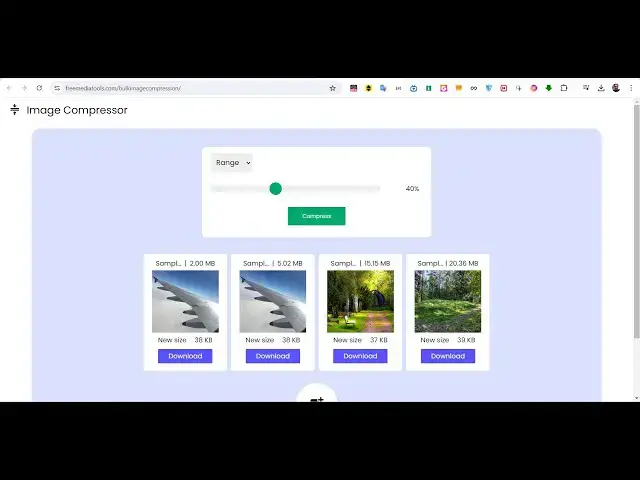
inside FF MPG web assembly and it is
0:09
deployed on my website free media tools
0:12
you can check out uh which allows you to
0:15
compress multiple images at once so it's
0:17
a bulk image compressor kind of a web
0:20
application it's a static app which
0:23
works uh using JavaScript client side
0:26
JavaScript your
0:27
images basically stays in the browser
0:30
and it is compressed so if you have a
0:33
lot of images that you want to compress
0:35
you can use this uh nice little tool
0:37
that I developed so here you need to
0:40
select your images or you can drag and
0:43
drop so let me select images which are
0:46
really high 20 megabytes 15 megabytes 5
0:50
2 megabytes so you can select all PNG
0:53
jpg webp all extensions are supported so
0:56
you can see one by one the images have
0:59
been reduced so the original size of
1:01
this image was 2 megabytes it has been
1:04
reduced to 38 kilobyte this was 5
1:07
megabytes it has been reduced to 38
1:10
kiloby this was 15 megabytes it has been
1:13
reduced to 37 kiloby and it was 20
1:17
megabytes and it is been reduced to 39
1:20
kilobytes you can see how much size have
1:23
been reduced and you will basically save
1:25
a lot of space if you run a website if
1:28
you are a plogger if you uh want to make
1:32
your videos thumbnail it will be a
1:33
really useful tool in the browser
1:37
without having to use any third party
1:39
video editor you will be able to
1:41
compress your images using the slider if
1:43
you want to compress more you will see
1:45
that 67% so it starts from 0% and it
1:49
reaches 100% so using the slider you can
1:52
adjust the level of compression if you
1:55
do
1:55
66% now even more the images will get
1:59
compressed 38 kiloby so as you increase
2:02
the compression the image quality will
2:04
suffer so this is 100% now the image
2:08
quality will not be good so I will just
2:10
say just make sure you put around about
2:14
25% is enough and click on compress so
2:17
your images will be compressed you will
2:19
see from 2 megabytes to 665 to 70 15
2:24
mgab to 79 and 20 megab to 79 so once
2:28
you are done you can even individually
2:30
click these download button to actually
2:33
download these image you can see the
2:35
quality Remains the Same but the size
2:37
have been reduced you can see
2:44
that or you can simply click download
2:47
all and it will actually download all
2:49
these images at once so it's a CL you
2:53
can even add by clicking this to uh if
2:55
you want to add more images you can just
2:57
add this so now more images will get
3:00
added so you can see 368 kiloby the size
3:02
of this image it has been reduced to 65
3:06
kiloby so if you download this you will
3:08
see that the quality Remains the Same
3:11
guys you will see this was the
3:14
image so the quality Remains the Same
3:17
but the size is considerably reduced so
3:20
if you need the full source code of this
3:22
project I basically given the link in
3:24
the description of this live stream you
3:25
can go to the description and go to my
3:28
e-commerce website Pro Cod store.com and
3:31
this is actually the project that I
3:32
developed almost 726 lines of hard work
3:37
and dedication I've written this code
3:39
step by step from scratch using fmpg web
3:41
assembly library to actually compress
3:44
these images right in the browser itself
3:47
so no server site code is involved it is
3:49
entirely coded inside HTML CSS and
3:51
JavaScript so you can see this is
3:55
actually the overall code right
3:57
here so you will get this ZIP file which
4:00
will actually contain the single index.
4:02
HTML you can actually deploy this tool
4:05
very easily if you have a shared hosting
4:07
or if you have a cloud hosting anywhere
4:09
which your form you can just deploy this
4:11
to a real domain name and earn a lot of
4:13
revenue from ISO and AdSense as well you
4:16
can put advertisements and people will
4:18
come to your website and the user
4:19
interface is really nice guys and you
4:22
can see you can select multiple images
4:24
right here so the user interface is
4:27
really
4:28
nice very user friendly and the user
4:31
will come to your website and they can
4:34
reduce the size very easily you'll see
4:37
from 141 to 39 from 368 to 39 you can
4:41
just control the sliders of level of
4:44
compressions you can control it very
4:46
easily you will see that so once you are
4:49
done you can simply click the download
4:50
all button to actually download the
4:52
images very easy interface guys and the
4:55
link is given in the description you can
4:57
go to my website and
5:00
before purchasing it I've given the live
5:02
demo link so you can just use this tool
5:04
before purchasing it so just see how
5:07
easy it is if you like it then only
5:10
purchase it and if you still face
5:12
problems after purchasing you can just
5:13
contact me at my email address and phone
5:15
number I've given these details on my
5:18
website so it's really good tool guys
5:21
it's a static app it works in the
5:25
browser so no server site code is
5:27
involved so no complexity really works
5:30
in the browser it's really fast
5:32
effective you can see it inside it also
5:36
works in the mobile devices if you see
5:38
it's completely responsive you can see
5:41
it's completely responsive tool and uh
5:44
it's a very good or single page website
5:47
if you want to build a tool you will
5:50
really get to loar if you purchase it
5:52
you will see the whole code you will
5:54
understand line by line how I develop
5:56
this using HTML CSS and JavaScript we
5:59
have hav use just use the fmpg web
6:02
assembly Library if you don't know about
6:04
fmpg it's a image audio and video
6:07
processing library and fmpg web assembly
6:10
it's the extension for running this fmpg
6:12
right in the browser itself so it's a
6:14
base library that we used for this
6:16
application so fmpg it's a pure web
6:21
assembly which allows you to run fmpg
6:23
right in the browser itself so this is a
6:26
bulk image processor guys where you
6:28
select your multiple image files where
6:30
you compress
6:32
it like this so if you are interested
6:35
guys the link is given in the
6:37
description and I will be seeing you
6:39
guys in the next live stream
#Multimedia Software
#Clip Art & Animated GIFs
#Photo & Video Sharing
#Photo & Image Sharing
#Video Sharing