live_tv
Livestream Starting Soon
00
Hours
:
00
Minutes
:
00
Seconds
Up next in 10

Build a Canva Clone Social Media Template Image Editor in Browser Using HTML5 & Javascript
Jan 9, 2025

Buy the full source code of the application here:
https://procodestore.com/index.php/product/build-a-canva-clone-social-media-template-image-editor-in-browser-using-html5-javascript/
Buy Premium Scripts and Apps Here:
https://procodestore.com/
Show More Show Less View Video Transcript
0:04
uh hello guys welcome to this video so
0:06
in this video we are basically show you
0:09
a canva clone social media template kind
0:12
of editor that I developed inside
0:14
browser it works in the browser fully
0:17
client site and it works offline also
0:20
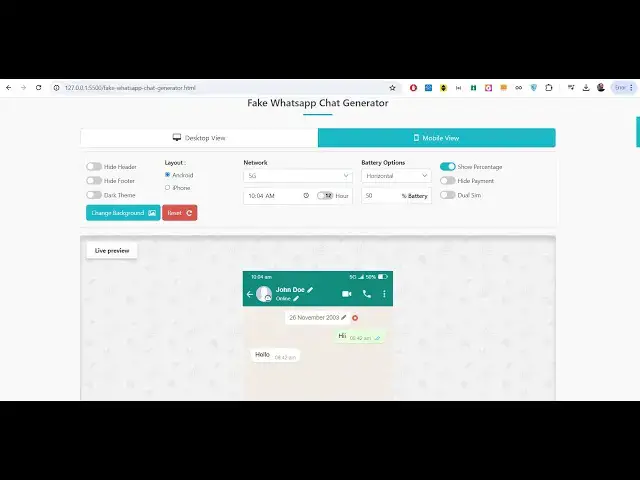
and you can basically see we have this
0:22
WhatsApp fake WhatsApp chat generator
0:25
kind of editor which works on desktop
0:27
and mobile view you can edit all these
0:29
uh
0:30
you can see the pencil is available
0:33
right here you can change the name
0:34
profile picture you can just add
0:36
messages right here and then you can
0:38
export them into images so if you click
0:41
this option download what WhatsApp chat
0:43
as image so it will basically download
0:47
this WhatsApp chat as an image you will
0:49
basically see as a PNG image so you can
0:51
basically share this with your friends
0:53
right here so you can customize
0:55
everything right here you can uh change
0:57
the background as well if you want to
1:00
have any
1:02
background if you want to have this
1:05
background here you can
1:08
customize so now you will basically see
1:10
the background has been changed and uh
1:14
you can also customize this 4G uh 3G any
1:19
Wi-Fi horizontal or vertical if you want
1:22
the layout everything you can customize
1:25
in this editor this is the mobile view
1:27
that you're seeing right here
1:30
and uh what about the messages right
1:32
here you can even edit those messages as
1:34
well
1:37
so you can basically
1:49
see you can add this message send you
1:52
can see the message is edited you can
1:54
even change the name as well let's
1:56
suppose
2:01
you can change the name you can even
2:02
edit the profile picture you will see
2:12
that so now you can see the profile
2:14
picture is also been changed name is
2:16
changed the background is changed and
2:19
now if I download this this is awesome
2:22
editor already de developed guys in
2:24
browser it works in the browser and uh
2:27
you can see that so now you can export
2:30
these into images individual images and
2:34
uh we have various social medias
2:35
available YouTube Facebook Twitter
2:37
Instagram WhatsApp so I'm just showing
2:39
it for WhatsApp right here so if you
2:41
need this application guys the link is
2:43
given you can directly purchase the full
2:44
source code of this application you will
2:46
after that you will get this uh
2:48
directory structure all this JavaScript
2:51
code HTML code it works in the browser
2:53
you can directly upload this inside your
2:55
hosting platform or you can use it
2:57
locally as well so this is actually
2:59
JavaScript code you will see that and
3:02
HTML code so it works in the browser no
3:05
you can see I'm running this on my Local
3:07
Host machine
3:10
so and uh various options are there you
3:13
can hide the header if you don't want to
3:15
show the header you can even hide the
3:17
footer as well if you don't want to
3:20
show if you want to toggle the Dark
3:22
theme you can even toggle Dark
3:25
theme you can reset if you want to
3:28
remove the background so it will reset
3:30
to the WhatsApp background that it has
3:33
dual SIM you can put here dual SIM hide
3:35
the
3:36
payment show
3:38
percentage so everything that you
3:40
control guys this is the thing you can
3:44
share this we also have the desktop view
3:46
as well for WhatsApp this is the desktop
3:49
view you can change the date you can
3:51
edit the messages as well just change
3:53
the
3:57
message can see that
4:03
you can change the time as well
4:05
everything you can control by using this
4:07
date picker will be
4:12
there so today you can put the name as
4:15
well you can see that so everything you
4:18
can customize if you click now this will
4:22
be export
4:25
it as a PNG file so you can basically
4:28
deploy this to to guys earn a lot of
4:31
money money using advertisement user
4:33
will definitely use this tool it's a
4:36
very interactive tool and
4:42
uh so you can send this message you will
4:45
see
4:47
that select the if you want to receive
4:50
this m message or send this message you
4:53
can basically create a fake WhatsApp
4:55
chat and basically export this into a
4:57
image which you can share with your
4:59
friends so this is a nice tool with live
5:02
preview and you can basically download
5:04
this as a image and then what we come to
5:07
is we also have a WhatsApp video call as
5:11
well this is also if you're making a
5:14
video call you can basically replace the
5:16
image right
5:22
here so here this will be person one
5:34
you can see that so like this you can
5:36
control this
5:39
everything and it also you can be
5:43
basically exported to a image
5:49
file so this is the for the WhatsApp
5:52
video call all these options that I
5:54
showed you you can basically control all
5:56
these options are there
6:00
then we similarly have the WhatsApp
6:04
Facebook Chat as well so you can even
6:06
control this also tablet View mobile
6:08
view desktop view so this is Facebook
6:11
Messenger so if you have done Facebook
6:15
me message you will see that this is
6:17
actual layout that you see if you want
6:19
to receive this message so you can do
6:21
this everything you can customize this
6:24
you
6:26
can pencil icon you can change the name
6:29
here
6:30
you can change the status and you can
6:34
also change your profile picture like
6:36
this control this click on done so your
6:39
profile picture is changed right here
6:42
and then you can export this into a
6:44
image file so rimed tools that I'm
6:48
giving you guys you can
6:50
basically export this into image it's a
6:53
canva clone social media template editor
6:57
where various social media supported
6:58
WhatsApp Facebook and you just need to
7:00
rade templates are available you just
7:03
need to edit and your image will be
7:05
downloaded you will see that so this is
7:08
for the iPhone if you are using iPhone
7:11
basically this will be the structure
7:12
right here Android you can basically
7:14
toggle you can change all these options
7:17
if you want to show hide the profile or
7:19
show the profile everything you can
7:21
control here show percentage this is
7:23
actually the desktop view this is the
7:25
tablet View and this is the mobile view
7:27
so this is for the Facebook
7:30
and also if you are creating a Facebook
7:32
post then also we have various options
7:35
you can even control you can export this
7:39
post as an image you can select the
7:43
profile picture you can make your first
7:46
Facebook post and Export that into a
7:48
image you can change your name you can
7:51
change the date as well if you want to
7:54
make a Facebook post as a photograph you
7:56
can select your photograph you can make
7:59
the this post just add this your own
8:02
message everything that you can add you
8:04
can also change the like
8:07
number you can change this to 200
8:11
commment you can even change to 67 and
8:13
then you can export this so now this
8:16
will be you can even make a video as
8:19
well you need to upload the thumbnail
8:21
for the video so this will be treated as
8:23
a video so then again
8:27
similarly so it's a ready thing guys
8:30
that I'm giving you and profile picture
8:32
you can select your own profile picture
8:35
it will be set right here for the iPhone
8:37
it will look something like
8:42
this this is for the mobile view this is
8:45
the desktop view so if you're using
8:47
Android
8:48
or iPhone it will look something like
8:51
this so this is for the Facebook post
8:54
and if you are making a Facebook video
8:56
call then also this is the same template
8:59
that it uses you can basically select
9:01
your
9:02
image person two you can set the image
9:07
this is person to and then you can
9:08
export this to a image this is for
9:11
Facebook video call if you're doing it
9:13
you can basically take a screenshot like
9:16
this and share it like this you will see
9:19
that so this is for and then we have
9:23
Instagram similarly Instagram if you
9:26
just want to edit the profile here you
9:28
need to change all these things you can
9:30
customize using this pencil you can
9:32
change description profile name you can
9:35
change
9:36
your ID you can post change the number
9:39
of post followers change the profile
9:41
pick everything you can control right
9:45
here and you can even add a post if you
9:48
want to add some post you can say post
9:50
it you can add multiple post you can add
9:55
a real as well
9:59
you can see now you can export this so
10:03
horizontal vertical everything is
10:06
supported and uh it should look iPhone
10:09
like this show percentage so this is for
10:13
the shows
10:15
acation if you are interested guys in
10:18
this application the link is given you
10:20
can directly purchase it and you will
10:22
get HTML CSS code after this you can run
10:24
it in the browser you will get this
10:26
directory structure from Google Drive
10:28
after you make the the payment this is
10:31
similarly we have the Instagram chat if
10:34
you're doing someone with chat you can
10:35
basically send
10:37
messages and receive messages as
10:43
well you can export this as a image you
10:46
can control everything change the
10:52
name so display chat settings everything
10:55
you can control you don't want to show
10:57
the profile everything tablet View
10:59
desktop view this is for the Instagram
11:02
then also Instagram post if you are
11:04
creating it will look something like
11:06
this and uh you can basically customize
11:09
everything here change your profile
11:12
picture change your name and if you are
11:16
doing
11:17
it you can customize
11:20
everything like this view all 16
11:23
commments you can
11:25
basically customize this also
11:29
description everything everything you
11:30
can customize guys that you see right
11:32
here and then you can export this as a
11:37
image you can see that so everything
11:41
that you can
11:47
do then we have is uh Instagram video
11:51
call that you're making this also is
11:54
same here you need to select your
11:58
pictures the layouts are different for
12:00
different platforms if you are making
12:02
video calls so this is for Instagram and
12:06
if you're on iPhone it will look
12:08
something like
12:12
this then we have uh the X which is
12:16
Twitter if you're making a Twitter chat
12:19
it will look something like this on
12:21
desktop it will look something like this
12:24
you can change your profile picture like
12:27
this if you hide
12:30
mobile view look something like
12:32
this then we have uh if you want to
12:35
tweet something you can basically change
12:37
your profile picture it's Ultimate
12:39
Software guys for all social media
12:41
networks it will create if you want to
12:44
have verified tweets you can control
12:47
whatever message that you want to tweet
12:49
you can change a photo if you are
12:51
tweeting a photo you can basically send
12:53
out a photo and then you can download
12:57
your Tweet as an image and then share
13:00
it on social media and you will
13:03
basically
13:04
see you can fool our friends by just
13:08
showing the
13:09
screenshot similarly we have the profile
13:13
Twitter profile if you want to customize
13:15
this and share it in your social media
13:17
you can change the banner photograph
13:19
everything you can
13:20
control profile picture you can change
13:24
the name username birth date
13:29
join date
13:30
following everything you can
13:34
control this is for the desktop
13:37
view if you want to have a verified
13:39
account this will be verified
13:41
AIT and then it will be downloaded as an
13:44
attachment as an
13:50
image you will see that so if you are
13:53
interested guys in this the link is
13:55
given in the description you can
13:56
directly purchase it
14:02
then we have basically uh the Tik Tok as
14:04
well so if you're using Tik Tok then
14:06
also it works just go to T Tik Tok
14:09
profile you can basically edit
14:12
this uh select your
14:15
image download Tik Tok uh profile as
14:19
image you can customize everything you
14:20
right here
14:29
so live preview is there you will see
14:31
that everything can be customized right
14:49
here so you can basically see that we
14:52
are using HTML to Canvas as
14:55
well in our application so HTML to
14:58
canvas is basically a library if you
15:00
don't know about html2 canvas is used to
15:04
actually export
15:07
your uh Canvas
15:13
2 so this is actually the library
15:18
here so we are using the CDN for HTML to
15:22
Canvas if you see
15:36
so if you see here HTML to
15:39
Canvas so we are you can see we are
15:42
using html2 canvas
15:52
Library you can see that so fake this is
15:56
a directory structure here
16:07
so if you are interested guys in this
16:09
project the link is given in the
16:11
description same goes for the video post
16:13
as
16:14
well if you have a YouTube video you can
16:17
customize this this is actual template
16:19
which is
16:21
there you can basically change the
16:23
subscribers channel name everything you
16:26
can do
16:27
subscribed comment account you can
16:30
select your banner
16:33
image you can basically change the video
16:36
title video hashtag video post
16:44
image you can change the channel name
16:47
subscribers as well everything you can
16:49
control right
16:50
here and uh similarly YouTube channel if
16:53
you want to make YouTube channel art
16:56
then also you can control this this is
16:58
we have template everything you can
17:00
control the name subscribers everything
17:03
you can control in live preview you will
17:05
get this iPhone Android layout will be
17:13
there Hangouts also and Google Hangouts
17:18
this also you can customize this you can
17:21
change the image send uh
17:25
message add a message select your
17:28
profile I
17:31
pick this is for Hangouts and uh
17:35
messenger you have also telegram as well
17:38
if you are basically making telegram you
17:41
can even customize this also so all the
17:43
social networks are supported guys in
17:45
this canva clone social media ultimate
17:49
editor if you are interested the link is
17:51
given you can directly purchase it and
17:53
uh you will basically see Snapchat is
17:55
also
17:57
there you can export this
18:02
Snapchat then we also have Skype also
18:06
available for us Skype if you're doing
18:08
Skype chat you will customize this
18:13
accordingly change the profile picture
18:15
everything Night board on hide the
18:17
footer everything it is
18:20
customizable then we have uh
18:24
our V chat also available if you see the
18:28
quality of the image looks great you
18:29
will
18:34
see V chat which is also a social media
18:38
Network for chatting website you see
18:41
customize everything iPhone hide
18:44
Banner change the name everything then
18:47
we have uh line chart
18:51
LinkedIn and can see
18:58
so everything being customize
19:04
it this is LinkedIn here if you want to
19:07
put LinkedIn right here change the
19:10
name all the templates are supported and
19:14
then we have the Tumblr as well Tumblr
19:18
it
19:19
also so you can see I'm running it on
19:21
Local Host and it works in the browser
19:24
only so no server site code is involved
19:26
you can
19:27
directly use this editor right in the
19:30
browser itself and if you are interested
19:32
guys in this application the link is
19:34
given you can directly purchase it and
19:38
uh use this awesome
19:41
tool
19:43
so Android text message as well if you
19:47
can customize
19:49
everything it's a full website that I'm
19:52
giving you guys for uh the link is given
19:55
in the description
20:01
so if you are interested then you can go
20:05
to the description and purchase the full
20:07
source code and thank you very much for
20:10
watching this video you will get this
20:11
source code all will be yours so the
20:14
link is given you can directly
20:17
go I I'll be seeing you in the next
20:20
video
#Text & Instant Messaging
#Voice & Video Chat
#Online Goodies
#Skins, Themes & Wallpapers
#Social Network Apps & Add-Ons