Up next in 10

Build a Angular PDF Editor in Browser to Merge & Delete Pages Using PDF-LIB in Browser Using TS
Jan 9, 2025

Buy the full source code of application here:
https://procodestore.com/index.php/product/build-a-angular-pdf-editor-in-browser-to-merge-delete-pages-using-pdf-lib-in-browser-using-ts/
Hi Join the official discord server to resolve doubts here:
https://discord.gg/cRnjhk6nzW
Visit my Online Free Media Tool Website
https://freemediatools.com/
Buy Premium Scripts and Apps Here:
https://procodestore.com/
Show More Show Less View Video Transcript
0:00
welcome to this uh live stream so in
0:01
this live stream I will actually show
0:03
you a PDF editor that I developed inside
0:07
angular 18 to actually merge or delete
0:11
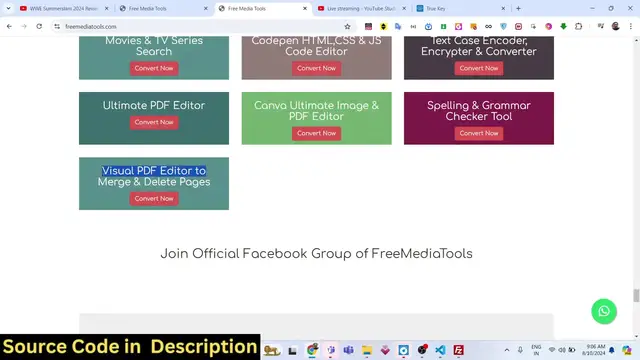
pages inside the PDF document so this is
0:14
actually hosted on my website free
0:16
mediat tools.com if you visit this
0:19
website this is my website here and if
0:21
you go to the bottom page right here
0:23
this is a tool that I added visual PDF
0:26
Editor to merge or delete pages so if
0:29
you go to this tool you will actually
0:31
find this interface you can drag and
0:33
drop your PDF file or you can pick a PDF
0:36
file that you want to
0:38
so let me pick a file right
0:41
here PDF file which contains these two
0:44
pages right here there is this dpin icon
0:47
available where you can actually delete
0:49
the pages right here or we can add
0:53
multiple files as well by clicking this
0:55
plus icon or we can even click this icon
0:57
as well so you can add multiple files
1:00
right here again if I write the if I add
1:03
the same file now it contains four pages
1:05
right here you can individually
1:07
rearrange by clicking The Click Click
1:11
button in the mouse you
1:13
can rearrange them like this at any
1:17
location you can delete the pages right
1:20
here or we can rearrange the ordering
1:22
here like this very simple drag and drop
1:25
so this is actual visual live editor
1:26
that I developed inside angular you can
1:29
drag and drop the the numbering of the
1:30
pages or you can delete them like this
1:33
or you can just select them multiple PDF
1:37
files right here let me select this one
1:40
as well so now it contains a lot of
1:42
pages inside this so if you have a lot
1:44
of pages inside PDF if you want to
1:46
reorder them specifically at which
1:49
location you can do this very easily
1:51
using this live editor of PDF and we
1:55
actually use the PDF lib Library so
1:57
after you are happy with the ordering
1:59
you can simp L click the download button
2:01
so now your PDF file will be downloaded
2:03
so it will actually contain all these
2:05
Pages the files will be merged and it
2:08
will also maintain the order so
2:10
whichever order that you do so if you
2:12
want to move this page at the starting
2:14
now if you download this you will
2:16
actually see that page in the beginning
2:19
so now the first page is this one now
2:21
this is the second page third page all
2:23
these stuff so now if you want to
2:25
individually delete some pages you can
2:27
click the dusan icon so you can it will
2:30
delete those pages like
2:34
this so it's very easy guys you can see
2:38
you can click the delete button so those
2:41
pages will be removed so now only these
2:44
pages are there 1 2 3 4 5 6 7 14 pages
2:48
are there
2:49
so you can see how easily you can remove
2:52
the pages you can reorder the
2:54
numbering you can shift which pages
2:58
to you can and uh just change
3:03
the re rearrange the pages in The PDF so
3:07
you can see that now only 10 pages are
3:09
there so this is actual project that I
3:12
made guys if you see you can even change
3:14
the properties of the PDF document as
3:17
well you can just change the title
3:20
author subject keywords all that stuff
3:23
and then we have this I developed this
3:25
so just
3:27
simply so this is actually the overall
3:30
project this is a full project here that
3:33
I'm giving you the link is given in the
3:35
description so you can go to my website
3:37
procore.com and directly purchase the
3:39
full source code so after you purchase
3:42
it you will be redirected to Google
3:44
Drive where you will actually get the
3:46
zip file you need to extract the zip
3:48
file and this will be the actual
3:50
directory structure we have the
3:51
different components out there you will
3:53
see for different functionality the fun
3:55
uh the full application and split it
3:58
into angular components each component
4:00
is doing its own job and then if you if
4:03
I show you the package.json file these
4:06
are the dependencies we are using we're
4:08
using the latest version of angula which
4:10
is 18 at the time of recording this live
4:12
stream it is compatible with all the
4:14
versions so don't need to worry about it
4:16
and we are actually using the PDF lib
4:19
Library PDF JS dis
4:21
Library so you can try out this tool
4:24
before purchasing it at the checkout
4:26
page I have given this link so you can
4:28
basically try out this tool before you
4:31
purchase it
4:33
so after you do this after you purchase
4:36
it after you extract all the files you
4:40
need to go to in order to run this I'm
4:45
already if you want to run this locally
4:48
it's very simple just go to CMD and just
4:52
type here npmi so this will install all
4:54
the modules and it will actually create
4:57
a node modules folder right inside your
4:59
room directory so this will install all
5:01
the packages which are mentioned in the
5:03
package.json file and then you just need
5:05
to write here mpm Run start so this will
5:09
actually start the angular application
5:11
at Port number Local Host
5:14
4200 so it will just start your
5:17
application
5:20
so so it is just compiling all the
5:23
assets all the packages into the actual
5:28
application which will listen on Local
5:30
Host
5:32
4200 you can see application compiled
5:35
and it is running on Local Host 4200 so
5:38
if I open Local Host
5:41
4200 so now this is your
5:45
application so Local Host
5:49
4200 so this is the same app and now you
5:52
can choose your PDF file you can choose
5:54
multiple files at one time as well like
5:57
this so multiple files we have choos
5:59
Chen you can rearrange the numbering you
6:03
can merge them delete the pages and then
6:05
you can download it so this is overall
6:08
project guide it makes it very much easy
6:10
you it will save a lot of time for you
6:13
because you don't need to manually merge
6:15
or delete pages you can do it using this
6:17
live visual PDF editor that I developed
6:20
in angular 18 the latest version and we
6:22
have used PDF lip library for
6:25
the so the link is given guys you can
6:27
directly purchase the full source code
6:29
this will be a complete project that I
6:31
will give you you can then modify this
6:33
code as well or you can use this code
6:35
and if you want to deploy this uh you
6:38
can build out this application the build
6:40
process is very simple there is a simple
6:42
command in angular you can just write
6:44
npm run build so this will actually
6:47
create a disc folder right inside your
6:49
root directory where you can have your
6:51
static assets and the minified CSS and
6:54
the JavaScript code so it is just
6:57
building your application for production
6:59
so
7:00
it's it it is that easy now you can see
7:03
it has created this disc folder and it
7:05
contains all your minified JavaScript
7:08
and the minified CSS code so you can
7:10
just purchase a domain name and then you
7:12
can deploy this project very easily any
7:15
sort of Hosting you can do and then you
7:17
can deploy this very easily this is the
7:20
overall project guys and for the library
7:24
if you don't know about PDF lip this is
7:27
a open-source library for building PDF
7:30
level applications for modifying PDFs
7:33
the PDF lip so we have actually used
7:36
this Library PDF flip and you can just
7:38
read the documentation all these you can
7:41
what Watermark PDF you can merge split
7:44
delete pages everything you can do it so
7:46
we have used integrated this inside our
7:49
angular application and used it to
7:51
actually build out this awesome looking
7:52
PDF editor which does all these tasks
7:55
that I showed you and if you still have
7:58
any sort of problem of purchasing you
8:00
can contact me at my email and phone
8:02
number at which is mentioned on my the
8:05
pro code store website so this is the
8:07
overall project guys please hit that
8:10
like button subscribe the channel as
8:11
well if you're watching it for the very
8:13
first time so you can see all these
8:15
components are coded inside as HTML this
8:18
is a SAS we have used for The Styling
8:21
and this is typescript so this is Ed
8:24
inside typescript which is a super set
8:26
of JavaScript additional features are
8:28
type checking a aailable so these are
8:30
different components which are there and
8:32
this is for the drag and drop directory
8:35
so these are different services that we
8:38
have for the upload store preview live
8:41
preview lazy dialogue all this stuff so
8:44
it's a overall complete project you will
8:46
see in angular you will get this and
8:49
this is a
8:52
basic you can see that so everything you
8:54
can customize after you purchase it
8:57
so this is a complete project drag and
9:00
drop live visual PDF editor which allows
9:03
you to delete pages merge different
9:05
files you can take as many PDF files it
9:09
works in the browser so no need to worry
9:11
about any sort of time it's blazingly
9:14
fast and uh all this user interface is
9:19
pretty much very simple and uh thank you
9:23
very much for watching this live stream
9:24
guys and I will be seeing you in the
9:27
next one