live_tv
Livestream Starting Soon
00
Hours
:
00
Minutes
:
00
Seconds
Up next in 10

Build a Angular Image Cropper Editor With Live Preview & Controls Using ngx-image-cropper in TS
Jan 30, 2025

Get the full source code of application here:
https://codingshiksha.com/angular/build-a-angular-image-cropper-editor-with-live-preview-controls-using-ngx-image-cropper-in-ts/
Hi Join the official discord server to resolve doubts here:
https://discord.gg/cRnjhk6nzW
Visit my Online Free Media Tool Website
https://freemediatools.com/
Buy Premium Scripts and Apps Here:
https://procodestore.com/
Show More Show Less View Video Transcript
0:00
uh Hello friends welcome to this video
0:02
so in this video I will show you how to
0:04
build a simple image Cropper inside your
0:06
angular application with live preview
0:09
with all these Advanced controls so
0:10
there is a package here which allows you
0:12
to build this image Cropper so we are
0:16
building this application you will see
0:17
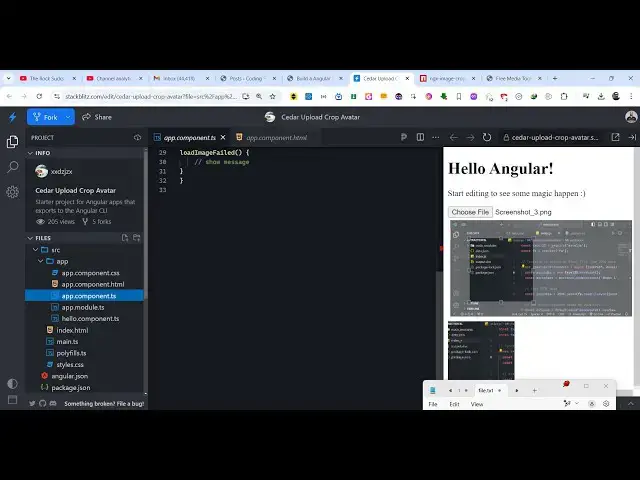
the live demo here we have a choose file
0:20
button where you will select your PNG or
0:22
JPG file as soon as you select the image
0:25
you will see these controls being added
0:27
this is actually the live control you
0:29
can select any portion of the image that
0:31
you want to crop here and at the bottom
0:34
side you will see the live preview as
0:35
soon as you select any portion this live
0:37
preview will be updated so in this way
0:41
and after that you can open this image
0:43
in new tab and simply save this image
0:46
inside here this is your cropped image
0:49
so in this way you can crop any image
0:51
using this module here the name of the
0:53
module is ngx image Cropper it's a very
0:57
famous module of angular so just search
1:00
on npmjs.com this is actually the image
1:04
Cropper module for angular the command
1:08
is very simple ngx image Cropper and
1:10
it's almost having 134,000 weekly
1:13
downloads so it's a pretty popular
1:15
package you could see the documentation
1:17
it has a nice little documentation I
1:19
have written a step by-step blog post on
1:22
my website with the full example code so
1:25
if you want to follow along you can go
1:26
to the description so now I will simply
1:29
delete everything thing and start from
1:31
scratch so I will also delete the HTML
1:34
typescript code so the very first thing
1:36
we need to do we need to register this
1:38
module so you need to go to app. module.
1:41
typescript file and here you need to add
1:44
the import statement of that module so
1:46
we simply say import image
1:49
Cropper module and it will be coming
1:52
from this package ngx image Cropper so
1:56
you just need to add this import line
1:58
and then you need to go to the Imports
2:00
array and then add this image crer
2:02
module that's all that we need to do the
2:05
configuration code now you can close
2:07
this file and then come to your app.
2:09
component. HTML file this is your
2:11
template file and here you will add this
2:14
input field where we allow the user to
2:17
Simply select a image file so input type
2:22
file and we binding this on change event
2:25
handler so whenever you select any file
2:28
we will this file change event will
2:30
occur you will pass this this event so
2:33
now we need to Define this function in
2:35
the typescript code so we go to the app.
2:37
component. typescript file and right
2:40
here we declare two variables first of
2:43
all the image change
2:46
event and then the cropped
2:49
image so these two variables which is
2:52
required for this application image
2:54
change event in the cropped image which
2:56
will be the output image now we need to
2:58
Define this file change
3:00
function right here so we simply Define
3:03
file change which will have the event
3:05
automatically
3:07
passed and it will be of type vo and
3:11
here what we do we simply take this
3:13
image change event and initialize it to
3:15
the event this. image change event so
3:19
now we need to go to app. component.
3:21
HTML and just after this we display our
3:25
image Cropper by this directive image
3:28
Cropper opening and the closing tag so
3:30
now it takes some options that you need
3:32
to pass so the very first option is take
3:35
is the image changed event so this will
3:39
be the same variable that you will be
3:42
initializing that we have in the
3:44
typescript so when the file changes we
3:47
are initializing this event if you see
3:49
this. image change event so we are
3:51
directly passing it to the Cropper so
3:54
this takes as an argument and then it
3:56
also
3:57
takes let me just paste all the options
3:59
and explain you step by
4:01
step these are all the options it
4:04
supports this NG image Cropper so
4:07
maintain as ratio of the image to be
4:10
true aspect ratio you can control it one
4:13
resize to width 128 format PNG output
4:18
type both and then we have a series of
4:20
functions that you can attach to this
4:22
image cropped when the imagees crop this
4:24
custom function will be executing when
4:27
the image is loaded you can have or
4:29
failed
4:30
we only need this function to actually
4:32
crop the image once you select the
4:34
portion so we will just declare this
4:36
function which is after we select the
4:40
portion for cropping the
4:48
image so now what happens if I select
4:51
any image you will
4:55
see the image if you see in the console
4:59
I think
5:02
okay we do need to initialize this so
5:04
image
5:07
cropped we haven't defined this function
5:09
so image cro is the actual event so we
5:12
go to this typescript image cro event
5:15
and it it will be of the Type image
5:18
cropped event which will be coming from
5:21
this ngx image Cropper so essentially
5:25
right here we will initialize this so
5:28
This Dot
5:31
cropped image is equal to event dot base
5:35
64 so if you select your
5:38
image now the image is not displaying
5:41
because we haven't displayed the image
5:43
so come to
5:45
your after this we display this image
5:48
image source and whatever is
5:51
your dynamically display this image
5:54
which will be cropped
5:57
image so we display is inside this image
6:00
Cropper so if you select any image
6:10
now if you go to the description link
6:13
guys I have given all the source code
6:17
so can see that so if I select you will
6:21
see the image proper will
6:22
show and you will be able to crop your
6:25
image so this is actually the package
6:27
guys it's a very famous package for
6:28
image cropping in angle
6:30
all the example code is given in my
6:32
description I've written a step bystep
6:34
blog post you can see that so you can go
6:35
to it and simply copy and paste the
6:39
source code and thank you very much for
6:41
watching this video and please hit that
6:43
like button and also check out my
6:45
website as well free mediat tools.com uh
6:48
which contains thousands of tools
6:50
regarding audio video and image and I
6:53
will be seeing you guys in the next
6:55
video
#Clip Art & Animated GIFs
#Other
#Video Sharing