Up next in 10

Build a Angular CSV Parser & Viewer Web App Using Papaparse Library in Browser Using TypeScript
Feb 5, 2025

Get the full source code of application here:
https://codingshiksha.com/angular/build-a-angular-csv-parser-viewer-web-app-using-papaparse-library-in-browser-using-typescript/
Hi Join the official discord server to resolve doubts here:
https://discord.gg/cRnjhk6nzW
Visit my Online Free Media Tool Website
https://freemediatools.com/
Buy Premium Scripts and Apps Here:
https://procodestore.com/
Show More Show Less View Video Transcript
0:00
uh hello guys welcome to this video so
0:02
in this video I will show you how to
0:04
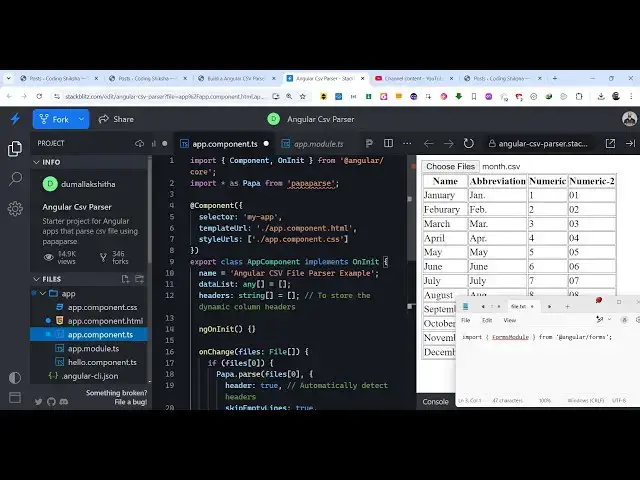
implement uh or build a CSV parser or
0:08
viewer using popup ours package inside
0:11
angular application so we will be having
0:13
a simple application where we allow the
0:16
user to Simply select a CSV file CSV
0:19
file if you don't know it is comma
0:21
separated value file it is similar to
0:23
Exel file so it is having an extension
0:26
of CSV which is comma separated value so
0:29
we are actually having this CSV
0:32
file so if I just select this file you
0:35
will see it will display the content of
0:38
the CSV file using a CSV parser Library
0:43
which is very famous which is called as
0:45
Papa pars package which is a JavaScript
0:47
open source CSV parser Library you have
0:51
definitely know so we are essentially
0:53
passsing the CSV data which is present
0:55
and displaying it in the browser so that
0:57
you can can clearly see and display your
1:00
CSV files like this you can select any
1:03
file here it will automatically detect
1:05
the column names and then it will return
1:07
this data in the console if you
1:10
see
1:12
each each column will have this object
1:15
it will first of all convert to into a
1:17
series of objects and here we displaying
1:19
it in the browser so it's a complete
1:22
angular project and uh if you don't know
1:25
about papaers if you just write here PA
1:28
a PA a p a i RS this is actually the
1:31
powerful CSV parser for JavaScript so
1:34
it's an open- Source uh CSV parser
1:37
Library we are integrating it inside our
1:40
angular application for this you just
1:42
need to install this package go to
1:45
npmjs.com just search for this package
1:48
which is Papa par and you just need to
1:51
install this package the command is
1:53
simple I've already installed it it's
1:55
almost called 2 million weekly downloads
1:58
so this is their document website here
2:00
official website so I've written a
2:03
stepbystep blog post on my website the
2:06
full source code of this example is also
2:08
given so if you need to follow along
2:09
with the video the link is given in the
2:12
description so now to get started guys
2:14
first of all you need to include this
2:16
module which is a forms module because
2:18
we will be working with forms so just
2:20
need to go to your app. module.
2:22
typescript file of your project and just
2:25
include the built-in angular forms
2:28
module so just add this import
2:30
line import forms module from add theate
2:33
angular
2:35
forms and then go to your Imports array
2:38
add this forms module that you imported
2:41
that's all the configuration which is
2:42
needed now we can start from scratch let
2:45
me delete everything and start from
2:49
scratch so the very first thing we will
2:52
do you come to the app. component.
2:54
typescript file and first of all at the
2:57
very top we require the package which is
3:00
a papa pars package so import everything
3:04
as Papa from Papa pars package so in
3:09
this way you can import this package
3:12
using this import line so we imported
3:15
this package now what we need to do we
3:18
need to declare some variables inside
3:21
our typescript so first of all you will
3:24
declare this data list which will be an
3:26
array
3:27
here which will be an empty array so
3:30
you'll be storing the content of the CSV
3:32
file and secondly you'll be also be
3:35
having a headers array which will store
3:38
the column names so these are the two
3:41
variables which are needed for this
3:42
application so after this we come to the
3:45
app. component. HTML file which is your
3:48
template file so right here we'll be
3:51
having a simple input
3:54
field so input type file and we'll only
3:57
be accepting the CSV files
4:00
and
4:02
uh can give it a form control class and
4:05
then we'll be binding this directive SL
4:08
uploads and we will allow to select
4:11
multiple files you can select multiple
4:13
files at one time and we binding this on
4:16
change event handler so you binding a
4:18
custom function on change so as soon as
4:21
you select a file from the this choose
4:24
file this custom function will execute
4:26
on change and will be basically passing
4:29
the files which are selected upload.
4:33
files so now uh we need to
4:37
Simply inside this Define this function
4:40
on change in our app. component.
4:42
typescript file so we Define this
4:44
function which is called as on change
4:47
and here the files are passed here so
4:50
for each file this will be a file array
4:54
and here we'll be dynamically be
4:55
checking in this if condition that if
4:57
the files are being selected then in
5:00
that case we will be using this package
5:02
and it contains this function pass to
5:05
actually pass the CSV file and we
5:08
actually pass the first file in the
5:10
array and then it takes an argument here
5:14
header if you want to automatically
5:16
detect the headers in the CSV file and
5:19
then it also have a attribute skip empty
5:23
lines so we need to skip the empty lines
5:26
which is present if present in the CSV
5:28
file then the third is a call back
5:31
function so when the paring is complete
5:35
then this call back function will
5:36
execute holding the result for us so
5:39
here we can simply console log the
5:41
result just to check if the process is
5:44
working or
5:45
not so now what happens if you select a
5:49
CSV
5:50
file in the console you will see a
5:53
response coming back to us which is
5:55
holding our data so we have this data
5:57
property if you see we have 12 columns
6:00
each column representing the actual data
6:03
here which is you can see that so each
6:05
object containing these properties so
6:07
now we just need to display this data in
6:09
the browser so for displaying the this
6:13
data we just need to run a simple for
6:17
Loop first of all we need to store this
6:19
data in the variable data list
6:24
result do data and also the header
6:28
column names do headers result.
6:33
meta
6:36
Fields if the column names are not
6:38
present then we will simply assign empty
6:40
column names that's all that we need to
6:42
do right here then we come to the app.
6:44
component. HTML file and we display the
6:48
data in a t table like structure so we
6:51
simply have the table tag
7:01
so inside your table row tag we
7:04
display we run a
7:06
simple ng4 directive which will simply
7:10
run a simple for Loop ng4 so this will
7:14
be responsible for printing out the
7:16
column names so here we display the
7:21
header so now if you select a CSV file
7:24
you will see all the column names will
7:26
be printed out one by one so this is all
7:28
the column names Nam now we need to
7:31
display the rows for displaying the rows
7:33
we come to the table body
7:38
tag so you can see how easy it is to
7:42
pass your CSV file and display the data
7:45
so we again run a simple ng4
7:48
directory so this is now for the rose
7:51
data
7:53
list and here for
7:58
each again again we run a simple NG for
8:09
directive so inside double Calli bracket
8:12
we display the actual
8:14
record that's all so if you see now you
8:19
will see all this data will be present
8:21
so in this way guys you can display your
8:24
CSV files using a papa pass package you
8:26
can directly pass it inside your angular
8:29
application it's a fully working example
8:32
so you can go to the description link if
8:33
you need the full source code I have
8:35
given the full source code with a step
8:37
bystep detailed blog post as well so
8:40
thank you very much guys for watching
8:41
this video and also check out my website
8:44
as well free mediat tools.com uh which
8:47
contains thousands of tools regarding
8:49
audio video and image and I will be
8:52
seeing you guys in the next video