Up next in 10

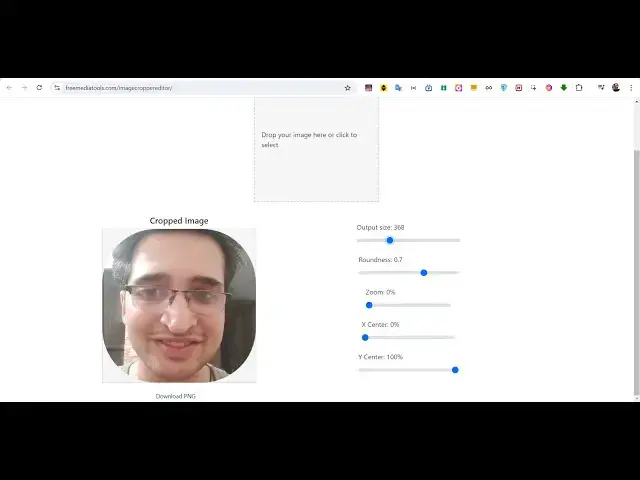
Build a Advanced Image Cropper & Resizer Editor With Live Preview in Browser Using Javascript
Jan 9, 2025

Buy the full source code of application here:
https://procodestore.com/index.php/product/build-a-advanced-image-cropper-resizer-editor-with-live-preview-in-browser-using-javascript/
Hi Join the official discord server to resolve doubts here:
https://discord.gg/cRnjhk6nzW
Visit my Online Free Media Tool Website
https://freemediatools.com/
Buy Premium Scripts and Apps Here:
https://procodestore.com/
Show More Show Less View Video Transcript
0:02
uh hello guys welcome to this uh live
0:05
stream of coding sixa so in this video I
0:08
will let you know a new tool that I
0:10
developed on my website freem mediat
0:12
tools.com and it's image Cropper and
0:15
resizer so this is actually the
0:18
interface of the application and it is
0:20
entirely coded inside vanilla JavaScript
0:24
HTML in CSS it works as a static app
0:27
inside browser so your images that you
0:30
isn't uploaded to server it basically
0:32
runs in the browser and this is actually
0:35
the interface so here you will select
0:37
your image file so whatever images that
0:40
you want to select let me select uh this
0:44
image so as you select your image these
0:47
are some of the controls and Sliders
0:50
which are there and basically you need
0:53
to if you want to increase the size of
0:56
the image like this if you want to
0:58
increase this you can make the slider up
1:01
and down you can see that now the image
1:04
is increasing and decreasing if you want
1:06
to make it not round oval shape you can
1:10
make this image round or oval shape by
1:13
actually adjusting the roundness
1:15
parameter right here if you want to zoom
1:18
in inside a specific portion you can
1:21
even do that as well and you can adjust
1:24
the horizontal position of the image if
1:26
you want to crop or the vertical
1:28
position as well so in this way you can
1:31
crop any portion of your image and now
1:34
if you are happy you can simply click
1:37
the download button and now your image
1:40
is successfully cropped into a
1:42
particular shape right here and it also
1:44
been resized and in this way these are
1:47
all the controls which are
1:50
there so you can take any extension of
1:53
the image PNG jpg webp all extensions
1:56
are supported so you can see you can
1:59
make your icon as well if you are a web
2:03
developer you can adjust your image and
2:05
convert this into a icon small little
2:08
icon these are the sliders you can
2:11
adjust the roundness of the
2:14
image you can make it full round and you
2:17
can basically zoom in you can adjust the
2:20
X Direction and the Y
2:23
Direction so now if you are happy you
2:25
can click on the download button so now
2:28
your basically image is resized you can
2:31
see that it has been converted into a
2:34
circle shaped image and perfectly
2:36
cropped and resized so you can take an
2:39
input image and convert this into this
2:42
so I just developed this using HTML CSS
2:45
and JavaScript this is the whole
2:46
application about
2:49
23 lines of code that I written from
2:51
scratch so the link is given in the
2:54
description you can go to my e-commerce
2:56
website proor store.com and purchase the
2:58
full source code you will actually get
3:01
the zip file after you purchase it from
3:04
Google Drive automatically then it
3:06
contains this index HTML and you can
3:08
deploy this
3:10
app by purchasing a domain name it's
3:12
very easy just a static app just index.
3:16
HTML which runs in the browser and it R
3:19
lets users uh select their input image
3:23
and uh you can adjust the size of the
3:26
image you can adjust the roundness you
3:28
can zoom in at a particular portion you
3:31
can adjust you can see that everything
3:34
you can
3:35
control if you want to zoom and at a
3:38
particular location in the image you can
3:41
see
3:43
that can increase the size decrease the
3:46
size every each and everything you can
3:48
control guys you will see that
4:00
so all these controls are there so once
4:03
you're done you can click the download
4:04
button so your image is resized and
4:07
cropped into a circular shape right here
4:11
so this is a really useful tool guys
4:14
useful application if you get this
4:16
source code you can modify as well you
4:19
will get full permission from me to
4:21
actually modify this and you will
4:23
actually see how I code it line by line
4:26
you will get to understand it so it's a
4:28
very good deal that I'm offering you the
4:30
link is given in the description the
4:31
link will redirect you to my e-commerce
4:34
website procore.com you can purchase
4:37
this project
4:40
and and at the checkout page I have
4:43
given the link where you can actually
4:44
try this tool before purchasing it by
4:47
visiting this uh link so it is deployed
4:50
on my website freem medat tools.com
4:52
image Cropper editor so before
4:56
purchasing it you can try this tool
4:59
before you buy this so this is the
5:06
overall tool guys it's a mini image
5:10
editor Cropper and resizer which lets
5:12
you do
5:13
this so if you are interested the link
5:16
is given in the description please hit
5:18
that like button subscribe the channel
5:20
as well and I will be seeing you guys in
5:22
the next one
5:29
h
#Online Media
#Multimedia Software
#Skins, Themes & Wallpapers
#Video Sharing