Up next in 10

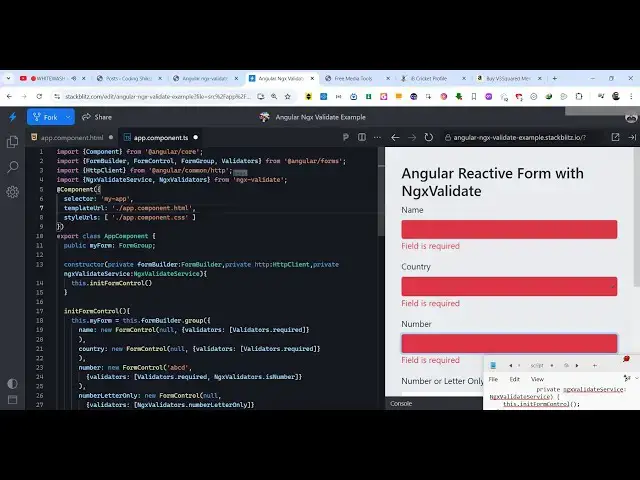
Angular ngx-validate Example to Implement Form Validation With Error Messages in Browser Using TS
Jan 30, 2025

Get the full source code of application here:
https://codingshiksha.com/angular/angular-ngx-validate-example-to-implement-form-validation-with-error-messages-in-browser-using-ts/
Hi Join the official discord server to resolve doubts here:
https://discord.gg/cRnjhk6nzW
Visit my Online Free Media Tool Website
https://freemediatools.com/
Buy Premium Scripts and Apps Here:
https://procodestore.com/
Show More Show Less View Video Transcript
0:00
uh hello guys welcome to this video so
0:02
in this video I will show you a package
0:04
inside angular which does the form
0:08
validation with error messages so the
0:11
name of the module is ngx validate so we
0:14
have a simple form right here which
0:16
contains name country number and
0:19
password field and if I don't enter
0:21
anything and click on the submit button
0:23
you will see these error messages will
0:25
pop in it will highlight this input
0:27
field that field is required and as soon
0:30
as I write something in this
0:32
automatically the error message will go
0:34
away so it's reactive form validation
0:36
which is happening here as soon as I'm
0:39
again not hitting the again the error
0:42
message will pop in so it is reacting to
0:44
the user input right here so as soon as
0:47
you start to type here the error message
0:49
will go away same goes with the drop
0:52
time input field here so as I select the
0:54
value the error will go
0:56
away and as it's a number input field so
1:02
it is printing out this custom message
1:04
that only number is allowed so basically
1:06
as soon as you enter the number this
1:09
message will go away and same goes with
1:12
the password as well so password is not
1:16
strong enough so you need to enter
1:19
a password which is strong
1:23
enough like
1:25
this so password don't match so as soon
1:29
as the password password matches you
1:30
will see that both passwords are matched
1:34
so if you click the submit you will see
1:35
the form data will be captured and it
1:38
will be displayed inside this allert
1:39
window so this is actually the package
1:41
guys which is ngx validate it's a very
1:45
popular package
1:47
inside angular if you just go to
1:50
npmjs.com
1:52
and just search for this package
1:55
ngx validate this is actually the
1:58
package that we are using for this
2:02
tutorial so the command is very simple
2:05
this is actually the command I've
2:07
already installed it and I have WR a
2:10
step by-step blog post on my website I
2:13
have also attached the full source code
2:15
that I used in this video so if you need
2:17
the full source code you can follow
2:19
along with my blog post the link is
2:22
given in the description so now to get
2:24
started guys first of all you need to go
2:26
to this file app. module. types script
2:30
file of your angular project and just
2:33
make sure that you add these two import
2:35
statements so we imported this custom
2:39
module which is ngx validate module
2:42
which is coming from this package ngx
2:44
validate and you also need the angular
2:46
forms module as well because we are
2:48
working with forms so this reactive
2:52
forms module this is part of the actual
2:54
angular framework now we come to the
2:57
Imports array and we actually import
3:00
both these modules that's all the
3:02
configuration code is required so now
3:04
you can close this file and right here
3:07
inside your app. component. typescript
3:10
file we at the very top we import this
3:13
ngx validate service ngx validators
3:17
which is coming from this package and
3:19
now I will show you from scratch so I
3:23
will delete everything
3:25
here so we have a simple form right here
3:29
so if click the submit button you will
3:31
see the the form will submit so now for
3:34
doing the validation we need to write
3:36
the typescript code here so right here
3:38
in the Constructor we will first of all
3:41
initialize our form validation so right
3:45
in this Constructor we will simply
3:48
pass we will create the variables here
3:53
first of
3:54
all for the form
3:58
Builder which which is of the type form
4:02
Builder and private HTTP which is of the
4:06
type HTTP client and private
4:11
ngx
4:13
validate
4:16
service which is of the
4:20
type ngx validate service so it's empty
4:23
Constructor and we basically passed this
4:26
ngx validate service which is coming
4:29
from the this package if you see we are
4:31
importing it from this package so now
4:34
inside this Constructor we just need to
4:36
initialize this service so this do we
4:39
initialize a function right here a
4:41
custom function in it form control so
4:44
now we just need to Define this function
4:46
in it form control so inside this
4:50
function you will initialize the
4:52
validation so you will first of all
4:56
initialize the form right here so this
4:58
do form home builder and here we will
5:02
basically write the validations so for
5:05
the name input field we will basically
5:10
pass the null and then it actually takes
5:13
the validators so right here you
5:15
basically pass the options so name field
5:18
must be required so there is a
5:20
validation which you can directly pass
5:23
which is validators do
5:26
required so this means that the name
5:29
input field is required if you don't
5:31
submit this you will see that it will be
5:34
highlighted with the red background
5:36
color so as soon as you write this the
5:39
error will go away this is coming
5:41
because of validators is required we
5:43
attach this input field so same thing we
5:46
can do this to the country as well so we
5:50
simply
5:53
say we put a comma
6:00
so right here
6:07
uh so this is our validators which is
6:11
required after
6:18
name so we put a comma right
6:22
here and then we do the same thing for
6:26
the country as well so we initialize new
6:29
form
6:34
control and again we pass the validators
6:37
which will
6:45
be so same thing we will do this
6:53
for so you will basically get all the
6:56
source code in the description so now
6:59
what we we have
7:08
done this. form Builder sorry so
7:12
basically now for the country here we
7:14
also attach validators is required but
7:17
for the number we have this NG
7:20
validators is number so there is
7:23
a method available so if the input field
7:27
is a number field there is this
7:29
validator out there which only accept
7:31
numbers so it's number and then for the
7:34
number letter only there is actually a
7:37
method which only specifies the input
7:41
field which only contains the number and
7:43
letter only so we have this validator as
7:45
well and then for the password you have
7:48
the first of all the password is
7:50
required and then the password must be a
7:53
strong password so we have passing both
7:55
these validators and then we are
7:58
checking there is a method available
8:00
inside this package match password which
8:03
actually checks both the password match
8:06
with each other or not so we are
8:08
attaching all this functionality so as
8:11
soon as you click it now you will see
8:13
these error messages popping in at field
8:15
is required and as soon as you this is
8:18
the select field and only numbers so
8:22
password must match you will see
8:25
password doesn't match so you will see
8:26
all these error messages appearing so
8:29
this this is the reactive form
8:30
validation using this package ngx
8:34
validate and in the app. component. HTML
8:37
file we are having displaying a simple
8:40
form right here and for showing the
8:42
error message we are using this
8:44
component validation error if you see
8:48
and we are putting this control which is
8:51
the name right here so this validation
8:54
error is actually displaying this error
8:56
message that you are specifying you are
8:59
see see these error messages at the
9:02
bottom of the input field this is coming
9:05
because of this validation error this is
9:07
for the name and same goes with the
9:09
country as well if you see this is for
9:12
the
9:14
country then we are showing it for the
9:18
number field as well then we are number
9:22
letter and then lastly we are showing it
9:25
for the password as well
9:27
so so each input field have having this
9:30
validation error component for showing
9:32
the error messages so in this way guys
9:34
you can uh
9:37
actually configur this you will find the
9:39
full example source code in my blog post
9:42
the link is given in the description so
9:44
thank you very much guys for watching
9:46
this video and also check out my website
9:48
as well free mediat tools.com uh which
9:52
contains thousands of tools regarding
9:54
audio video and image and I will be
9:57
seeing you guys in the next video