Up next in 10

Angular ngx-ui-tour-md-menu Tutorial to Build Interactive Guided Tour Animation For Apps in Browser
Jan 26, 2025

Get the full source code of application here:
https://codingshiksha.com/angular/angular-ngx-ui-tour-md-menu-tutorial-to-build-interactive-guided-tour-animation-for-apps-in-browser/
Hi Join the official discord server to resolve doubts here:
https://discord.gg/cRnjhk6nzW
Visit my Online Free Media Tool Website
https://freemediatools.com/
Buy Premium Scripts and Apps Here:
https://procodestore.com/
Show More Show Less View Video Transcript
0:00
uh hello guys welcome to this video so
0:02
in this video I will show you uh a
0:05
angular package which allows you to make
0:07
your
0:09
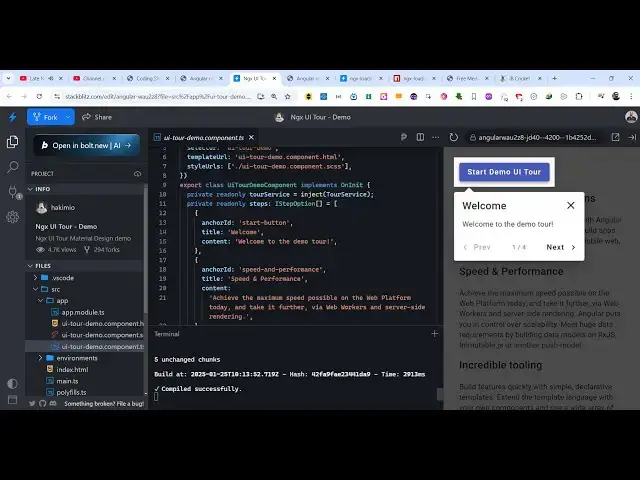
demo of your apps demo UI tour uh user
0:13
interface tour so if you make any sort
0:15
of application inside your react CH if
0:17
you want to make a demo so that the
0:19
users May understand it properly you can
0:23
have this toour rout right here so as
0:25
soon as I click the button you will see
0:26
this model window will appear and it
0:29
will specifically Zoom in on this
0:31
element it will specifically tell the
0:34
user that this is the thing and it does
0:38
this thing so welcome to the tour
0:39
welcome to the demo tour and we have the
0:42
previous and the next buttons we also
0:44
have the close button if you want to
0:46
close the tour you can close it and then
0:49
you have seen these tours if you go to a
0:51
documentation if you have specifically
0:54
going to a website that offer these
0:56
tools and you click the next button you
0:59
then they highlight and zoom in on the
1:02
next element they tell little bit
1:04
information about this what it does and
1:08
this nice little animation with now goes
1:10
to the third step you will see that so
1:12
what is angular it is highlighting all
1:14
this so now is the end button you can go
1:17
to the previous step as well by using
1:19
these previous buttons we have the next
1:21
button so it's a simple UI tour and you
1:24
can configure this very easily using
1:26
this package in angular and uh the
1:30
starting is very simple you basically
1:32
highlight the elements inside your
1:36
HTML and you can create these awesome
1:40
looking user interface to us and uh if
1:44
you go to npmjs.com uh there is this
1:47
specific package I have written a
1:48
complete step by-step blog post on my
1:51
website so you can get all the source
1:53
code of this example so if you go to
1:56
npmjs.com just search for this ngx UI
2:02
tour uh material design and menu so this
2:06
is actually the name of the
2:08
package it works with the latest version
2:11
of angular as well so the command is
2:13
simple you first of all install this
2:15
package and it's almost having 8,000
2:18
weekly downloads so now to get started
2:20
we are having this tack
2:22
blits demo right here so I will simply
2:25
delete everything and start from scratch
2:30
let me delete
2:38
everything so first of all what we need
2:40
to do
2:42
uh you need to go to your app. module.
2:46
TS file and we will register this so for
2:49
registering this we need to add a import
2:51
statement so we simply
2:54
use let me zoom in so that you can
2:57
clearly see we import this
3:00
so which is toour Matt menu module and
3:05
it will be coming from this package
3:06
which is
3:07
ngx and then we add this inside the
3:10
Imports are we simply add
3:15
this so after adding this you can close
3:18
this file now we come to
3:21
the this
3:26
file and here we will actually def find
3:32
the the tour service and we will import
3:35
this line here at the top which is
3:37
coming of this and we start this and
3:40
here you will
3:42
Define all
3:47
the various type of animations that you
3:49
need to Define uh so we can actually
3:52
create an array here private readon
3:56
steps of your UI tour and this will be
4:00
of the type I
4:02
step option so here you will specify all
4:05
the array of object so each object will
4:09
reference the here you need to provide
4:11
your anchor ID so this will be the
4:15
specific ID that you will given in the
4:17
HTML document so this is actually
4:19
contains the an anchor ID and then it
4:22
specify the title what title that you
4:25
want to give so I will say welcome and
4:27
then the content
4:29
the content of the model window so
4:31
welcome to the demo tour so in this way
4:35
uh you can
4:39
specify like this so we
4:43
actually declared this
4:46
array which will have all these demo
4:49
points first of all the user will see
4:52
this start button then in the HTML we go
4:55
to this section Speed and Performance
4:57
what is angular component metadata so
4:59
these are the four steps involved in
5:01
this animation and we'll be now be using
5:03
the life cycle method NG on in it so as
5:06
soon as your application loads you will
5:08
start this service this. to service we
5:11
will initialize
5:13
it and we need to pass the steps and the
5:16
second object will be the some options
5:19
if you want to enable the backdrop you
5:21
will say
5:23
true and backdrop configuration here you
5:27
can put the offset to 10
5:31
and then we come to the app. component.
5:34
HTML file so here you can specify any
5:38
HTML so as I write this HTML you will
5:41
see the live
5:46
demo we'll see Hello World and here you
5:49
need to specify your
5:53
actual HTML that you will be needing for
5:57
the UI tour so this can be anything
6:00
related to your whatever tool that you
6:02
have built or application that you have
6:08
built so I will simply paste a all the
6:12
source code I have given in the
6:14
description so you can
6:17
actually and lastly we need to put this
6:20
tour step template like this
6:32
and here it is specifying that we have
6:35
started a button right here so we have
6:37
added this button to start the animation
6:39
of demo user interface tour now we need
6:42
to make this function start Tour so we
6:44
come to the typescript here we Define
6:46
this actual
6:49
function which is
6:51
start the tour demo tour and here we'll
6:54
be starting this service so this do T
6:57
service dot start so as soon as you do
7:01
this you will see this button out
7:04
there and as soon as you click the
7:06
button you will see this animation will
7:08
start the demo tour and here you can
7:12
specify this is actually the anchor ID
7:14
which we given start button this is the
7:16
same anchor ID that we given to this
7:18
button so you'll see there is this
7:20
attribute it it takes to our anchor and
7:24
then we given this to Anchor so as soon
7:26
as you click to the next step it will go
7:28
to this
7:30
section Speed and Performance if you see
7:32
it will show this second tour and again
7:35
if I click the it will navigate to this
7:38
one which is again T anchor so whichever
7:42
element that you want to highlight you
7:44
need to give this attributes and it will
7:46
move to that demo to us and then we come
7:49
to this section if you see we have again
7:51
given this attribute to our
7:53
anchor and now it ends so again if I
7:57
given this if you want
8:00
to
8:04
so so I will simply change it to footer
8:09
so in the typescript we just need to add
8:12
one more thing right here which will be
8:16
I will change this to
8:21
footer so now what happens so
8:30
so now we have
8:33
this component metadata here you can
8:36
change the title here let's suppose I
8:38
want to customize this so I will say
8:50
footer so you in this way you can
8:52
customize it add more steps to your demo
8:56
it's very simple inside this typescript
8:58
code you de cleare an array here of
9:01
steps inside the animation then you come
9:03
to the HTML and Define these T anchor so
9:06
whatever element that you want to
9:08
highlight in the demo tour you can do it
9:10
so in this way you can use this package
9:11
in angular all the source code I've
9:14
given in the description so you can go
9:16
to my blog post and get the full source
9:18
code so thank you very much for watching
9:20
this video and also check out my website
9:23
as well free mediat tools.com uh which
9:26
contains thousands of tools regarding
9:28
audio video and
9:30
and I will be seeing you guys in the
9:32
next video
#Virtual Tours
#Guided Tours & Escorted Vacations
#Sightseeing Tours