Up next in 10

Angular ngx-intl-tel-input Example to Build International Phone Number Form Input With Flag in TS
Jan 30, 2025

Get the full source code of application here:
https://codingshiksha.com/angular/angular-ngx-intl-tel-input-example-to-build-international-phone-number-form-input-with-flag-in-ts/
Hi Join the official discord server to resolve doubts here:
https://discord.gg/cRnjhk6nzW
Visit my Online Free Media Tool Website
https://freemediatools.com/
Buy Premium Scripts and Apps Here:
https://procodestore.com/
Show More Show Less View Video Transcript
0:00
uh hello guys welcome to this video so
0:02
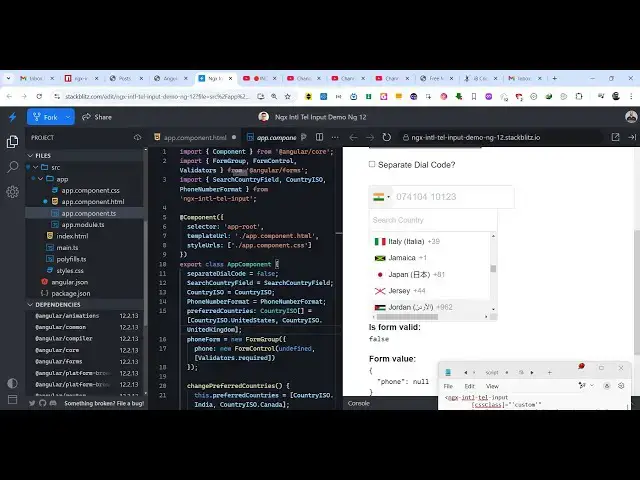
in this video I will show you a package
0:04
inside angular which allows you to do
0:07
this phone number validation with
0:10
the country picker as well country flags
0:13
will also come so this international
0:16
code if you want to have allow user to
0:19
enter phone number with international
0:21
code as well so as the select their
0:24
respective country that international
0:27
code will automatically be applied so
0:29
let's say suppose I select India so that
0:32
plus 91 will automatically be inserted
0:35
so then we can enter our 10 digigit
0:37
mobile number what they want to write so
0:40
this plus 91 will automatically get
0:42
handled you will see that the number
0:44
will be returning this is plus 991 it is
0:46
automatically being added this is
0:49
actually the country
0:50
code which is there for all the
0:53
respective countries so we have showing
0:55
this country picker you will see that
0:58
the with the they can search for the
1:00
respective country and also the flags
1:02
will also appear so this is essentially
1:05
the package for
1:06
angula uh the package name
1:10
is if you go to npmjs.com uh you just
1:13
need to search for this package let me
1:15
show
1:17
you so just go to npmjs.com uh just
1:21
search for this package
1:22
ngx International Telephone input so
1:27
this is actually the package here uh the
1:30
command is very simple you just need to
1:32
execute this command and it's almost got
1:35
177,000 weekly download it's a pretty
1:38
pack popular
1:40
package and uh I have written a simple
1:43
blog post on my website containing all
1:46
this example code that I will show you
1:47
in this video so you can go to the
1:50
description link to get the full source
1:52
code the very first thing we need to do
1:54
in order to get started we need to go to
1:57
this file here AB module. typescript
2:00
file so here you need to first of all
2:02
register or configure this module so we
2:04
just need to add this import statement
2:07
so we simply say import ngx
2:10
International Telephone input module and
2:13
which will be coming from this package
2:15
ngx International Telephone input and
2:18
then you need to go to the Imports array
2:20
and just add this module ngx
2:23
International Telephone input module so
2:26
that's all that is required for the
2:28
configuration now you can close close
2:30
this file and start using this module so
2:33
we come to the right here let me explain
2:37
you and tell you each option in
2:40
detail
2:42
so let me just delete
2:50
this so one by one you will see on the
2:53
right hand
2:55
side there is no input field so now the
2:59
wave that which we initialize this is
3:02
ngx I
3:04
ntl telephone
3:06
input this is the opening tag and the
3:08
closing tag this is actually your so as
3:12
soon as you do
3:13
this you will see this input field
3:16
appearing and now it actually takes some
3:18
options that you can actually pass here
3:21
one by one I will show those options you
3:24
can even pass a CSS class if you want to
3:27
style it you can provide a c CSS class
3:31
so now you will see we are just adding
3:33
some padding and Border as we apply this
3:36
and then you can even
3:38
pass a preferred countries option so
3:42
let's suppose you only want to specify a
3:45
see a certain number of countries then
3:48
you can create a array and pass
3:50
it using this preferred countries so
3:53
those countries will already be showing
3:56
and the third option is if you want to
3:58
enable the auto
4:00
country
4:03
select so I will say true so now what
4:06
happens this Auto country select
4:08
automatically the code will be written
4:10
side by side with the country name so as
4:13
soon as you select the country the code
4:14
will be automatically applied so that's
4:16
meant by this option and then if you
4:19
also want to show a simple
4:22
placeholder you can even show that so
4:25
that the user
4:27
clearly uh just know what to write here
4:32
here and uh if you also want to show the
4:39
flag then you can show the actual flag
4:42
as
4:45
well if I just disable this now what
4:49
happens the flag will not show so in
4:51
this
4:56
way so these are all the options
5:01
basically so I will just write all the
5:03
options right here you will find all the
5:05
example codes in the description of the
5:07
video so this is you can control here
5:10
the maximum length all these options
5:13
separate dial code name is
5:16
form and then in the typescript code
5:19
here we initialize all these options
5:21
right
5:23
here one by one so if you do want to
5:26
have preferred countries you can show
5:29
this
5:30
preferred
5:33
countries so these two countries will be
5:36
shown early
5:38
on so this is these are your preferred
5:41
countries and then and then the rest of
5:43
the countries come so in this way you
5:44
can initialize your preferred countries
5:47
and this is a very handy module if you
5:50
are taking user input in the form of a
5:52
mobile number if you want to
5:55
accept mobile numbers with country codes
5:58
then this is a nice module in angula so
6:01
it allows you for automatically allowing
6:04
the user to select their respective
6:05
country and automatically adding that
6:08
country code so thank you very much guys
6:10
for watching this video and also check
6:12
out my website as well freem mediat
6:14
tools.com uh which contains uh thousands
6:18
of tools regarding audio video and MH
6:21
and I will be seeing you in the next
6:23
video