live_tv
Livestream Starting Soon
00
Hours
:
00
Minutes
:
00
Seconds
Up next in 10

Angular ngx-device-detector Example to Detect Device & Browser Info in Browser Using TypeScript
Jan 26, 2025

Get the full source code of application here:
https://codingshiksha.com/angular/angular-ngx-device-detector-example-to-detect-device-browser-info-in-browser-using-typescript/
Hi Join the official discord server to resolve doubts here:
https://discord.gg/cRnjhk6nzW
Visit my Online Free Media Tool Website
https://freemediatools.com/
Buy Premium Scripts and Apps Here:
https://procodestore.com/
Show More Show Less View Video Transcript
0:00
uh hello guys welcome to this video so
0:02
in this video I will show you a angular
0:05
package which automatically detects your
0:09
device whether you are running it from a
0:12
mobile device or tablet or PC and it
0:15
will automatically detect the browser
0:17
information and display
0:20
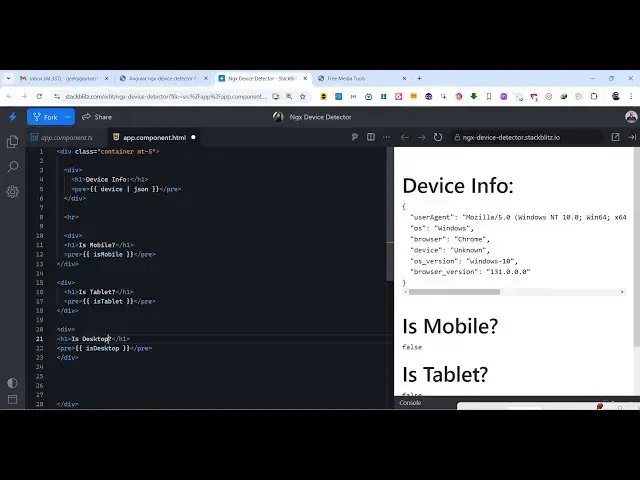
it so this is actually the demo and you
0:24
can see it returning this object it's
0:26
holding this information user agent
0:29
operating system system what is the
0:30
browser that you are using so I'm using
0:33
the Chrome browser we are on the Windows
0:35
machine and it also shows the specific
0:37
browser information as well operating
0:40
system Windows 10 browser version which
0:42
is 131 so and then this is not a mobile
0:47
device so it's return false here not a
0:50
tablet it's a desktop device so it
0:52
returns true so if you need this
0:53
information if you want to detect this
0:55
information of your user which is coming
0:58
to your website or any tool website that
1:01
you developed so there is a package in
1:03
angular which automatically detects all
1:06
this information and the name of this
1:08
package is if you simply go to npmjs.com
1:11
and just search for this package ngx
1:15
device detector so this is actually the
1:18
name of the
1:20
package so I already installed this so
1:23
the command is simple uh you just need
1:26
to execute this and it's almost having
1:28
138 ,000 weekly download it's a very
1:31
popular package so I have given all the
1:34
source code I've written a step bystep
1:36
blog post on my website so the link is
1:38
given in the description so now I will
1:42
start it from
1:44
scratch so I will delete everything
1:47
here and also delete here from here so
1:51
now first of all you need to go to your
1:52
app. component. HTML file and right here
1:56
we need
1:58
to dis play the details but before that
2:01
you need to come to app. component.
2:03
typescript file here and first of all we
2:06
need to import this module so we simply
2:09
say import and device
2:13
Detector service so this is actually
2:17
the service which is available in this
2:20
module
2:21
ngx device
2:24
detector so we actually import this
2:26
service which is device Detector service
2:30
and here inside the
2:33
Constructor we will actually pass this
2:36
service here private I will just create
2:39
a variable here device service and which
2:41
is of the type
2:44
device
2:46
Detector
2:49
service so right here we are simply
2:52
declaring a variable here of the type
2:54
device Detector service and now we can
2:57
actually get all this information we can
2:59
declare a a set of methods right here
3:03
which will detect the device of the user
3:05
by this method device and here we can
3:08
simply return this. device service and
3:12
it contains this function device info
3:15
and then it will return this Json object
3:17
containing information about your device
3:19
such as the browser information
3:21
operating system all this
3:23
information and one more function we'll
3:25
be declaring which is for detecting
3:28
whether the device is a mobile device or
3:31
not so it will return either true or
3:33
false and inside this service we have
3:38
this function that is
3:42
mobile so it returns true or for false
3:45
value depending upon whether you are
3:47
running a mobile device or not and
3:50
similarly we will have the methods for
3:52
tablet and desktop as well which will
3:55
also return Boolean values true or false
3:58
for tablet
4:00
is template and desktop is desktop and
4:03
now we need to go to the template file
4:05
app. component because if you refresh
4:07
the P page here we can't see anything
4:10
because we need to write the code inside
4:12
this file so that we can clearly show to
4:15
the user which device they are running
4:17
so inside this we simply put the div tag
4:21
and I just give it a class here
4:24
container margin top five and here we
4:28
simply render out this
4:31
information so we first of all show the
4:34
device
4:35
info and here inside the preag we
4:38
actually show the
4:41
Json which is your device which is
4:44
actually a
4:45
Json response
4:57
so so app. module do DS so in this way
5:01
you
5:07
can you can render out the things
5:13
here so I've have given all the step
5:16
byst step code here you can go to my
5:18
description
5:19
link so basically what if you write this
5:22
you will see this Json response
5:30
you will see
5:31
that and then we can even render out
5:35
whether it's a mobile device or
5:41
tablet so you can see that so it's a
5:43
mobile or is tablet and if you see on
5:46
the right hand side it's not a mobile
5:47
device so it returns false and it's not
5:50
a tablet as well and similarly we can
5:54
show it whether it's
5:57
a desktop so we will say is
6:02
desktop so it will return true because
6:04
it's a desktop device
6:08
so so in this way you can use this
6:10
package to get the device information
6:12
about a user whether which browser
6:15
operating system they are running and it
6:17
will detect everything and return you
6:19
this Json information sometimes it's
6:22
necessary to get the user device
6:24
information depending upon if you are
6:27
developing some kind of a tool website
6:29
or if you have a website where you need
6:31
to detect all this information so you
6:34
can use this package in angular ngx
6:36
device detector it's rimed specifically
6:40
developed for angular applications so
6:42
you can use this and also check out my
6:45
website as well uh free mediat tools.com
6:47
uh which contains uh thousands of tools
6:51
regarding audio video and Mage and I
6:54
will be seeing you guys in the next
6:56
video
#Software
#Internet & Telecom
#Mobile & Wireless Accessories
#Gadgets & Portable Electronics