live_tv
Livestream Starting Soon
00
Hours
:
00
Minutes
:
00
Seconds
Up next in 10

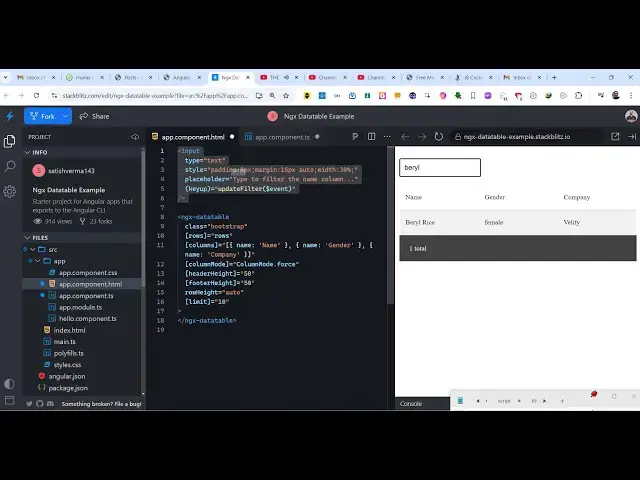
Angular ngx-datatable Tutorial to Render Data in Table With Sorting & Pagination in Browser Using TS
Jan 30, 2025

Get the full source code of application here:
https://codingshiksha.com/angular/angular-ngx-datatable-tutorial-to-render-data-in-table-with-sorting-pagination-in-browser-using-ts/
Hi Join the official discord server to resolve doubts here:
https://discord.gg/cRnjhk6nzW
Visit my Online Free Media Tool Website
https://freemediatools.com/
Buy Premium Scripts and Apps Here:
https://procodestore.com/
Show More Show Less View Video Transcript
0:00
uh hello guys welcome to this video so
0:02
in this video I will show you a angular
0:05
package which allows you to display
0:07
tabular data with all the filtering and
0:10
the pagination controls out there you
0:11
will see this is a data table package
0:13
for Angar we're displaying this set of
0:16
data right here in the table structure
0:18
we have three columns name gender and
0:20
company and we have that much of rows
0:23
out there and we also see these
0:25
pagination controls appearing at the
0:27
bottom screen here so we are on the
0:28
first page when we displaying these 10
0:30
records per page so 100 records are
0:33
there so on each page we are displaying
0:35
10 so if I navigate to the second page
0:38
the next 10 records will show up and we
0:40
also have these search control as well
0:43
so is a search field you can sort this
0:46
by in the ascending order if you click
0:48
on the column name you will see that or
0:51
you can search for a specific name
0:53
starting with a so you will see as soon
0:56
as you type here automatically
1:00
the name will pop in so in this way you
1:02
can search for a particular name using
1:04
the search field and it supports the
1:07
searching functionality as well so
1:09
actually the name of the package is this
1:11
one the command is very simple this is
1:14
actually the
1:15
command and uh almost having 74,000
1:20
weekly downloads so on my website I've
1:22
written a simple step by-step detailed
1:24
blog post explaining about this package
1:27
and all the source code I've also given
1:29
of this example code that I will use in
1:31
this video so the very first thing we
1:33
need to do you need to go to this file
1:35
app. module. typescript file of your
1:37
angular project and just import this
1:40
line this is your ngx data table module
1:44
which is coming from this package and
1:46
then you need to go to the Imports array
1:48
and then add
1:51
this like here for this we also need the
1:53
forms module as well just require the
1:56
forms module which is a built-in module
1:58
in angular so after this that's all the
2:01
configuration code now you can go to
2:03
your app. component. HTML file
2:07
and let me delete everything and start
2:10
from
2:11
scratch so here we actually declared
2:15
this data here which I will be using for
2:18
displaying the data this data can be
2:20
anything it can be coming from an API or
2:22
database as well so you just have a row
2:26
array of object each object is
2:28
containing four properties name gender
2:30
company and age so we have this Rose
2:33
data so if you want to display this we
2:35
will use this directive which is ngx
2:38
data
2:40
table this is the opening tag and the
2:42
closing tag and it actually expects some
2:46
options that needs to be passed first of
2:48
all you just need to pass if you want to
2:51
style it you can pass a custom style
2:54
which is a class which is bootstrap and
2:56
then you here you need to provide the
2:58
rows of data You're simply providing it
3:01
and the columns which here you can
3:04
statically configure the column names
3:06
which
3:12
is so this needs to be
3:18
in so here we have three columns so in
3:22
this way you can configure the column
3:25
names
3:31
so which is name gender and Company and
3:34
uh then we have this option column mode
3:37
which is
3:38
specifying we want to force the column
3:42
mode so we need to this means that we
3:45
all want to specify all the columns we
3:47
need to show all the columns and then
3:49
you can specify all these
3:52
controls the header height the footer
3:55
height and how many items you want to
3:57
display per page so here we are putting
3:59
this limit which is 10 so we are only
4:03
displaying 10 records per page now it is
4:07
saying that this update filter function
4:09
doesn't exist so now go to this app.
4:12
component.ts
4:13
file for the time being let me remove
4:16
this so you will see that it is saying
4:19
column mode doesn't exist on type app
4:25
component you will see that as soon as I
4:27
add this typescript code
4:30
the data table will show we have these
4:33
three columns right here name gender
4:35
company so in this way you can sort
4:38
these column names in ascending or
4:40
descending order or 100 records are
4:42
displaying on per page we are displaying
4:45
10 records so we are on the first page
4:47
we can also see these pagination
4:49
controls as well
4:51
so or obviously you can even bind a
4:54
update filter function as well so here
4:57
it actually searches whatever value the
4:59
user writes it searches in this rows
5:02
array and only return returns you use
5:05
the JavaScript filter function so here
5:08
we can add this in input field right at
5:11
the top so that you enter a specific
5:14
name you will be able to find that
5:18
record so in this way you can upd uh
5:21
integrate the search input field as well
5:23
so this is actually essentially the
5:24
package angular data table package which
5:27
allows you to render data of your inside
5:30
this nice little table structure with
5:32
all the pagination and the searching
5:34
controls sorting controls so thank you
5:36
very much guys for watching this video
5:38
and also check out my website as well
5:41
free mediat tools.com uh which contains
5:44
thousands of tools regarding audio video
5:46
and image and I will be seeing you guys
5:48
in the next video