live_tv
Livestream Starting Soon
00
Hours
:
00
Minutes
:
00
Seconds
Up next in 10

Angular jsPDF-Autotable to Export HTML Table to PDF Document in Browser Using TypeScript
Feb 5, 2025

Get the full source code of application here:
https://codingshiksha.com/angular/angular-jspdf-autotable-to-export-html-table-to-pdf-document-in-browser-using-typescript/
Hi Join the official discord server to resolve doubts here:
https://discord.gg/cRnjhk6nzW
Visit my Online Free Media Tool Website
https://freemediatools.com/
Buy Premium Scripts and Apps Here:
https://procodestore.com/
Show More Show Less View Video Transcript
0:00
uh Hello friends welcome to this video
0:02
so in this video I will show you how to
0:04
export a HTML table with data into PDF
0:08
document inside your angular application
0:11
and for this we will be using the jspdf
0:13
autotable library so jspdf is a open
0:16
source JavaScript library which allows
0:18
you to export your HTML data into PDF
0:21
document so we have a very simple
0:22
application so we are displaying this
0:25
tabular structure data we have some data
0:27
right here we have three columns right
0:29
here and these much of row and we have a
0:31
button right here if I click this button
0:34
export to PDF so you will see the table
0:37
will be downloaded and you will be able
0:39
to download this PDF
0:42
file so if I open this PDF file you will
0:45
see all this tabl data that you see
0:47
right here inside here it converted to
0:50
the PDF document the table is
0:51
successfully converted so I will show
0:54
you this example step by step and for
0:56
this we are actually using a open source
0:59
Library if if you don't know about GS
1:01
PDF if you just write this on Google the
1:03
very first package which comes this is
1:05
an open- Source JavaScript PDF
1:07
generation Library which works in the
1:09
client site and this is actually the
1:11
command here you just need to install it
1:14
as a node module and it's having almost
1:17
1 million weekly downloads so I've
1:19
already installed it and I also written
1:21
a step by-step blog post on my website
1:24
so if you need the full source code of
1:25
this example you can go to the
1:26
description link so now I will simply
1:29
delete everything and start from
1:33
scratch so we will simply delete this as
1:37
well and just refresh the application so
1:40
you will see we are starting it from
1:41
scratch so the very first thing we need
1:44
to do we need to go to this file here
1:46
which is ab. module. typescript file and
1:49
here you just need to import the
1:51
built-in forms module of angular so if
1:54
you want to work with forms you need
1:57
this forms module so you just need to
1:59
import this form module from the buil-in
2:01
add the angular / forms and then you
2:03
need to go to the Imports array and just
2:05
add this forms module that's all that we
2:08
need to do now you come to your app.
2:10
component. HTML file right here and
2:13
right here you will specify which
2:16
section of data that you want to convert
2:18
so I will just give it an ID here which
2:21
will be PDF table and I will just give
2:24
it a i ID to it so we are giving this
2:27
unique identifier to it hash Sy PDF
2:30
table so we'll be targeting this section
2:33
inside angular so we just need to give
2:35
this unique identifier and then inside
2:38
this you will display the TBL structure
2:41
you will have
2:44
three columns you can have as much data
2:47
that you want so you'll have simple
2:50
three columns name Age
2:56
Country and inside this we we will have
3:00
actually our table body and inside this
3:05
you can hardcode this data this data can
3:07
be coming from your database or any API
3:11
but I'm just taking a very simple
3:13
example
3:14
just hardcoding it just for showing this
3:25
example so you can see we have one row
3:28
one row of data so I will simply repeat
3:32
this four times you will see we have
3:35
four rows of data so we need to convert
3:38
this to PDF so we have given this unique
3:42
identifier just notice we have given
3:43
this unique identifier now we go to the
3:45
app. component.ts file and uh right here
3:50
we
3:51
declare a first of all the variable for
3:54
targeting this so we declare this atate
3:57
view child we will use this and we
4:00
basically pass the same identify that we
4:05
given the second argument will be static
4:08
to
4:09
false and then we basically declare a
4:12
variable PDF which is of the type
4:16
element
4:19
ref so what we have done guys we
4:21
actually targeted this section right
4:24
here with this ID that we have given so
4:26
we actually did this which is of the
4:29
type so just put a colon right here so
4:31
we just targeted this now we just need a
4:34
simple button right inside your HTML
4:38
just after this table right here we will
4:40
have a simple button so as soon as you
4:43
press that
4:46
button so you'll just give it a on click
4:49
listener to this button and whenever you
4:51
click this button you will execute this
4:53
function which is download PDF so we
4:55
binded this on click listener so the
4:58
label of the button you can simply
5:01
say export PDF so you'll see this green
5:06
button if you see at the bottom side so
5:08
as soon as you click the button I need
5:10
to now generate a PDF document so for
5:13
this I will just Define this function
5:15
this is
5:17
your export
5:22
PDF so this is your same function sorry
5:25
this is called as download PDF so let me
5:27
rename this download PDF so here inside
5:30
this we actually instantiate a new
5:33
instance of this jspdf package so we we
5:37
need to import this package so what we
5:40
say we simply say import
5:48
jspdf so we simply import this package
5:52
at the very
5:54
top so after we do this we simply
6:04
Target this so we
6:07
simply write
6:10
this so here we are specifically
6:12
targeting this editor right
6:17
here so all the source code guys it will
6:21
be given in the description of the video
6:23
so you don't need to worry about it you
6:27
simply go to my blog post and copy paste
6:31
the full source
6:33
code so let me just paste it and then
6:37
explain to you what is happening
6:44
so so you'll see this table you have
6:47
this input field you can dynamically
6:49
change its value and then as you click
6:51
the download button you will see the PDF
6:53
will get downloaded with that Dynamic
6:55
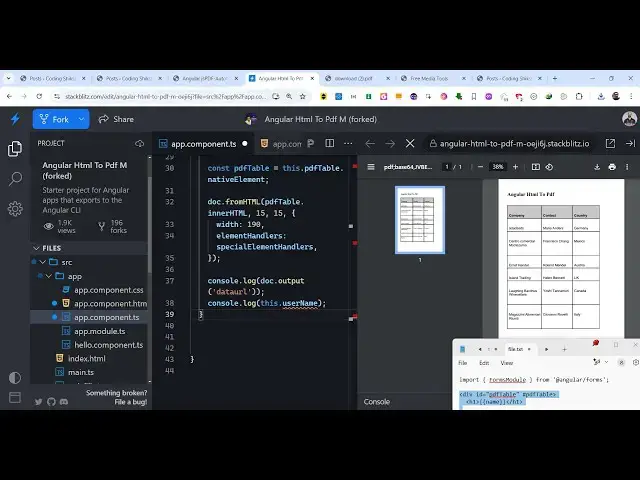
data so what we are essentially doing in
6:57
this function we are instantiating a new
6:59
inst of jspdf then we are targeting this
7:02
value where we allow the user to enter
7:04
the dynamic value so we are given this
7:06
table data tag we given an ID here and
7:09
we binded this NG model directive so
7:12
whatever that you write right here it is
7:14
being targeted and then we use this
7:17
native element method then we have this
7:19
function from HTML which are available
7:23
in this JS PDF package which actually
7:25
converts the HTML to PDF you target the
7:28
actual element that you want to convert
7:30
and then we provide the width of the
7:32
document and lastly we convert this into
7:34
a PDF document that you can see so you
7:37
can simply click the download button and
7:39
save this document inside your machine
7:41
so you can see the table has been
7:43
successfully converted so essentially it
7:45
is using jspdf Auto table in the
7:47
background to convert the table into PDF
7:50
so thank you very much guys for watching
7:52
this video all the source code example
7:54
code is given in the my blog post you
7:55
can go to the description link and also
7:58
check out my website as well free mediat
8:01
tools.com uh which contains thousands of
8:04
tools regarding audio video and image
8:06
and I will be seeing you guys in the
8:08
next video